
A Deep Dive into Amazon EBS: The Persistent Heart of Your EC2 Instances 🚀
A practical guide to volumes, snapshots, and performance for building resilient and cost-effective applications.

When you build applications in the AWS cloud, you often start with an Amazon EC2 instance—the “brain” of your operation. But a brain needs a place to store its memories and data persistently. That’s where Amazon Elastic Block Store (EBS) comes in. It’s more than just a virtual hard drive; it’s a foundational service for building resilient, scalable, and high-performance applications.
Let’s break down this essential service, from the basics to the advanced features that can supercharge your architecture.
What Exactly is EBS? The Core Concepts 🧱
At its heart, Amazon EBS provides block-level storage volumes for use with EC2 instances. Think of it as a raw, unformatted hard disk that you attach to your virtual server over a high-speed network.
Block Storage vs. File Storage: Unlike file storage (like Amazon EFS) where you see folders and files, EBS presents itself to the operating system as a raw block device. Your EC2 instance’s OS then creates a file system (like
ext4/xfson Linux orNTFSon Windows) on top of it, just like you would with a physical hard drive.Persistent and Independent: This is a crucial feature. An EBS volume’s lifecycle is not tied to the EC2 instance it’s attached to. You can stop, or even terminate, your EC2 instance, and the data on your EBS volume remains perfectly safe. You can then detach it and reattach it to another instance, making it incredibly versatile for data recovery and migration. 💽
One-to-One Relationship (Mostly): Typically, an EBS volume is attached to a single EC2 instance at a time, providing dedicated performance. (We’ll touch on an exception to this rule later!).
The Geography of EBS: Understanding Availability Zones and Resilience 🗺️
To truly grasp EBS, you must understand its relationship with the AWS global infrastructure, specifically Regions and Availability Zones (AZs).
As the first diagram illustrates, an EBS volume is provisioned and lives within a single Availability Zone.
Why a single AZ? This design choice is all about performance. By keeping the volume in the same physical datacenter (AZ) as the EC2 instance, AWS guarantees extremely low-latency communication between them.
Built-in Resilience: When the notes say EBS is “Resilient in that AZ,” it means the service is designed for high availability. Behind the scenes, your volume is automatically replicated across multiple servers within that single AZ to protect you from the failure of a single hardware component. If one disk in the EBS backend fails, your volume stays online without you even noticing.
The AZ Boundary: This is a hard boundary. An EC2 instance in
us-east-1acannot directly attach to an EBS volume inus-east-1b. So, how do you move data or recover from an AZ failure? This is where snapshots come in.
The Magic of Snapshots: Your Architectural Time Machine 📸
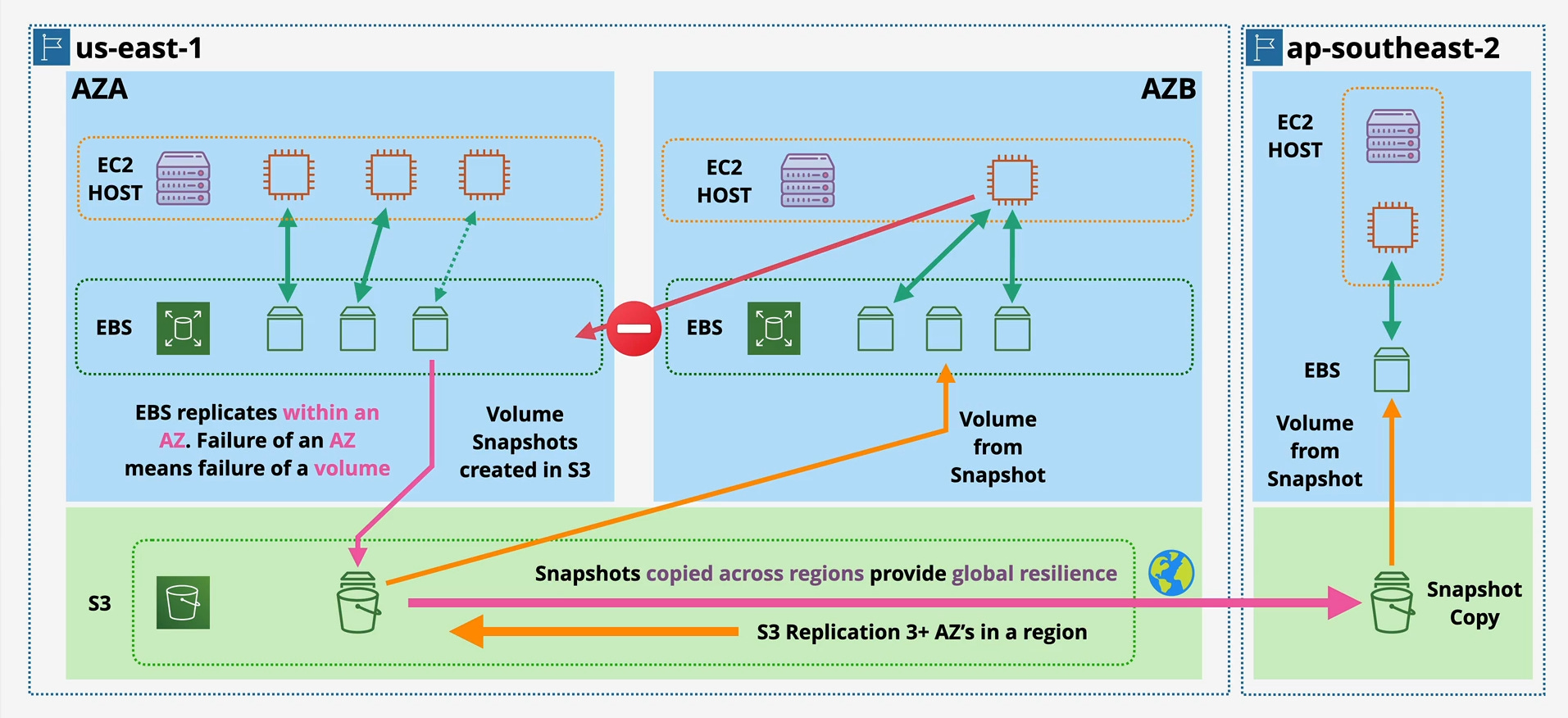
EBS Snapshots are the cornerstone of backup, disaster recovery, and data migration strategies in AWS.
A snapshot is a point-in-time backup of your EBS volume. But the real power lies in where it’s stored and how you can use it.
Durable Storage in S3: Snapshots are not stored with the EBS volumes themselves. They are copied and stored in Amazon S3, which is a regional service with incredible durability (designed for 99.999999999% durability). This means your backup is stored redundantly across at least three different AZs within the region, making it exceptionally safe.
AZ Migration & Recovery: As shown in the diagram, you can create a brand new EBS volume from a snapshot in any AZ within the same region. This is the standard way to “move” a volume’s data from AZ-A to AZ-B, or to recover a service in a different AZ if your primary one experiences an outage.
Global Resilience & Disaster Recovery: For ultimate resilience, you can copy a snapshot from one AWS region to another (e.g., from
us-east-1toap-southeast-2). This allows you to re-launch your entire application stack in a different part of the world in the event of a regional disaster, forming a critical part of any robust DR plan. 🌍
Not All Disks Are Created Equal: A Practical Guide to EBS Performance 🚗💨
Choosing the right EBS volume is crucial for performance and cost. But to choose correctly, we need to speak the language of storage performance. The two most important words are IOPS and Throughput.
IOPS (I/O Operations Per Second): Think of a cashier scanning items at a grocery store. IOPS measures how many individual items (read or write operations) they can scan per second. High IOPS is vital for workloads with many small, random requests, like a busy database responding to user queries.
Throughput (Megabytes per Second - MB/s): Now imagine a fire hose filling a swimming pool. Throughput measures the total volume of water (data) that can flow per second. High throughput is essential for workloads that read or write large, sequential chunks of data, like video streaming, log processing, or data warehousing jobs.
These two are related: Throughput = IOPS × I/O Size. As the image notes, AWS often standardizes on a 16 KB I/O size for its IOPS calculations. If your application uses larger I/O sizes, you might hit your volume’s throughput limit before you hit its IOPS limit.
Understanding this is key to deciphering the difference between the volume types, especially the older gp2 and the modern gp3.
The Old Way: A Deep Dive into the gp2 Burst Bucket
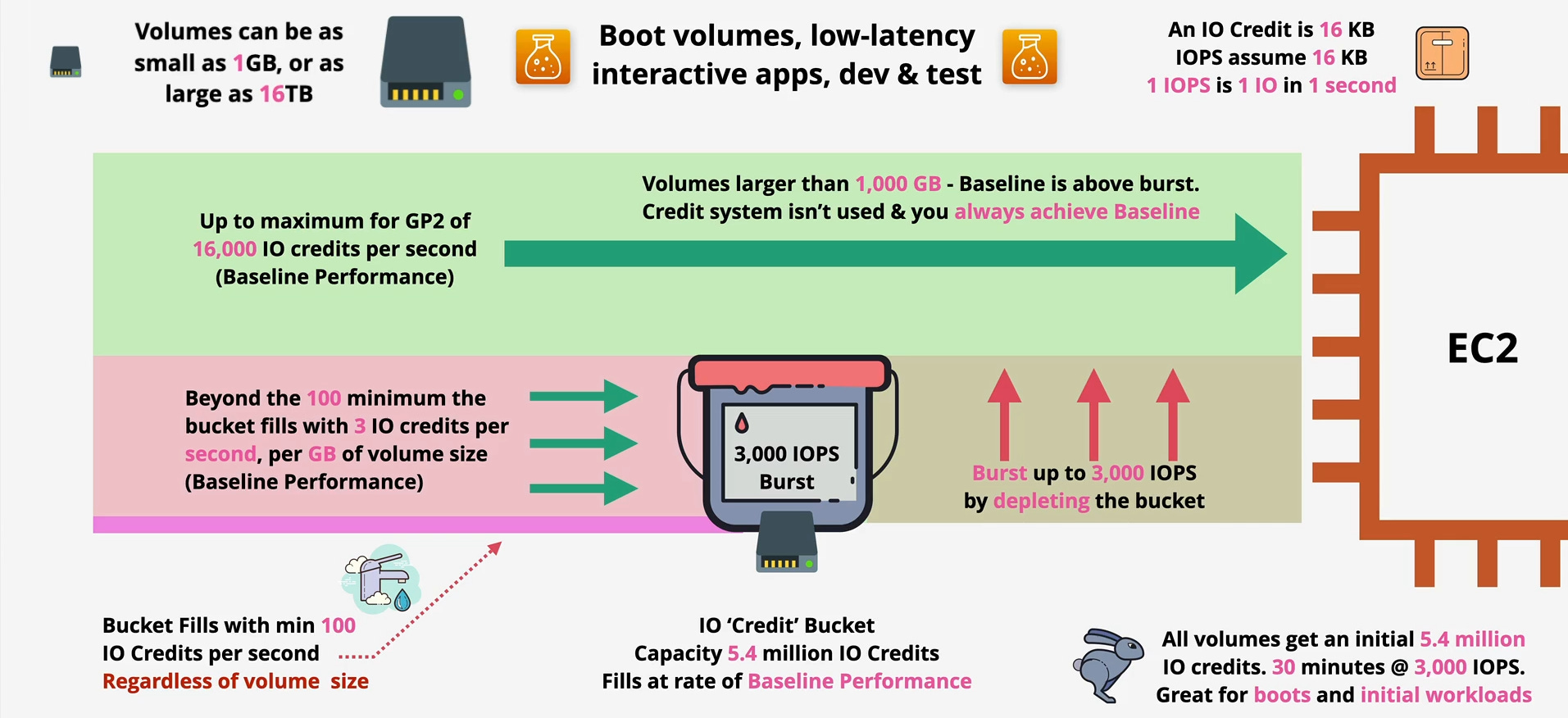
The gp2 volume type operates on a clever but complex “burst bucket” model.
The Starting Line (Initial Credits): Every new
gp2volume starts with a full “I/O Credit Bucket” containing 5.4 million credits. This gives you a powerful performance boost for 30 minutes at 3,000 IOPS right from the start, fantastic for instance boot-up.Earning Your Allowance (Baseline Performance): Once initial bursts settle, the volume’s performance is governed by its baseline. This is the rate at which the I/O credit bucket refills, directly tied to size: 3 IOPS per GB of storage. (e.g., a 200 GB
gp2volume earns 600 credits/sec, giving 600 IOPS baseline).Spending the Credits (Bursting): Your application can “burst” up to 3,000 IOPS by spending credits from the bucket, for volumes under 1 TB.
The “Performance Cliff”: If your sustained workload is higher than your baseline, the credit bucket will eventually empty. When empty, performance is throttled down to the baseline level, creating unpredictable slowdowns.
The Tipping Point: For
gp2volumes larger than 1,000 GB (1 TB), the baseline performance (3,000 IOPS) equals the burst maximum. At this point, the credit system isn’t used, and you are always guaranteed 3,000 IOPS or more.
The Modern Solution: Predictability and Power
The complexity and unpredictability of gp2 led AWS to create superior, modern alternatives.
gp3: The Smart, All-RounderThe Pitch:
gp3completely eliminates the burst bucket and I/O credits. It provides predictable, consistent performance.How it Works: Every
gp3volume starts with a strong, guaranteed baseline of 3,000 IOPS and 125 MB/s of throughput, regardless of its size. If you need more, you can provision it independently. You can have a small 50 GB volume but pay to give it 10,000 IOPS. Maximum IOPS per volume forgp3is 16,000 IOPS (as shown in the image).The Verdict: For nearly all new workloads,
gp3is the superior choice. Easier to manage, predictable performance, and often more cost-effective.
io1/io2/io2 Block Express: For the Mission-Critical 🧪🚀The Pitch: When you need an absolute guarantee of high performance for your most demanding applications. You provision the IOPS, and AWS delivers.
io1andio2: These are Provisioned IOPS SSDs, designed for high-performance, latency-sensitive workloads, I/O-intensive NoSQL & relational databases.You can provision IOPS independently of size, up to 500 IOPS/GB (MAX) for both
io1andio2.Volume Range: 4 GB to 16 TB.
Maximum per volume:
io1can scale up to 64,000 IOPS and 1,000 MB/s of throughput.io2builds onio1with 100x higher durability (99.999%), making it ideal for the most critical databases. While the image doesn’t explicitly state the max IOPS per volume forio2here, it implies similar high performance toio1in the previous image, differentiating primarily on durability.
io2 Block Express: The Ultra-High Performance Specialist 🚀This is the highest-performance block storage in AWS, built on the AWS Nitro System for consistent low latency & jitter.
You can provision up to 1000 IOPS/GB (MAX).
Volume Range: 4 GB to a staggering 64 TB.
Maximum per volume: Up to 256,000 IOPS and 4,000 MB/s of throughput. This is for the most extreme workloads, demanding sub-millisecond latency.
The Overlooked Bottleneck: Per-Instance Performance
Here’s a critical pro-tip, reinforced by the diagram’s “Per Instance Performance” section: Your EBS volume’s performance is only half of the equation. The other half is the EC2 instance it’s attached to.
The Instance Ceiling: Even if your EBS volume is capable of immense performance, the EC2 instance itself has a maximum dedicated bandwidth to EBS.
As the image shows, a single
io1volume can achieve up to 260,000 IOPS & 7,500 MB/s if the instance supports it.Similarly, an
io2 Block Expresscan also hit 260,000 IOPS & 7,500 MB/s at the instance level.
Analogy: You can have a gigabit fiber internet connection (your EBS volume), but if your laptop has a slow, old Wi-Fi card (your EC2 instance), you’ll never experience the full speed.
The Solution: Always use EBS-Optimized Instances and check their specifications. In the AWS documentation, look for the “EBS Bandwidth,” “EBS IOPS,” and “EBS Throughput” for your chosen instance type. You must select an instance that has enough dedicated network bandwidth to handle the performance of the volume you’re paying for. Attaching a high-performance volume to an underpowered instance is one of the most common and costly mistakes in AWS architecture.
Amazon EBS is a deceptively simple service with incredible depth. By understanding the fundamental performance models—especially the powerful advantages of gp3‘s predictable performance over the legacy gp2 burst model—you can make smarter architectural decisions. Choosing the right volume type, leveraging snapshots for resilience, and using advanced features allows you to build systems that are not only performant and cost-effective but also incredibly durable. It is truly the persistent, reliable backbone of the EC2 ecosystem.