

Amazon Kinesis Data Analytics & Video Streams Explained: Real-Time Processing and Media Streaming on AWS (Part 3)
From Real-Time SQL Stream Processing to Scalable Live Video Ingestion in the AWS Kinesis Ecosystem

In Parts 1 and 2, we explored Kinesis Data Streams for high-velocity event ingestion and Kinesis Data Firehose for managed delivery to storage and analytics destinations. We covered shards, partition keys, consumer lag, buffer intervals, and the operational reality of running streaming pipelines in production.
But we’ve only discussed moving data around. We haven’t talked about processing it in real time.
Writing stream processing code is hard. You need to handle windowing, aggregations, joins across streams, state management, fault tolerance, and exactly-once semantics. Most engineers who think they need custom Flink or Spark Streaming applications actually just need SQL queries running continuously against streaming data.
This is where Kinesis Data Analytics enters turning streaming data processing from a distributed systems problem into a SQL problem. And for a completely different use case, we’ll also explore Kinesis Video Streams, which solves the distinct challenge of ingesting, storing, and processing live video from cameras, drones, and IoT devices.
Let’s talk about what these services actually do, when they fit, and where they fail.
The Stream Processing Problem
You’ve built a streaming pipeline. Events flow into Kinesis Data Streams at thousands per second. Firehose delivers batches to S3 for long-term analysis. But your stakeholders want real-time metrics active users per minute, transaction volumes by region, error rates aggregated over 5-minute windows.
You could write a custom consumer application. Spin up EC2 instances running Flink or Spark Streaming. Implement windowing logic, state management, and checkpointing. Handle cluster management, scaling, and fault recovery. Maintain this infrastructure as traffic patterns evolve.
Or you could write a SQL query that does the same thing without managing any infrastructure.
Kinesis Data Analytics is AWS’s managed stream processing service. It runs Apache Flink applications (or legacy SQL applications) against streaming data from Kinesis Data Streams or Firehose, outputting results to various destinations. For common analytics patterns aggregations, filters, transformations, and simple joins SQL queries replace thousands of lines of stream processing code.
What is Amazon Kinesis Data Analytics?
Kinesis Data Analytics is a fully managed service for processing and analyzing streaming data in real time using SQL or Apache Flink. It continuously executes queries against incoming data, maintaining state across time windows and outputting results to destinations like Kinesis Data Streams, Firehose, Lambda, or directly to storage and analytics services.
Think of it as a perpetually running SQL query engine specifically designed for streaming data. Unlike batch analytics where you query historical data, stream analytics queries run continuously, processing each new record as it arrives and updating results in real time.
The service comes in two flavors:
SQL applications: Write standard SQL with streaming extensions (windowing functions, pattern matching). Best for straightforward analytics, aggregations, and transformations.
Apache Flink applications: Build sophisticated stream processing pipelines in Java or Scala using the Flink framework. For complex event processing, machine learning inference, or custom business logic.
Most use cases start with SQL. You only escalate to Flink when SQL’s expressive power becomes limiting.
Kinesis Data Analytics Architecture Explained
Understanding how Data Analytics fits in your streaming pipeline clarifies when it’s the right tool.
Input Sources: Where Data Comes From
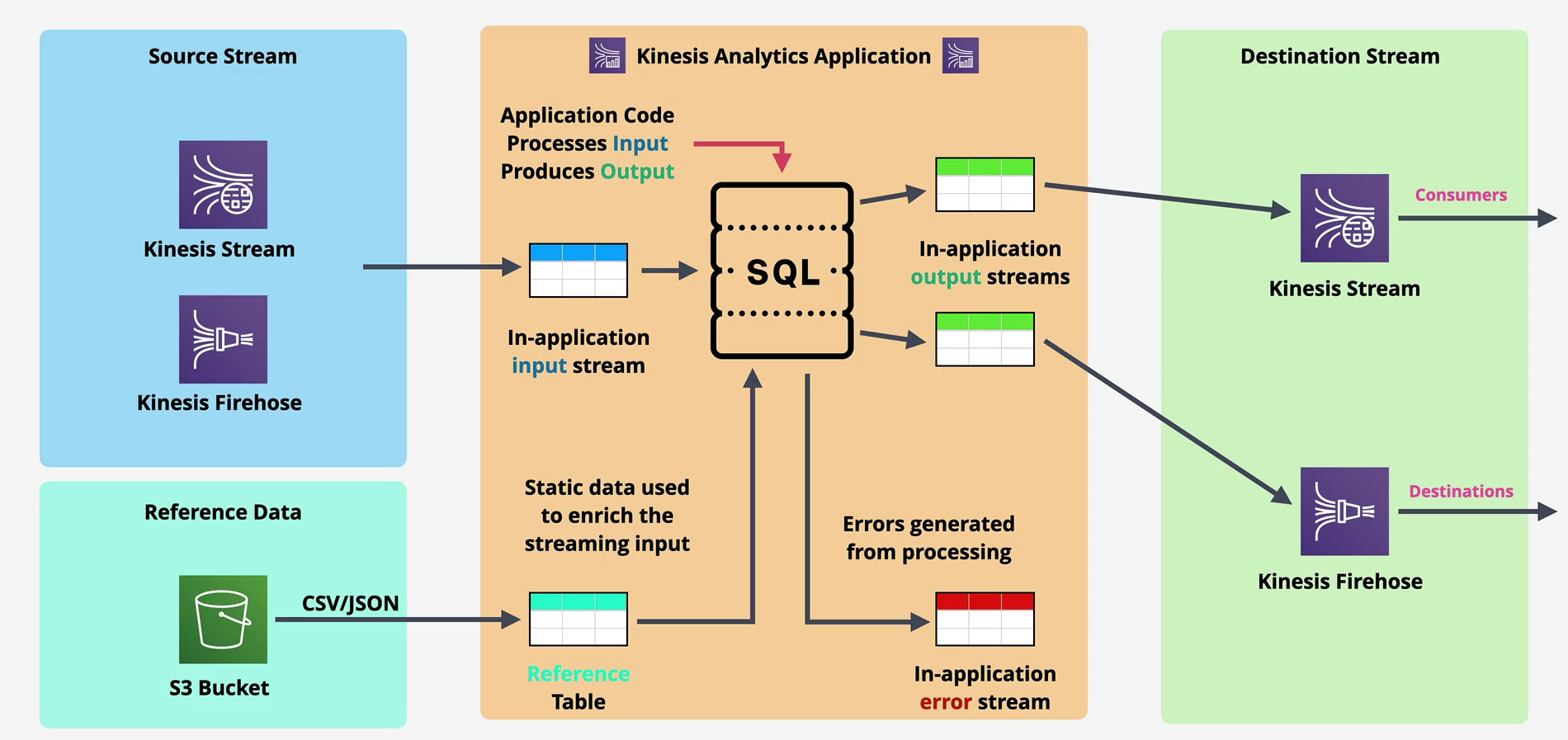
Data Analytics consumes from two primary sources:
Kinesis Data Streams: The canonical pattern. Events flow into Data Streams, multiple consumers process them, and Data Analytics runs continuous queries for real-time metrics and alerts.
Kinesis Data Firehose: Less common but supported. Useful when you want analytics on data already flowing through Firehose without setting up a separate Data Streams.
You configure an input stream, specify the schema (column names and types), and Data Analytics continuously reads from this source. Unlike batch processing where you load a dataset and query it, streaming queries operate on unbounded data the query runs forever, processing new records as they arrive.
The Processing Model: Continuous Queries
Here’s where streaming analytics diverges from traditional SQL. Your query runs perpetually, maintaining state and updating results as new data arrives.
Tumbling windows divide time into fixed, non-overlapping intervals. A 1-minute tumbling window counts events from 10:00:00-10:01:00, then 10:01:00-10:02:00, with no overlap. Use these for periodic metrics like “events per minute.”
Sliding windows overlap. A 5-minute sliding window that moves every minute includes records from 10:00-10:05, then 10:01-10:06, then 10:02-10:07. Each record appears in multiple windows. Use these for moving averages or detecting patterns over recent history.
Session windows group events with gaps smaller than a threshold. If events arrive within 30 seconds of each other, they’re in the same session. When 30 seconds pass with no events, the session closes. Perfect for user session analytics where you don’t know session duration in advance.
Stateful processing means Data Analytics remembers previous events. Calculating a running total, detecting when a value exceeds its 10-minute average, or joining streams based on correlation IDs all require state. The service manages this state, handles checkpointing, and recovers it after failures.
This is the critical capability that makes Data Analytics valuable. Implementing stateful windowing in custom code requires careful design, testing, and operational discipline. Data Analytics handles it declaratively through SQL.
SQL for Streaming: What It Looks Like
Let’s ground this in reality. You’re processing e-commerce clickstream data and need real-time metrics on product views per minute by category.
CREATE OR REPLACE STREAM product_views_per_minute (
    category VARCHAR(64),
    view_count BIGINT,
    window_start TIMESTAMP
);

CREATE OR REPLACE PUMP product_views_pump AS
INSERT INTO product_views_per_minute
SELECT STREAM
    category,
    COUNT(*) AS view_count,
    STEP(SOURCE_STREAM.ROWTIME BY INTERVAL '1' MINUTE) AS window_start
FROM SOURCE_STREAM
WHERE event_type = 'product_view'
GROUP BY
    category,
    STEP(SOURCE_STREAM.ROWTIME BY INTERVAL '1' MINUTE);
This query creates a tumbling 1-minute window, filters for product view events, counts by category, and outputs results every minute. The STREAM keyword indicates this operates on streaming data, and STEP defines the windowing function.
Every minute, this query outputs aggregated counts to your destination stream. Downstream consumers (Lambda, Firehose, dashboards) receive updated metrics without any custom aggregation logic.
Output Destinations: Where Results Go
Data Analytics can output to multiple destinations:
Kinesis Data Streams: Send processed events to another stream for further processing or consumption by custom applications.
Kinesis Data Firehose: Route results directly to S3, Redshift, OpenSearch, or Splunk via Firehose’s managed delivery.
AWS Lambda: Trigger Lambda functions with query results, enabling real-time actions like sending alerts or updating external systems.
Direct destinations: For Flink applications, you can write directly to S3, DynamoDB, RDS, or other AWS services using Flink connectors.
The multi-destination capability enables powerful patterns. A single analytics application might output aggregated metrics to a Data Stream for dashboard consumption, raw enriched events to Firehose for archival, and alerts to Lambda for operational response.
A Real-World Architecture: Real-Time Fraud Detection
Let’s build a concrete example. You’re running a payment processing platform handling 5,000 transactions per second globally. You need real-time fraud detection based on behavioral patterns flagging accounts when transaction velocity, geographic anomalies, or amount patterns deviate from normal.
The Architecture
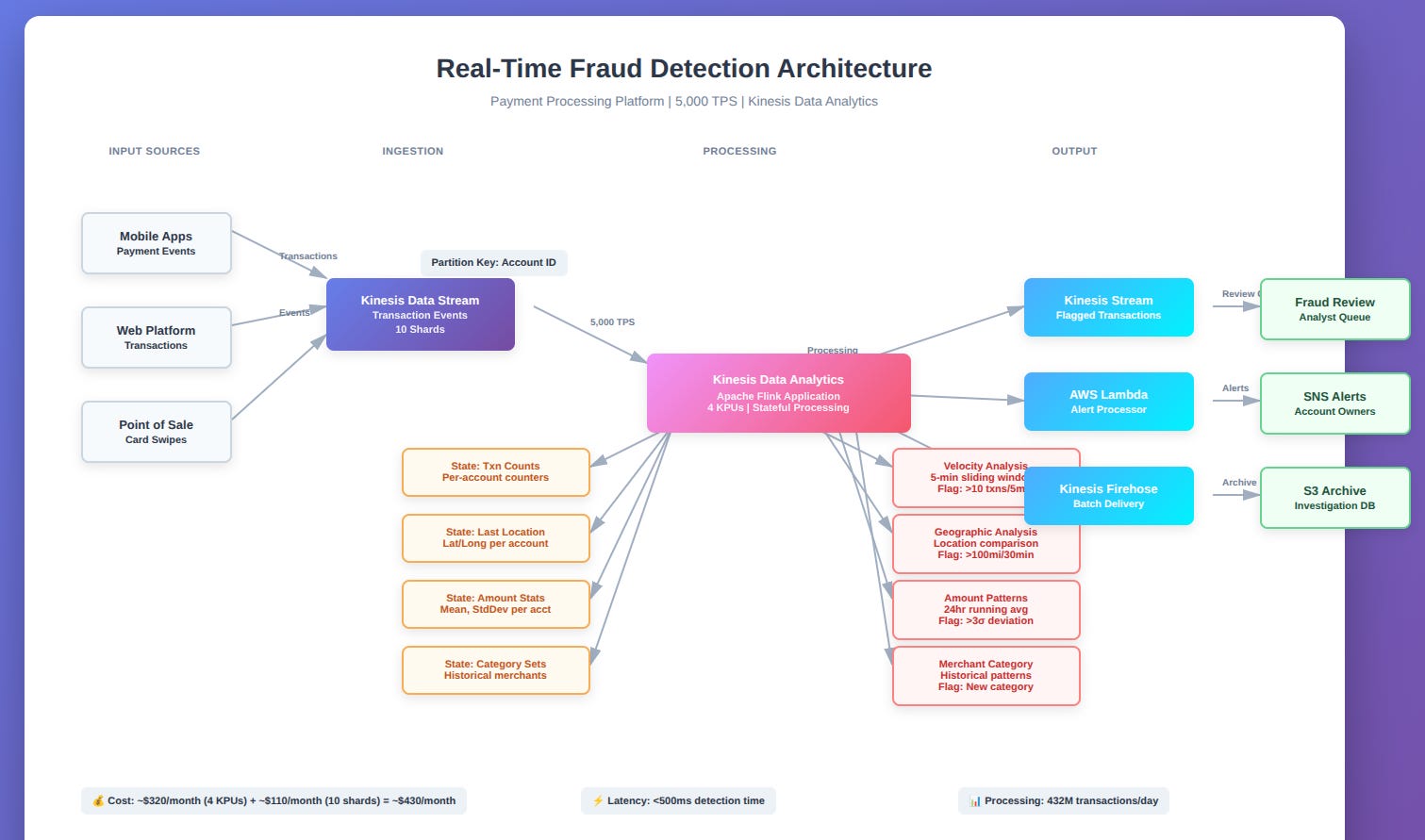
Input: Transaction events flow into Kinesis Data Streams. Each event includes account ID, amount, merchant category, location, and timestamp.
Data Analytics Application: A Flink application (SQL isn’t expressive enough for this complexity) processes the stream:
Velocity analysis: Counts transactions per account over 5-minute sliding windows. Flags accounts exceeding 10 transactions in 5 minutes.
Geographic analysis: Joins transaction stream with itself on account ID, comparing consecutive transaction locations. Flags transactions occurring >100 miles apart within 30 minutes (impossible without sharing credentials).
Amount pattern analysis: Computes running averages of transaction amounts per account over 24-hour windows. Flags transactions >3 standard deviations from the account’s mean.
Merchant category deviation: Maintains historical merchant category distribution per account. Flags transactions in categories the account has never used before.
Stateful processing: The Flink application maintains:
Running transaction counts per account (for velocity)
Last transaction location per account (for geographic analysis)
Transaction amount statistics per account (for pattern detection)
Historical merchant category sets per account
All of this state is automatically checkpointed and recovered on failure.
Output: Flagged transactions are written to:
Kinesis Data Stream: Real-time fraud review queue consumed by fraud analysts
Lambda: Immediate alerts to account owners via SNS for high-confidence fraud signals
Firehose → S3: All flagged transactions for investigation and model training
The alternative: Building this in custom code requires implementing Flink application logic, managing Flink cluster infrastructure, handling state backends (RocksDB or S3), configuring checkpointing, monitoring cluster health, and scaling based on throughput.
Data Analytics handles cluster management, scaling, state management, and fault tolerance. You write business logic in Flink APIs. AWS runs the infrastructure.
Why Data Analytics Over Custom Flink
Could you run Flink on EC2 or EKS? Absolutely. But you’re now responsible for:
Cluster sizing and autoscaling
State backend configuration and tuning
Checkpoint storage and recovery
Job deployment and version management
Monitoring cluster health and job metrics
Upgrading Flink versions
For $0.11 per KPU-hour (Kinesis Processing Unit roughly 1 vCPU and 4 GB memory), Data Analytics eliminates this operational burden. At 4 KPUs running continuously, that’s ~$320/month. Compare this to the engineering cost of building and operating a Flink cluster.
Common Mistakes Engineers Make with Data Analytics
Production experience reveals patterns that documentation glosses over.
1. Using Data Analytics for Simple Transformations
If you just need to filter events or do simple field transformations, use Lambda with Firehose or a basic Kinesis consumer. Data Analytics is overkill for “select * where status = ‘active’.”
The fix: Reserve Data Analytics for aggregations, windowing, or stateful processing that actually requires stream processing semantics. For simple transformations, simpler tools exist.
2. Not Understanding KPU Scaling
KPUs (Kinesis Processing Units) are your compute capacity. Too few KPUs and your application falls behind, accumulating lag. Too many and you’re paying for idle capacity.
The fix: Monitor MillisBehindLatest metric. If it continuously increases, you’re under-provisioned. Right-size based on actual throughput, not guesses.
3. Overly Complex SQL Queries
SQL for streaming isn’t SQL for batch. Every join maintains state. Every window keeps data in memory. Complex multi-way joins or large windows exhaust memory and kill performance.
The fix: Simplify queries. Break complex analytics into multiple applications. Don’t try to do everything in a single query.
4. Ignoring Checkpointing Implications
Data Analytics checkpoints state periodically for fault recovery. Large state (millions of keys in aggregations) means larger checkpoints, slower recovery, and potential performance issues.
The fix: Design for bounded state. Use session windows that close rather than unbounded running aggregations. Expire old keys. Monitor checkpoint sizes.
5. Misunderstanding SQL vs Flink Trade-Offs
SQL is convenient for simple aggregations. Flink is necessary for complex business logic. Trying to force complex logic into SQL creates unmaintainable queries.
The fix: Start with SQL. Migrate to Flink when SQL becomes limiting. Don’t prematurely optimize by using Flink when SQL would suffice.
6. Not Monitoring Application Health
“Managed” doesn’t mean “invisible.” Application failures, schema mismatches, and downstream throttling require monitoring and alerting.
The fix: Set up CloudWatch alarms on MillisBehindLatest, InputProcessing.DroppedRecords, and application-specific metrics. Monitor continuously.
When to Use Kinesis Data Analytics
The decision framework is clearer than most architects assume.
Use Data Analytics When:
You need real-time aggregations or metrics. Computing counts, sums, averages, or percentiles over time windows is Data Analytics’ sweet spot.
State management is required. Tracking running totals, detecting patterns across events, or maintaining per-entity statistics benefits from managed state.
You want SQL expressiveness without operational complexity. If your analytics fit SQL’s capabilities (and most do), Data Analytics is simpler than custom code.
Integration with AWS ecosystem matters. Native integration with Kinesis, Firehose, Lambda, and other AWS services reduces integration work.
Don’t Use Data Analytics When:
Simple transformations are all you need. Lambda or Firehose transformations are cheaper and simpler for basic filtering or field mapping.
Batch processing is acceptable. If hourly or daily processing meets requirements, use Athena against S3 or scheduled Spark jobs. Much cheaper than continuous processing.
You need sub-second latency. Data Analytics introduces processing latency. For ultra-low-latency requirements, custom consumers may be necessary.
Complex business logic dominates. If your processing is 90% custom code and 10% aggregation, a custom application might be clearer than wrapping complex logic in Flink.
Cost sensitivity trumps operational simplicity. Running Data Analytics continuously costs more than batch processing. For cost-constrained scenarios, batch may win.
Understanding Data Analytics Costs and Trade-Offs
Let’s talk money because stream processing isn’t cheap.
The Pricing Model
Data Analytics charges per KPU-hour: $0.11 per hour per KPU. A KPU provides roughly 1 vCPU and 4 GB memory. Most applications start with 1-4 KPUs and scale based on throughput.
Example cost calculation:
Application running 4 KPUs continuously: 4 × $0.11 × 24 hours × 30 days = ~$317/month
Add 50 GB/month of durable application state: ~$2/month
Total: ~$319/month
This continuous cost model means idle applications still cost money. Unlike Lambda where you pay only for executions, Data Analytics applications running 24/7 accumulate charges whether processing 1 event per second or 10,000.
Additional Costs
Data transfer: Ingesting from Kinesis Data Streams in the same region is free. Cross-region incurs data transfer charges.
Output destinations: Writing to Kinesis Data Streams, Firehose, or Lambda incurs standard charges for those services.
State storage: Durable application state (snapshots) costs $0.04/GB-month. For applications with large state (millions of aggregation keys), this adds up.
Apache Flink applications: Using Flink libraries or connectors that require additional dependencies increases application size and potentially memory requirements, driving up KPU counts.
Cost Optimization Strategies
Right-size KPUs: Monitor MillisBehindLatest and CPU/memory utilization. Scale down if you’re over-provisioned.
Use Tumbling Windows: They expire state predictably. Sliding windows maintain more state and cost more.
Limit state cardinality: Don’t aggregate by high-cardinality keys like user IDs if you can aggregate by coarser dimensions like user cohorts.
Consider batch processing: If real-time isn’t mandatory, scheduled Athena queries or Spark jobs cost less than continuous stream processing.
When Data Analytics Becomes Expensive
At scale, continuous stream processing costs accumulate. An application running 20 KPUs continuously costs ~$1,600/month. If you’re running multiple analytics applications (different metrics, different time windows), costs multiply.
This is where cost-benefit analysis becomes critical. Is real-time analytics worth the cost? If insights drive immediate actions that generate revenue or prevent losses (fraud detection, dynamic pricing, operational incident response), the ROI justifies the cost. If dashboards refresh in real time but nobody acts on second-level changes, you’re paying for capability you don’t leverage.
Be honest about latency requirements. Many “real-time” dashboards would function fine with 5-minute batch updates at a fraction of the cost.
Operational Considerations: Running Data Analytics in Production
Managed doesn’t mean maintenance-free.
Monitoring Strategy
Critical CloudWatch metrics:
MillisBehindLatest: How far your application is behind the latest record in the stream. If this increases consistently, you’re under-provisioned.
KPUs: Current KPU allocation. Monitor to understand capacity utilization.
CpuUtilization and MemoryUtilization: Per-KPU metrics showing resource usage. Sustained >80% indicates you need more KPUs.
InputProcessing.DroppedRecords: Records dropped due to deserialization failures or schema mismatches. Spikes indicate data quality issues.
InputProcessing.ProcessingDuration: How long it takes to process input records. Increases suggest computational bottlenecks.
Set alarms on MillisBehindLatest (alert if >1 minute for real-time applications) and dropped records (alert on any non-zero values).
Handling Schema Evolution
Streaming applications are long-lived, but data schemas evolve. New fields get added, types change, or structures are refactored.
Forward compatibility: Design schemas to handle new fields gracefully. Data Analytics can ignore unexpected fields, but type mismatches cause dropped records.
Versioning strategies: For breaking changes, you might need to:
Deploy new analytics applications with updated schemas
Run both versions in parallel during transition
Migrate consumers to the new output format
Deprecate the old application
This coordination complexity is why schema changes in streaming systems are painful. Plan schemas carefully upfront.
Application Updates and Versioning
Updating a running Data Analytics application requires stopping it, deploying the new version, and restarting. This creates a brief processing gap.
Blue-green deployment: Run the new version alongside the old, reading from the same input. Once validated, cut over consumers to the new output and stop the old version. This ensures continuous processing but doubles costs during transition.
Snapshot-based updates: Stop the old application, deploy the new one starting from the last checkpoint snapshot. Processing gap equals deployment time (typically <1 minute).
For mission-critical applications, the blue-green pattern is worth the temporary cost. For less critical analytics, snapshot-based updates suffice.
Debugging Streaming Applications
Debugging is harder than batch processing because you can’t easily replay specific inputs or inspect intermediate state.
Logging: Enable CloudWatch Logs for your application. Log key decision points, aggregation results, and error conditions.
Sampling: For high-volume streams, log samples (1% of records) rather than everything to keep costs manageable.
Local testing: For Flink applications, you can run locally with synthetic data before deploying to Data Analytics. This catches many bugs before production.
Integration testing: Use Kinesis Data Streams with test data to validate end-to-end behavior before processing production traffic.
The lack of interactive debugging makes thoughtful logging and testing essential.
Amazon Kinesis Video Streams: A Different Beast Entirely
Let’s shift gears completely. Kinesis Video Streams solves a fundamentally different problem: ingesting, storing, and processing live video and audio from connected devices.
This isn’t about JSON events or clickstream data. It’s about surveillance cameras, doorbell cameras, dash cams, drones, radar feeds, depth sensors, and any device producing streaming media.
What is Kinesis Video Streams?
Kinesis Video Streams is a fully managed service for ingesting live video and audio from devices, storing it durably for playback and analysis, and integrating with computer vision and machine learning services.
Unlike Data Streams where you’re dealing with discrete records, Video Streams handles continuous media streams H.264 video, audio codecs, metadata tracks. The service solves challenges specific to media: buffering, codec support, time-indexed storage, seeking, and playback.
Think of it as YouTube’s upload and storage infrastructure as a managed service, but designed for IoT devices and real-time analytics rather than user-uploaded content.
Supported Producers: What Can Stream Video?
Security cameras: IP cameras, doorbell cameras (Ring, Nest), surveillance systems.
Vehicles: Dash cams, autonomous vehicle sensor feeds, fleet management cameras.
Drones: Aerial footage from commercial and consumer drones.
Industrial IoT: Manufacturing inspection cameras, quality control systems.
Smartphones and tablets: Mobile apps can stream video to Kinesis Video Streams using the SDK.
Radar and depth sensors: Not just visible light radar, LIDAR, thermal, and depth sensor feeds.
Audio streams: Voice assistants, phone calls, IoT audio sensors.
Devices use the Kinesis Video Streams Producer SDK (available for C++, Java, Android, and GStreamer) to stream media. The SDK handles authentication, chunking video into fragments, managing network issues, and ensuring delivery.
The Architecture: How Video Streams Work
Ingestion: Devices authenticate via AWS credentials (typically using IoT Core certificate-based auth or Cognito) and establish an HTTPS connection to Kinesis Video Streams. Video is encoded (H.264/H.265 for video, AAC/PCM for audio) and transmitted in chunks called fragments.
Fragments are the basic unit of video storage typically 2-10 seconds of media. Each fragment contains a timestamp, codec information, and the encoded media data. This fragmentation enables seeking and time-indexed playback.
Storage: Kinesis Video Streams stores fragments durably for your configured retention period (1 hour to 10 years). Data is encrypted in transit (TLS) and at rest (KMS). Unlike S3 where you directly access objects, Video Streams uses an API-based access model.
Playback: You don’t download video files. Instead, you use the GetMedia API to retrieve fragments from a specific time range, or the HLS (HTTP Live Streaming) API for playback in web browsers and media players.
This API-based model is deliberate. Video Streams isn’t a file storage system; it’s a time-series database for media optimized for streaming access patterns.
Why Not Just Use S3?
Fair question. Why not have devices upload video files to S3?
Real-time access: Kinesis Video Streams makes video available for playback and analysis milliseconds after ingestion. S3 uploads complete before the file is accessible.
Time-indexed seeking: Video Streams lets you request video from “2024-01-15 14:30:00 to 14:35:00” directly. With S3, you’d need to manage indexing and chunking yourself.
Continuous streams: Devices can stream indefinitely without worrying about file boundaries, upload retries, or partial file handling.
Bandwidth efficiency: For live viewing, clients can consume video as it arrives rather than waiting for entire files to upload.
Integration with AWS ML services: Native integration with Rekognition Video for computer vision, Amazon Connect for audio analysis, and SageMaker for custom ML models.
S3 works for batch video processing where latency doesn’t matter. Video Streams enables real-time and near-real-time use cases.
Integration with AWS Services
Amazon Rekognition Video: Kinesis Video Streams integrates directly with Rekognition for real-time video analysis detecting faces, recognizing celebrities, tracking objects, identifying unsafe content, detecting PPE compliance in manufacturing, and custom label detection.
You create a Rekognition Video stream processor pointing at your Video Stream. Rekognition continuously analyzes incoming video and outputs results (detected faces, labels, bounding boxes) to Kinesis Data Streams for downstream processing.
Amazon Connect: For contact center applications, Video Streams integrates with Amazon Connect to enable video calling with real-time analysis—sentiment detection, transcription, facial analysis during customer interactions.
Custom ML models: Video fragments can be pulled from the stream and sent to SageMaker endpoints for inference. Common patterns include anomaly detection in manufacturing, wildlife monitoring in conservation projects, and traffic analysis in smart city applications.
Lambda: You can’t directly trigger Lambda from Video Streams, but you can process Rekognition results (sent to Data Streams) with Lambda for real-time actions like sending alerts when specific objects are detected.
Real-World Architecture: Smart Retail Analytics
Let’s make this concrete. You’re running a retail chain and want to analyze customer behavior foot traffic patterns, dwell time in different departments, queue lengths at checkout.
The Architecture
Cameras: 50 stores, each with 10 cameras (500 total) streaming 720p video at 2 Mbps each.
Ingestion: Cameras stream H.264 video to Kinesis Video Streams. Each camera creates a separate video stream with 7-day retention.
Rekognition Video: Stream processors analyze video in real time:
Count people entering/exiting (person detection)
Track customer movement patterns (object tracking)
Measure queue lengths at checkout (person detection + spatial analysis)
Analyze dwell time in product sections
Output: Rekognition sends detected labels, bounding boxes, and timestamps to Kinesis Data Streams.
Data Analytics: A Flink application processes the Rekognition output:
Aggregates foot traffic by store, hour, and day of week
Calculates average dwell time by department
Tracks queue lengths over time
Detects anomalies (unusually long queues, empty stores during peak hours)
Visualization: Results feed into QuickSight dashboards showing real-time and historical analytics.
Storage: Original video retained for 7 days in Video Streams. After analysis, you don’t need to store all video—only flagged incidents (unusually high traffic, safety issues) are archived to S3 via a custom Lambda function.
The Numbers
Video ingestion: 500 streams × 2 Mbps = 1 Gbps total. At $0.00850 per GB ingested, 1 Gbps = 450 GB/hour = ~$3.83/hour = ~$2,750/month.
Storage: 500 streams × 7 days retention. Each stream stores ~200 GB/week (2 Mbps × 7 days). 500 streams × 200 GB = 100 TB stored. At $0.023/GB-month, that’s ~$2,300/month.
Rekognition Video: Processing video at 2 Mbps per stream, 500 streams. Rekognition charges $0.12 per minute of video processed. 500 streams × 60 minutes/hour × 24 hours = 720,000 minutes/day = ~$86,400/day. This is where costs explode.
Reality check: You don’t process all video continuously. Instead, you:
Sample frames (analyze every 10th second instead of every frame)
Process only during store hours (12 hours/day instead of 24)
Process only specific camera feeds (entry/exit cameras, not all 10 per store)
With optimizations: 50 stores × 2 cameras × 12 hours × 60 minutes = 72,000 minutes/day × $0.12 = ~$8,640/day = ~$259,200/month.
Still expensive, but now in the realm of ROI for a retail chain getting actionable insights.
Why Video Streams Over Custom Infrastructure
Building this yourself requires:
Video ingestion infrastructure accepting RTSP/RTMP streams
Durable storage for millions of fragments with time-indexed seeking
HLS/DASH streaming infrastructure for playback
Encryption and access control
Integration with ML services
The engineering effort to build and operate this infrastructure dwarfs the service costs for most organizations. Video Streams makes sense when video analytics provides business value exceeding the cost.
Common Mistakes with Kinesis Video Streams
Video streaming has unique pitfalls.
1. Underestimating Bandwidth Requirements
Video consumes massive bandwidth. 100 cameras at 2 Mbps each = 200 Mbps = 25 MB/second = 2 TB/day in ingested data.
The fix: Understand bandwidth requirements before deployment. Consider lower resolutions or frame rates if full HD isn’t necessary.
2. Not Optimizing Rekognition Processing
Processing every frame of every video stream is prohibitively expensive. Most use cases work fine sampling every 2-5 seconds.
The fix: Configure Rekognition stream processors to analyze at intervals (e.g., 1 frame per 2 seconds) rather than every frame.
3. Over-Retaining Video
Default retention is 24 hours, extendable to 10 years. Storing high-resolution video for weeks costs a fortune.
The fix: Retain only what you need. For most surveillance use cases, 7-30 days suffices. Archive only flagged incidents to S3 for long-term retention.
4. Ignoring Network Reliability
Video streaming from edge devices requires stable connectivity. Network interruptions cause gaps in coverage.
The fix: Implement local buffering on devices when possible. Use the Producer SDK’s built-in retry logic. Monitor connection stability metrics.
5. Not Planning for Playback Load
Retrieving video for playback consumes bandwidth and incurs data transfer charges. If you expect frequent playback (security teams reviewing footage), budget for egress costs.
The fix: Estimate playback patterns. Consider CloudFront for frequently accessed video to reduce repeated retrieval from Video Streams.
When to Use Kinesis Video Streams
The decision is clearer than for data streaming services.
Use Video Streams When:
You need real-time or near-real-time video analysis. Security monitoring, live quality inspection, real-time customer analytics.
Integration with AWS ML services is required. Rekognition Video, custom SageMaker models, Amazon Connect for video calling.
Time-indexed access is important. You need to retrieve video from specific time ranges without managing fragmentation yourself.
Device-to-cloud streaming is your pattern. IoT devices, cameras, and sensors continuously streaming to the cloud.
Don’t Use Video Streams When:
Batch processing is sufficient. If you’re analyzing recorded video files uploaded periodically, process them directly from S3 with batch jobs.
Cost sensitivity dominates. Video Streams with Rekognition is expensive. For budget-constrained projects, consider alternatives like local edge processing or sampling strategies.
Storage is the primary need. If you just need to archive video long-term without real-time access or analysis, S3 (potentially with S3 Glacier for older data) is more cost-effective.
You’re building consumer video applications. For user-uploaded content (think YouTube or TikTok), S3 + MediaConvert + CloudFront is the right architecture. Video Streams is designed for device streaming, not user uploads.
The Streaming Processing Paradigm
What we’ve covered in this series Data Streams, Firehose, Data Analytics, and Video Streams represents a fundamental shift in how we build data systems.
Traditional architectures batch data, move it periodically, and analyze it retroactively. Streaming architectures process data continuously, react in real time, and treat data as a perpetual flow rather than discrete batches.
Data Analytics makes stream processing accessible. What once required distributed systems expertise and operational sophistication now requires SQL. The barrier to real-time analytics has collapsed.
Video Streams does the same for media. What once required custom infrastructure and deep expertise in video codecs, streaming protocols, and storage optimization now requires API calls and configuration.
But here’s the hard truth: streaming is not always better. It’s more complex, more expensive, and often unnecessary. The question isn’t “can we do this in real time?” but “should we?”
If batch processing meets requirements, use batch processing. If near real-time is sufficient, use Firehose. If real-time is genuinely necessary, use Data Analytics or custom consumers. If video analysis drives business value exceeding its cost, use Video Streams.
Architectural maturity means choosing the simplest solution that meets requirements, not the most sophisticated technology because it’s impressive.
The Complete Picture
Across three articles, we’ve explored the Kinesis ecosystem:
Part 1: Data Streams ordered, durable, replayable event ingestion with explicit capacity management through shards.
Part 2: Firehose managed delivery to storage and analytics destinations, trading sub-second latency for operational simplicity.
Part 3: Data Analytics SQL and Flink-based stream processing, enabling real-time aggregations and stateful analytics without managing infrastructure. Video Streams media ingestion, storage, and analysis for cameras and IoT devices.
Together, these services provide the primitives for building streaming data platforms on AWS. Used thoughtfully, they enable capabilities impossible with batch processing. Used carelessly, they introduce complexity and cost without corresponding value.
The difference between successful streaming architectures and failed ones isn’t technical capability. It’s understanding trade-offs, choosing appropriate tools for each use case, monitoring relentlessly, and optimizing for total cost of ownership including engineering time.
Streaming data is powerful. But power without discipline is waste. Build streaming systems when streaming solves real problems. Otherwise, embrace simplicity.
Quick Reference: Kinesis Data Analytics
KPU (Kinesis Processing Unit): ~1 vCPU + 4 GB memory compute unit
Pricing: $0.11 per KPU-hour (continuous cost even when idle)
Input Sources: Kinesis Data Streams, Kinesis Data Firehose
Output Destinations: Data Streams, Firehose, Lambda, S3, DynamoDB (Flink)
Window Types: Tumbling (fixed, non-overlapping), Sliding (overlapping), Session (gap-based)
Use For: Real-time aggregations, windowed analytics, stateful processing
Avoid For: Simple transformations, batch-acceptable use cases, ultra-low-latency requirements
Quick Reference: Kinesis Video Streams
Pricing: $0.00850 per GB ingested + $0.023 per GB-month stored
Retention: 1 hour to 10 years (configurable)
Access Model: API-based (GetMedia, HLS), not direct file access
Integrations: Amazon Rekognition Video, Amazon Connect, SageMaker
Use For: Real-time video analysis, surveillance, IoT media streaming
Avoid For: User-uploaded content, batch video processing, archive-only storage
This concludes our comprehensive exploration of Amazon Kinesis. From data ingestion to delivery, from real-time analytics to video streaming, you now have the architectural knowledge to design, deploy, and operate streaming systems on AWS. Choose wisely, build thoughtfully, and optimize relentlessly.
