
Amazon Kinesis Data Firehose Explained: Fully Managed Streaming Delivery on AWS (Part 2)
Beyond the Shard: Why Firehose is the "Easy Button" for Production Data Pipelines

In Part 1, we explored Amazon Kinesis Data Streams the foundation for real-time data ingestion on AWS. We discussed shards, partition keys, multiple consumers, and the architectural commitment that streaming data requires. We covered the hard parts: capacity planning, monitoring consumer lag, handling hot shards, and the operational reality of running streams in production.
But here’s the problem: most streaming use cases end with the same pattern. You ingest data into Kinesis, write a consumer application to read from the stream, batch records together, maybe transform them, and then deliver them to S3, Redshift, Elasticsearch, or Splunk. You’ve just built the same boilerplate data delivery pipeline everyone else builds.
This is where Amazon Kinesis Data Firehose enters. It’s the answer to one question: “Can’t AWS just handle the delivery part for me?”
The Problem Firehose Solves
Let’s be honest about what building a custom Kinesis consumer involves. You write code using the Kinesis Client Library. You handle batching logic to group records efficiently. You implement retry logic for failed deliveries. You manage checkpointing to track processed records. You deal with DynamoDB coordination between consumer instances. You monitor metrics, handle errors, and maintain this code as AWS services evolve.
For 90% of streaming data pipelines, this is undifferentiated heavy lifting.
Your business value isn’t in the batching algorithm or retry logic. It’s in the insights you derive from the data or the actions you take based on it. The plumbing? That’s commodity infrastructure.
Kinesis Data Firehose eliminates this entire category of work. It’s a fully managed, serverless delivery service that continuously loads streaming data into AWS data stores and analytics services. You configure a delivery stream, point your producers at it, and Firehose handles everything else buffering, batching, compression, encryption, transformation, and delivery.
No servers to manage. No capacity to provision. No consumer applications to write and maintain. Just reliable, scalable data delivery.
What is Amazon Kinesis Data Firehose?
Kinesis Data Firehose is a fully managed service for delivering streaming data to destinations like Amazon S3, Amazon Redshift, Amazon OpenSearch Service, HTTP endpoints, and third-party services like Splunk and Datadog. It automatically scales to match your data throughput, handles all the operational complexity, and charges only for the volume of data you ingest.
Think of Firehose as a specialized consumer for common delivery patterns. Instead of writing custom code to batch, transform, and load data into S3 or Redshift, you configure a delivery stream that does this automatically. It’s the difference between building a custom bike and buying one from a manufacturer—both get you there, but one requires far less effort.
The “Firehose” name is apt. You pour data in, and it flows to your destination with minimal back-pressure. Unlike Data Streams where you manage shards and consumers, Firehose abstracts away capacity entirely. It handles whatever volume you throw at it.
Kinesis Data Firehose Architecture Explained
Understanding Firehose’s architecture clarifies when it fits and when it doesn’t. Let’s break down the data flow.
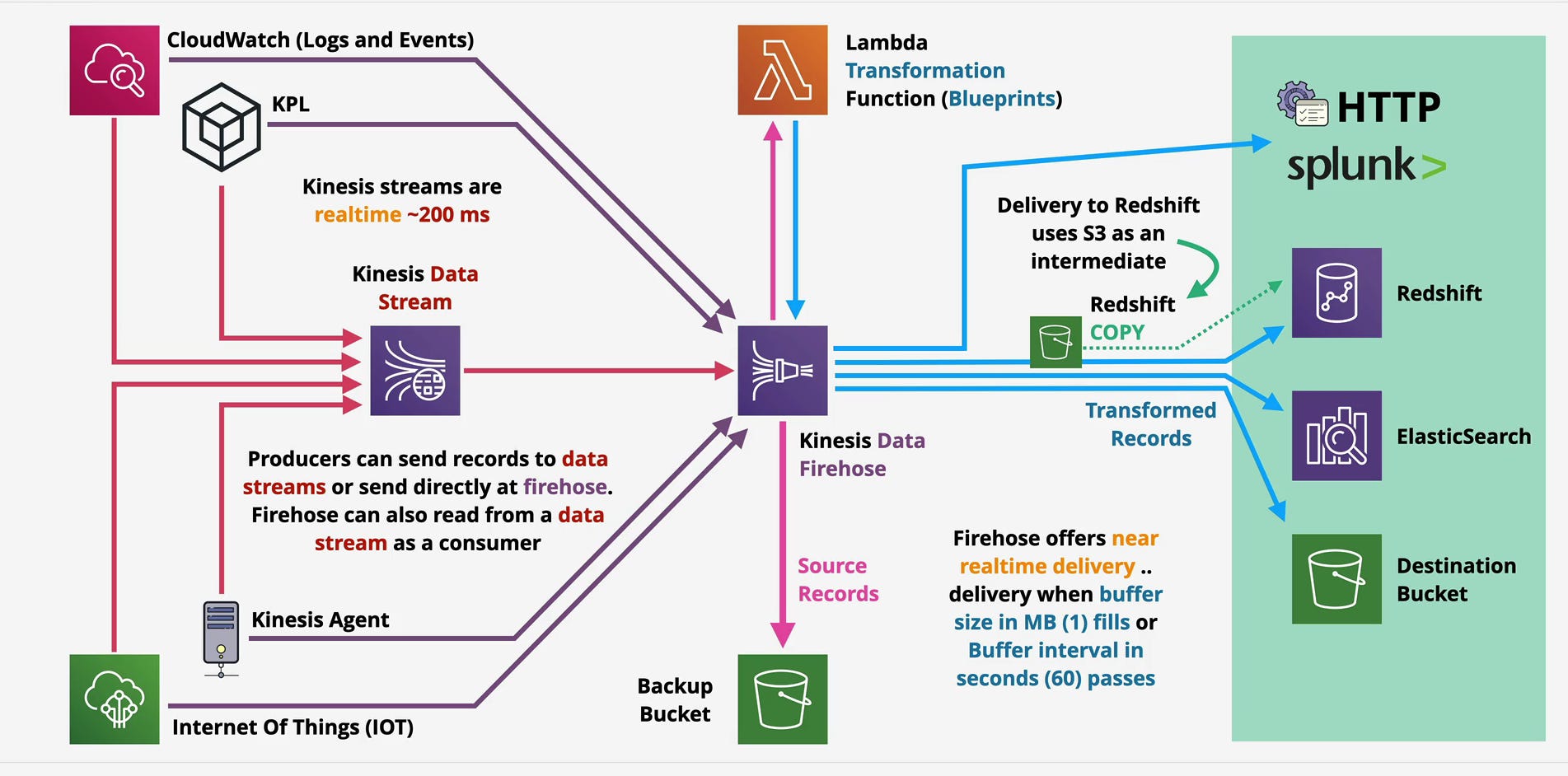
Source: Where Data Comes From
Firehose accepts data from three primary sources:
Direct PUT operations: Applications use the PutRecord or PutRecordBatch APIs to send data directly to Firehose. This works for simple use cases where you just want to stream data to a destination without intermediate processing.
Kinesis Data Streams: Firehose can consume from a Data Stream as a managed consumer. This pattern combines the strengths of both services—Data Streams handles high-velocity ingestion with multiple consumers, and Firehose manages delivery to specific destinations. Your architecture might have real-time processing consumers reading from Data Streams alongside Firehose delivering the same data to S3 for long-term storage.
AWS services: CloudWatch Logs can stream directly to Firehose. IoT devices can use AWS IoT Core to route data to Firehose. EventBridge can send events to Firehose. These native integrations eliminate the need for custom integration code.
The diagram you’re looking at shows this flexibility—producers can send directly to Firehose OR send to Data Streams with Firehose consuming from the stream. Choose based on whether you need the multi-consumer capabilities and replay functionality of Data Streams.
Buffer: Batching for Efficiency
Firehose buffers incoming records before delivering them to destinations. This batching is critical for efficiency and cost optimization. Instead of writing individual records to S3 (which would be prohibitively expensive and slow), Firehose accumulates records and writes them in batches.
Two parameters control when Firehose delivers a batch:
Buffer size: Measured in MB (default 5 MB for S3, configurable up to 128 MB). When buffered data reaches this size, Firehose triggers delivery.
Buffer interval: Measured in seconds (default 300 seconds, configurable from 60-900 seconds). If the buffer size isn’t reached within this time, Firehose delivers whatever data it has accumulated.
Delivery happens when either condition is met whichever comes first. This dual-trigger model balances latency and efficiency. High-volume streams fill the buffer quickly and deliver frequently. Low-volume streams deliver based on the time interval, ensuring data doesn’t sit indefinitely.
This is where near real-time comes from. With a 60-second buffer interval, data can sit in the buffer for up to a minute before delivery. Compare this to Data Streams where consumers can read records milliseconds after they arrive. Firehose trades sub-second latency for operational simplicity.
Transformation: Lambda-Based Processing
Between ingestion and delivery, Firehose optionally invokes a Lambda function to transform records. This enables data enrichment, filtering, format conversion, and schema transformation without writing a custom consumer.
Common transformation patterns:
Converting JSON to Parquet or ORC for efficient storage and analytics
Enriching records with additional context from DynamoDB or external APIs
Filtering out records that don’t meet certain criteria
Anonymizing or masking sensitive data before storage
Reformatting data to match destination schema requirements
AWS provides blueprint Lambda functions for common transformations like format conversion, which you can deploy with minimal configuration. For custom logic, you write your own Lambda function following Firehose’s invocation contract.
The latency implication: Lambda transformation adds overhead. Your function execution time plus Firehose’s batching to Lambda (to reduce invocations) extends delivery latency. A transformation function taking 500ms plus batching overhead can push your end-to-end latency from 60 seconds to 90+ seconds.
This matters if you’re expecting near-real-time dashboards or alerts. Transformation is powerful but not free it costs both time and money.
Delivery: Built-in Integrations
Firehose delivers to six destination types, each with specific behaviors and considerations:
Amazon S3: The most common destination. Firehose writes batched records as objects to S3, organizing them by date/time prefixes (e.g., year=2026/month=02/day=12/hour=15/). This automatic partitioning works seamlessly with analytics tools like Athena and Redshift Spectrum that leverage partition pruning for query optimization.
You can enable compression (GZIP, ZIP, Snappy), encryption (SSE-S3 or SSE-KMS), and format conversion to Parquet or ORC. These options reduce storage costs and improve query performance dramatically Parquet with compression can reduce storage by 80% compared to raw JSON while enabling 10x faster queries.
Amazon Redshift: Firehose doesn’t write directly to Redshift. Instead, it stages data in an S3 bucket and then executes a COPY command to load data into Redshift tables. This S3-COPY pattern is Redshift’s recommended bulk loading mechanism, providing better performance than individual INSERT statements.
The COPY operation happens automatically based on your buffer configuration. Firehose manages the entire workflow: write to S3, execute COPY, verify success, and clean up intermediate files. You configure the Redshift cluster, table schema, and COPY options; Firehose handles execution.
Amazon OpenSearch Service (formerly Elasticsearch): Firehose delivers records directly to OpenSearch indexes, optionally rotating indexes by time period (hourly, daily, weekly, monthly). This automatic index rotation prevents individual indexes from growing too large, which degrades OpenSearch performance.
OpenSearch delivery includes retry logic with exponential backoff. If OpenSearch experiences issues or throttling, Firehose backs off and retries automatically. Failed deliveries after all retries can be redirected to S3 as a backup.
HTTP endpoints: Firehose can POST data to any HTTP endpoint, enabling delivery to custom applications, on-premises systems, or third-party services that provide HTTP ingestion APIs. The service supports authentication via headers and includes retry logic for failed requests.
Splunk: Native integration with Splunk HTTP Event Collector (HEC). Firehose formats records according to Splunk’s expected structure and handles authentication, batching, and delivery. This eliminates the need to run and maintain Splunk forwarders.
Third-party providers: Datadog, New Relic, MongoDB, and others have integrated with Firehose, allowing direct delivery from Firehose to their platforms.
Backup: The Safety Net
Firehose includes a backup S3 bucket option that captures source records before transformation or delivery. This serves multiple purposes:
Data durability: If delivery fails repeatedly, records aren’t lost they’re in the backup bucket.
Transformation debugging: When Lambda transformations produce unexpected results, you have the original source data to analyze and reprocess.
Regulatory compliance: Some industries require raw, unmodified data retention. The backup bucket satisfies this requirement while allowing transformed data to flow to production systems.
Cost consideration: Backup storage doubles your S3 costs for Firehose data. Only enable it when you genuinely need these guarantees. For many use cases, monitoring delivery success rates and handling failures reactively is sufficient.
Near Real-Time vs Real-Time: Understanding the Trade-Off
Let’s address this directly: Firehose is not real-time. It’s near real-time, typically delivering data within 60-180 seconds of ingestion depending on configuration and transformation complexity.
If your use case requires sub-second latency fraud detection systems, real-time bidding platforms, live dashboards updating every second Firehose doesn’t fit. You need Data Streams with custom consumers or a different architecture entirely.
But here’s the reality: most analytics and storage use cases don’t need sub-second delivery. If you’re loading data into S3 for daily batch processing, 60-second latency is irrelevant. If you’re feeding Redshift for business intelligence dashboards refreshed every 15 minutes, 90-second delivery is perfectly adequate.
The near real-time model enables Firehose’s operational simplicity and cost efficiency. Batching amortizes per-request costs. Managed scaling eliminates capacity planning. Automatic retries provide resilience. These benefits come from accepting that delivery has a buffer period.
The decision point: Can your use case tolerate 1-3 minute delivery latency? If yes, Firehose’s simplicity is compelling. If no, build custom consumers or use a different service.
A Real-World Architecture: IoT Sensor Data Pipeline
Let’s ground this in a concrete scenario. You’re running an industrial IoT platform monitoring factory equipment 10,000 sensors reporting temperature, vibration, and power consumption every 10 seconds. That’s ~100,000 records per minute that need to land in S3 for long-term analysis and Redshift for operational dashboards.
The Architecture
Producers: IoT devices use AWS IoT Core, which routes sensor readings to Kinesis Data Streams. You choose Data Streams instead of direct-to-Firehose because you need real-time alerting on anomalous readings.
Data Stream: One stream with 10 shards (100,000 records/minute = ~1,667 records/second; 10 shards provides headroom). Partition key is device ID, ensuring all readings from a device maintain order.
Real-time consumer: A Lambda function (triggered via event source mapping from Data Streams) processes sensor readings and publishes alerts to SNS when readings exceed thresholds. This runs in true real-time with <500ms latency.
Firehose delivery stream #1 (S3): Consumes from the Data Stream. Configured with:
Buffer size: 128 MB
Buffer interval: 300 seconds (5 minutes)
Compression: GZIP
Format conversion: Parquet
Partitioning:
year=YYYY/month=MM/day=DD/hour=HH/
At 100,000 records/minute, Firehose fills the 128 MB buffer approximately every 3-4 minutes and delivers to S3. The GZIP compression and Parquet format reduce storage costs by ~85% compared to raw JSON. Athena queries against this data leverage partitioning for efficient scanning.
Firehose delivery stream #2 (Redshift): Also consumes from the Data Stream. Configured with:
Buffer size: 5 MB
Buffer interval: 60 seconds
Intermediate S3 bucket for COPY operations
Redshift table with appropriate schema
COPY options for optimal loading
Every 60-90 seconds, Firehose stages data in S3 and executes a COPY command into Redshift. Operational dashboards query Redshift and refresh every 5 minutes, making the 60-90 second delivery latency acceptable.
Why This Architecture Works
Single source, multiple destinations: Data Streams feeds both real-time alerting and batch delivery. One ingestion point, multiple consumption patterns.
No custom batch loading code: Firehose eliminates the need to write and maintain code for S3 delivery and Redshift loading. AWS handles batching, retries, and optimization.
Cost efficiency: Two Firehose delivery streams cost ~$0.029 per GB ingested. With 10 shards in Data Streams at ~$110/month plus Firehose ingestion costs, the entire pipeline runs for <$500/month. Building and operating custom consumer infrastructure would cost far more in engineering time alone.
Operational simplicity: No consumer instances to manage, no KCL coordination, no DynamoDB tables for checkpointing. Firehose scales automatically as sensor count grows.
Format optimization: Parquet conversion in Firehose reduces storage costs and query costs dramatically. Athena charges per TB scanned; Parquet with partitioning reduces scans by 10-50x for typical queries.
Why Firehose Over Custom Consumers
Could you build this with custom KCL consumers? Absolutely. Should you? Probably not.
Writing a consumer to batch records, convert to Parquet, compress, partition by date, and upload to S3 is 200-300 lines of code. Then add error handling, monitoring, checkpointing, deployment, and ongoing maintenance. For what benefit? Slightly lower latency that doesn’t matter for this use case?
Firehose does this out of the box for $0.029/GB. The engineering time saved pays for itself immediately.
Common Mistakes Engineers Make with Firehose
Production experience teaches what documentation doesn’t cover. Here are the patterns that cause problems.
1. Using Firehose for Real-Time Use Cases
“Near real-time” means 60+ seconds. If you need second-level latency, Firehose is the wrong tool. I’ve seen teams try to work around this with aggressive buffer configurations, only to face higher costs and still miss their latency requirements.
The fix: If your SLA is <10 seconds, build custom consumers. If you can tolerate 1-3 minutes, use Firehose. Don’t try to make Firehose something it’s not.
2. Ignoring Transformation Lambda Costs
Lambda invocations add up. At high volumes, transformation costs can exceed Firehose delivery costs. A stream processing 10 GB/hour with 5 KB average record size triggers ~2 million Lambda invocations per hour.
The fix: Batch Lambda invocations efficiently (Firehose does this automatically), optimize function runtime, and calculate transformation costs before enabling. For simple format conversion, use Firehose’s built-in Parquet/ORC conversion instead of Lambda.
3. Over-Aggressive Buffer Intervals
Setting buffer intervals to 60 seconds when you’re ingesting 1 MB/hour creates tiny batches and increases costs. Each S3 PUT request costs money. Writing 100-byte objects every minute is wasteful.
The fix: Match buffer configuration to your actual throughput. Low-volume streams should use longer intervals and smaller buffer sizes. High-volume streams benefit from larger buffers to maximize batch efficiency.
4. Not Enabling S3 Compression
Uncompressed JSON in S3 is expensive and slow to query. GZIP compression typically achieves 80-90% size reduction for JSON logs with minimal performance cost.
The fix: Always enable compression for S3 destinations unless you have a specific reason not to. The cost savings pay for themselves immediately, and query performance improves.
5. Forgetting Backup Buckets Have Costs
Enabling backup writes all source records to S3, doubling storage costs. For high-volume streams, this adds up quickly.
The fix: Only enable backups when you need them regulatory requirements, complex transformations requiring debugging, or destinations with reliability concerns. For most S3 delivery streams, disable backups and rely on monitoring.
6. Misunderstanding Redshift Delivery Mechanics
Firehose doesn’t stream directly to Redshift. It writes to S3 first, then executes COPY. This intermediate step adds latency and requires an S3 bucket you might not have budgeted for.
The fix: Understand the S3-COPY pattern. Size your intermediate bucket appropriately. Monitor COPY failures, as Firehose can’t automatically handle Redshift schema mismatches or constraint violations.
Kinesis Data Firehose vs Data Streams: When to Use Each
This isn’t “either/or.” Many architectures use both. But understanding when each fits is critical.
Use Firehose When:
You’re delivering data to supported destinations (S3, Redshift, OpenSearch, HTTP endpoints, Splunk) and don’t need custom delivery logic.
Near real-time latency is acceptable. Your use case tolerates 60-300 second delivery delay.
You want zero operational overhead. No servers to manage, no capacity planning, no consumer code to maintain.
Your data flow is one-to-one. Data comes in, gets optionally transformed, and goes to a single destination. Multiple destinations require multiple Firehose streams.
You value simplicity over flexibility. Firehose’s constraints are acceptable in exchange for managed operations.
Use Data Streams When:
You need sub-second latency. Real-time processing, alerting, or user-facing features can’t tolerate Firehose’s buffer delay.
Multiple consumers need the same data with different processing logic. Data Streams’ multi-consumer model is purpose-built for this.
You need data replay. Firehose doesn’t retain data after delivery. Data Streams’ retention window enables reprocessing.
Custom processing logic is required. Complex transformations, stateful processing, or integration with systems Firehose doesn’t support natively.
You’re building event-driven architectures where events trigger multiple downstream reactions.
Use Both When:
The most powerful patterns combine them. Data Streams handles high-velocity ingestion and real-time processing. Firehose manages delivery to analytics and storage destinations. This separation of concerns is exactly what both services are optimized for.
The canonical pattern:
Data Streams ingests events
Custom consumers process events in real-time (alerting, real-time analytics, state management)
Firehose consumes from the same stream, delivering to S3 for archival and Redshift for business intelligence
One ingestion pipeline, multiple consumption patterns, each using the right tool for its job.
Understanding Firehose Costs and Trade-Offs
Firehose’s pricing model is refreshingly simple: $0.029 per GB ingested (first 500 TB/month; volume discounts apply beyond that). No hourly charges, no provisioned capacity, pure pay-per-use.
Cost Breakdown
For a stream ingesting 100 GB/day:
Firehose ingestion: 100 GB × $0.029 = $2.90/day or ~$87/month
S3 storage (with GZIP): ~30 GB/day × $0.023/GB = $0.69/day or ~$21/month
Total: ~$108/month
Compare this to running custom EC2-based consumers:
Minimum viable setup: 2 t3.medium instances (for availability) = ~$60/month
Plus engineering time to build, deploy, and maintain consumer code
Plus DynamoDB for checkpointing
Plus monitoring and operational overhead
Firehose wins on cost at almost any scale once you factor in engineering time.
Additional Costs to Consider
Lambda transformation: If your transformation function runs for 200ms per MB processed and you’re processing 100 GB/day, that’s ~20,000 seconds of Lambda execution per day. At $0.0000166667 per GB-second, this adds ~$3-4/day or ~$100/month.
Data format conversion: Converting to Parquet or ORC is charged separately at $0.018 per GB converted. For 100 GB/day, that’s an additional $1.80/day or ~$54/month. However, the storage savings (80% reduction) and query performance improvements typically justify this cost.
Backup to S3: If enabled, you’re paying for duplicate storage. For high-volume streams, this doubles your S3 costs.
Redshift COPY operations: The S3 intermediate bucket for Redshift delivery incurs standard S3 costs. These objects are typically small and short-lived, but they accumulate.
Cost Optimization Strategies
Right-size buffer intervals: Longer intervals create fewer, larger batches, reducing S3 PUT request costs.
Enable compression: GZIP reduces storage by 80-90% for typical log data, cutting S3 costs proportionally.
Use format conversion selectively: For data accessed frequently via Athena or Redshift Spectrum, Parquet conversion pays for itself in reduced query costs. For archival data rarely queried, raw compressed JSON may be more economical.
Disable backup unless required: Backup doubles storage costs. Only enable when you have a specific need.
Monitor transformation costs: High-volume streams with complex Lambda transformations can see transformation costs exceed delivery costs. Profile your functions and optimize runtime.
When Firehose Becomes Expensive
Firehose pricing is volume-based, which means it scales linearly. At multi-petabyte scale, costs become significant. A pipeline ingesting 10 TB/day costs ~$290/day or ~$8,700/month in Firehose fees alone.
At this scale, custom-built solutions with optimized batching and direct integration might be more cost-effective. But you’re also at the scale where dedicated data engineering teams can build and maintain this infrastructure.
For most organizations ingesting less than 1 TB/day, Firehose’s simplicity and operational savings outweigh any cost premium over custom solutions.
Operational Considerations: Running Firehose in Production
Firehose is “serverless,” but that doesn’t mean “operationless.” Production deployment requires thoughtful configuration and monitoring.
Monitoring Strategy
Critical CloudWatch metrics:
IncomingBytes and IncomingRecords: Monitor ingestion volume to detect anomalies or understand scaling needs.
DeliveryToS3.Success / DeliveryToRedshift.Success: Track successful deliveries. Drops in success rate indicate downstream issues.
DeliveryToS3.DataFreshness: Measures the age of the oldest record in Firehose. If this spikes, buffering is occurring either due to low volume (waiting for buffer interval) or downstream throttling.
ExecuteProcessing.Duration: For streams with Lambda transformation, this shows transformation latency. Spikes indicate function performance issues.
ExecuteProcessing.Success: Transformation success rate. Failures indicate bugs in transformation logic or incompatible data.
Set alarms on delivery success rates (alert if <99%) and data freshness (alert if >2× your buffer interval). These catch the majority of production issues.
Handling Delivery Failures
Firehose retries failed deliveries automatically with exponential backoff. For S3 destinations, retries continue for up to 24 hours. For other destinations, retry duration varies.
After all retries are exhausted, Firehose writes failed records to a separate S3 bucket (if configured) or the backup bucket. This prevents data loss but requires monitoring and reprocessing failed records.
Common failure scenarios:
S3: Usually permissions issues (IAM roles) or S3 bucket policy problems. Rare after initial setup.
Redshift: COPY failures due to schema mismatches, constraint violations, or Redshift cluster issues. These require manual intervention fix the schema or data format and reprocess.
OpenSearch: Cluster capacity or mapping issues. OpenSearch can reject documents that don’t match index mappings. Monitor rejection rates and adjust mappings or transformation logic.
HTTP endpoints: Destination service outages or authentication failures. Implement robust error handling in your endpoint and monitor Firehose retry metrics.
Transformation Best Practices
Lambda transformations are powerful but add complexity. Some hard-learned lessons:
Keep functions fast: Every millisecond of transformation time adds to end-to-end latency and cost. Optimize aggressively. Sub-100ms per MB is a good target.
Handle failures gracefully: If transformation can’t process a record, decide whether to drop it, send it to a dead-letter queue, or pass it through unchanged. Throwing exceptions causes retries that increase latency and cost.
Test with real data: Sample production data and test transformation logic before deploying. Schema variations and edge cases that work fine in development will break in production.
Monitor invocation costs: Set CloudWatch alarms if Lambda costs exceed expected levels. This catches runaway invocations early.
Use blueprints when possible: AWS-provided transformation blueprints for format conversion are optimized and tested. Don’t reinvent these unless you have specific requirements.
Scaling Considerations
Firehose scales automatically, but this doesn’t mean infinitely. Service quotas exist:
Per-region limits: 50 delivery streams by default (increasable via support ticket).
Throughput limits: While Firehose scales to very high throughput, extremely spiky traffic can occasionally trigger throttling. Monitor ThrottledRecords metric.
Lambda concurrency: Transformation functions consume Lambda concurrency. At very high throughput, you might hit account-level Lambda concurrency limits. Reserve capacity if needed.
For most use cases, you’ll never approach these limits. But if you’re building infrastructure for massive scale (hundreds of GB per second), test at scale and coordinate with AWS support.
Data Quality and Schema Evolution
Unlike Data Streams where you control the consumer, Firehose has opinions about data formats and schemas. This creates operational considerations:
Schema changes: If you’re converting to Parquet and your schema evolves (new fields added), Firehose handles this gracefully. But removing fields or changing types can break conversion.
Invalid records: Records that fail transformation are retried and eventually moved to error buckets. Monitor these spikes indicate data quality issues upstream.
Partitioning changes: If you change S3 partitioning patterns, new data goes to new prefixes. Historical data stays in old prefixes. Plan partition changes carefully to avoid fragmenting your data.
The Serverless Paradigm: What It Really Means
Calling Firehose “serverless” is technically accurate but conceptually incomplete. Yes, you don’t manage servers. But you’re also constrained by the service’s opinions and limitations.
This trade-off is fundamental. Managed services give you simplicity in exchange for flexibility. Firehose makes common patterns trivial but makes uncommon patterns impossible without workarounds.
If your use case fits Firehose’s model streaming data to supported destinations with optional transformation you get tremendous value. The engineering hours saved compound over time. Not writing consumer code means not debugging consumer code, not monitoring consumer infrastructure, not handling consumer upgrades, and not being on-call for consumer failures.
But if your use case requires custom delivery logic, complex stateful processing, or integration with unsupported destinations, Firehose becomes a square peg in a round hole. You end up fighting the service rather than leveraging it.
The architectural principle: Choose managed services when they align with your requirements. Build custom solutions when requirements diverge from what managed services offer. Don’t force managed services to do things they’re not designed for.
Firehose in the Streaming Ecosystem
Kinesis Data Firehose doesn’t exist in isolation. It’s part of a broader AWS streaming ecosystem that includes Data Streams, Kinesis Data Analytics, MSK (Managed Streaming for Kafka), and various integration points with other AWS services.
Understanding where Firehose fits in this ecosystem helps you architect complete solutions:
Ingestion layer: Data Streams or direct-to-Firehose for initial data capture.
Processing layer: Kinesis Data Analytics (managed Apache Flink), Lambda, or custom applications for real-time processing.
Delivery layer: Firehose for managed delivery to storage and analytics destinations.
Storage layer: S3, Redshift, OpenSearch for data at rest.
Analytics layer: Athena, Redshift, QuickSight for querying and visualization.
Well-architected streaming pipelines often use multiple services from this ecosystem, each doing what it does best. Trying to use a single service for everything leads to compromises and complexity.
Looking Forward: The Evolution of Streaming
Streaming data architecture has evolved rapidly over the past decade. What once required teams of engineers managing Kafka clusters can now be accomplished with a few Firehose configuration clicks.
This trend toward managed services will continue. AWS continues to add features to Firehose new destinations, better transformation options, improved performance. The operational burden of streaming data continues to decrease while capabilities increase.
But the fundamental principles remain constant: understand your latency requirements, choose tools that match your use case, monitor religiously, and optimize for total cost of ownership including engineering time.
Firehose exemplifies these principles. It trades some flexibility and sub-second latency for dramatic operational simplification. For the majority of streaming delivery use cases, this is the right trade-off.
The Delivery Problem, Solved
Kinesis Data Firehose solves a specific problem exceptionally well: reliably delivering streaming data to common destinations without writing and maintaining custom consumer code. It’s not the right tool for every streaming use case, but for the cases it handles, it’s transformative.
The service represents a broader shift in how we think about infrastructure. Instead of building everything from scratch, we identify patterns common across many use cases and use managed services that handle these patterns. Engineering effort focuses on what differentiates your business, not on undifferentiated infrastructure.
When your streaming pipeline needs to land data in S3, Redshift, OpenSearch, or other supported destinations, and you can tolerate 60-300 second latency, Firehose eliminates categories of operational work. No consumer applications to write. No capacity to plan. No infrastructure to manage. Just reliable, scalable data delivery.
The constraints matter. Near real-time isn’t real-time. Supported destinations are limited compared to what custom code could deliver to. Transformation via Lambda has cost and latency implications. These trade-offs are real and require honest evaluation.
But for the vast majority of streaming data pipelines I’ve architected and operated, Firehose’s constraints are acceptable or even beneficial. The simplicity enables faster iteration, reduces operational burden, and allows teams to focus on deriving value from data rather than moving it around.
Streaming data delivery is a solved problem. We no longer need to build the same batching, retry, and delivery logic over and over. Firehose handles this commodity infrastructure reliably and cost-effectively. That’s valuable.
The future of data engineering involves more managed services handling more patterns, freeing engineering capacity for higher-value work. Firehose is an early example of this shift. Understanding when to use it and when not to is increasingly essential for building modern data platforms.
Quick Reference: Key Concepts
Buffer Interval: Time-based trigger for delivery (60-900 seconds, default 300)
Buffer Size: Size-based trigger for delivery (up to 128 MB for S3)
Near Real-Time: Typical delivery latency of 60-300 seconds
Transformation: Optional Lambda function for data processing before delivery
Backup Bucket: S3 location for source records before transformation/delivery
Redshift COPY: Firehose stages to S3, then loads via COPY command
Pricing: $0.029 per GB ingested (plus transformation and storage costs)
Auto-scaling: Fully managed, no capacity planning required
Stay tuned for Part 3, where we’ll explore Amazon Kinesis Data Analytics and Kinesis Video Streams and how AWS enables real-time stream processing and scalable video ingestion in motion.
