
AWS Direct Connect: A Field Guide to Private Connectivity Between Your Data Center and AWS
How enterprise networking actually works when you move beyond the public interne

There’s a moment in almost every serious AWS migration where the question of network connectivity moves from theoretical to urgent. Latency is unpredictable. Throughput is inconsistent. The compliance team wants to know exactly where the data goes. And someone in the room says: “We probably need Direct Connect.”
This article is for the people in that room. It’s not a documentation summary. It’s a structured walkthrough of how AWS Direct Connect actually works the physical model, the provisioning lifecycle, the pricing mechanics, the virtual interface design, and the architectural tradeoffs you need to think about before you commit to it.
The scenario we’ll use throughout: Meridian Financial Group, a mid-sized financial services firm based in Sydney, Australia. Meridian has a primary data center in their corporate offices. They’re running workloads in AWS ap-southeast-2 (Sydney), including EC2-based application servers, RDS databases, and an S3-based data lake fed by SQS. They need consistent, low-latency connectivity between their on-premises systems and AWS, and they can’t rely on the public internet to provide it.
Hi — this is Pushpit from CloudOdyssey . Each week, I write about Cloud, DevOps, Systems Design deep dives and community update around it. If you have not subscribed yet, you can subscribe here.
Why the Public Internet Isn’t Enough
Before getting into the mechanics of Direct Connect, it’s worth being precise about why internet-based connectivity falls short for certain workloads.
When Meridian routes traffic from its data center to AWS over the public internet (even through a Site-to-Site VPN), that traffic traverses multiple autonomous systems networks owned by different ISPs and carriers, each with their own congestion, routing decisions, and variable performance. On any given day, the path from Meridian’s Sydney office to the AWS Sydney region might cross five or six different network operators. When business in Asia-Pacific peaks, that path slows down. The variability isn’t theoretical; it shows up in application response times, database query latency, and data transfer windows that run long.
For a financial services firm with batch processing windows, real-time data feeds, and compliance requirements around data path visibility, that variability is a genuine problem. Direct Connect addresses it by replacing the public internet path with a dedicated, private physical connection.
What Direct Connect Actually Is
AWS Direct Connect is a service that provisions a dedicated physical network connection between a customer’s on-premises environment and AWS. The connection does not traverse the public internet. It runs over private fiber, through a facility called a Direct Connect location, and terminates at an AWS network endpoint.
It is not a VPN. There is no encryption by default (though you can layer encryption on top). It is a Layer 2 Ethernet connection that you configure at Layer 3 using BGP.
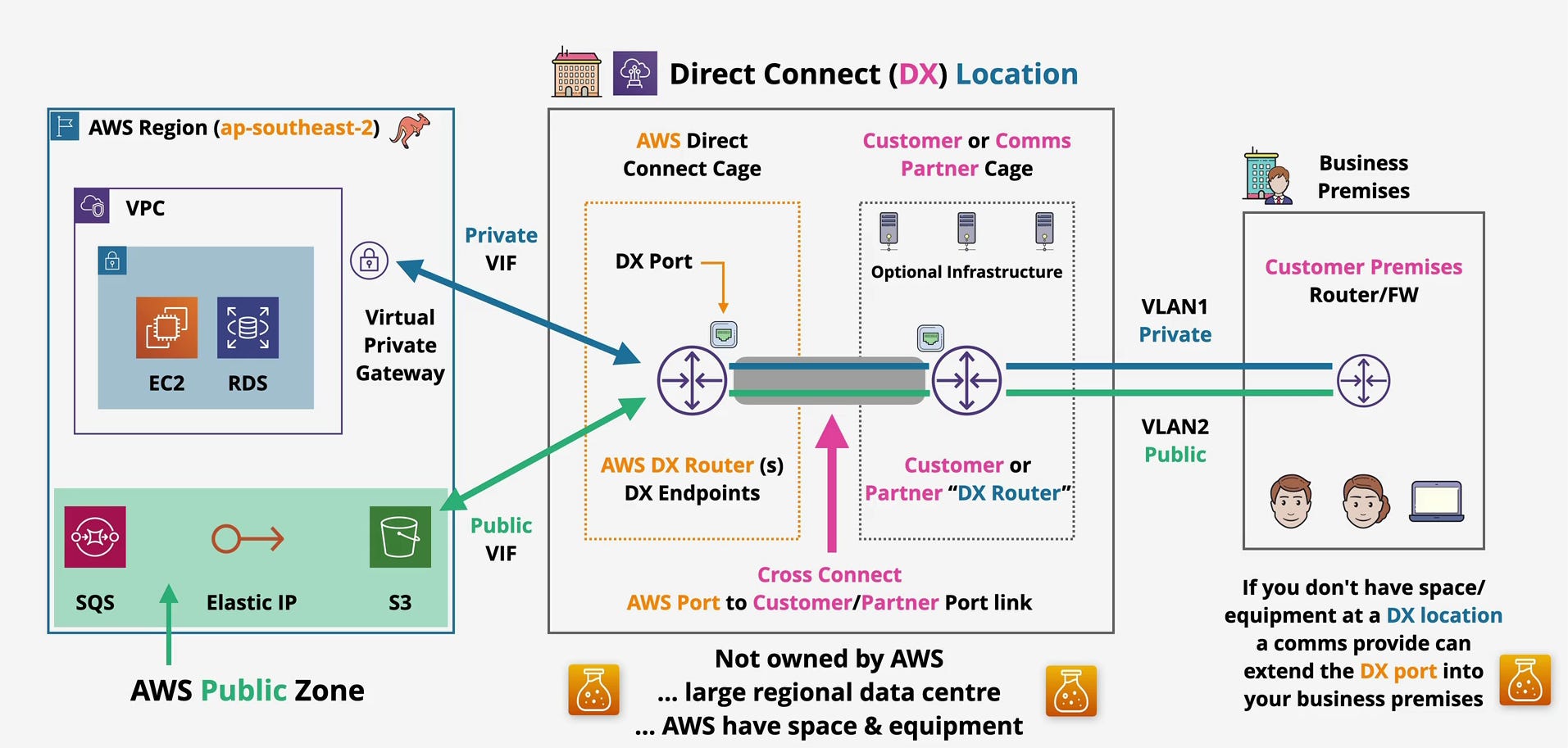
The architecture diagram at the top of this article shows the complete picture. Let’s walk through each component in the context of Meridian’s setup.
The Physical Connectivity Model
Direct Connect connections come in three port speeds:
1 Gbps — suitable for moderate throughput requirements
10 Gbps — the most common choice for enterprise workloads
100 Gbps — for organizations with very high bandwidth demands
Meridian’s team evaluates their peak data transfer volumes and settles on a 1 Gbps dedicated connection to start, with the option to add capacity later.
The physical path looks like this:
Meridian's Business Premises (Sydney CBD)
        ↓
Direct Connect Location (Sydney)
        ↓
AWS Region: ap-southeast-2
This is not a direct wire from Meridian’s office to AWS. There is always an intermediate facility the Direct Connect location acting as the meeting point between the customer’s network and AWS’s network. Understanding this facility is central to understanding how Direct Connect works.
Inside the Direct Connect Location
A Direct Connect location is a third-party colocation data center not an AWS-owned facility. AWS has contracted to place equipment inside it. In the Sydney market, the relevant facilities include the Equinix SY4 and Global Switch data centers. AWS does not own these buildings; they lease cage space within them.
As the architecture diagram illustrates, the Direct Connect location contains two distinct zones:
The AWS Direct Connect Cage
This is AWS’s physical space within the colocation facility. Inside it, AWS maintains DX Routers (labeled “AWS DX Router(s) / DX Endpoints” in the diagram) and the DX Ports the physical Ethernet interfaces that terminate customer connections.
When Meridian orders a Direct Connect connection, AWS allocates a physical port on one of these routers. That port is Meridian’s dedicated connection to AWS’s network backbone. Nothing else uses it.
The Customer or Comms Partner Cage
On the other side of the facility, Meridian (or its telecommunications carrier) has its own cage. This is where Meridian’s router lives or where the carrier’s equipment lives if Meridian is using a third-party connectivity provider.
The diagram labels this as the “Customer or Comms Partner Cage” and shows optional infrastructure, which might include patch panels, switches, or carrier handoff equipment depending on how the connection is provisioned.
The Cross Connect
The physical cable that bridges the two cages is called a cross connect. It’s a fiber jumper installed by the colocation facility’s operations team, running from the AWS DX port on the AWS router to a port on Meridian’s router (or the carrier’s equipment).
The cross connect is shown in the diagram as the “Cross Connect AWS Port to Customer/Partner Port link.” It’s highlighted in pink, and it’s the single most important physical element in the Direct Connect setup. Without it, the two sides of the connection can’t communicate.
This is also the element that most often surprises people: the cross connect is ordered separately from the Direct Connect port itself, and the colocation facility installs it, not AWS.
What If Meridian Doesn’t Have Equipment at the DX Location?
Meridian’s data center is in the Sydney CBD, not inside the Equinix facility. They have two options:
Engage a carrier or communications provider a telco or network provider that already has equipment in the DX location can extend the connection from the DX location to Meridian’s building. The diagram notes this: “If you don’t have space/equipment at a DX location, a comms provider can extend the DX port into your business premises.” The carrier handles the last-mile connectivity, often over dark fiber or a dedicated MPLS circuit.
Collocate equipment at the DX location Meridian could place a router in the customer cage, but this adds operational overhead.
For most enterprises without existing colocation presence, the carrier/partner route is standard. This is often called a hosted connection, where the carrier orders the DX port, provisions the cross connect, and hands Meridian a logical connection.
Provisioning Lifecycle: What Actually Happens When You Order Direct Connect
Step 1: Order the Port Through the AWS Console
Meridian logs into the AWS console and navigates to the Direct Connect service. They select:
Connection type: Dedicated
Location: Sydney (ap-southeast-2)
Port speed: 1 Gbps
AWS accepts the request and allocates a port on an AWS DX router in the Sydney DX location.
Step 2: Download the Letter of Authorization (LOA-CFA)
Within 72 hours, AWS generates a Letter of Authorization and Connecting Facility Assignment (LOA-CFA). This document is the key artifact in the process. It contains:
The specific AWS cage and port identifier in the colocation facility
The facility name and address
Authorization for the colocation facility to install the cross connect
Meridian takes this document and provides it to either the colocation facility (if they have their own cage there) or to their carrier/partner.
Step 3: Cross Connect Installation
The colocation facility’s operations team installs the physical fiber cross connect between the AWS DX port and Meridian’s designated port. This is manual physical work someone runs fiber through the facility’s cable management infrastructure.
Lead time reality check: The cross connect installation alone typically takes one to several weeks, depending on the facility’s queue and Meridian’s existing presence there. If Meridian doesn’t yet have a cage or carrier handoff at the facility, the timeline extends further to include that provisioning.
This lead time is often underestimated in project plans. Direct Connect is not something you provision in an afternoon. End-to-end, from port order to working BGP session, commonly takes four to twelve weeks for a first deployment, especially when working through a carrier.
Step 4: BGP Configuration
Once the physical connection is in place, Meridian configures BGP on their router. Direct Connect requires BGP it is not optional. Meridian’s router exchanges routes with AWS’s DX routers, and this is how traffic knows where to go in both directions.
Step 5: Virtual Interface Configuration
With BGP up, Meridian creates virtual interfaces in the AWS console to determine what kind of traffic traverses the connection. We’ll cover this in detail shortly.
Pricing: What You’re Actually Paying For
Direct Connect pricing has two components, and confusing them leads to budget surprises.
Port-Hour Charge
You pay for the allocated port by the hour, whether or not you use it. For a 1 Gbps dedicated port in the Asia-Pacific region, this is a fixed hourly charge. The port is yours exclusively, and you pay for it continuously once it’s provisioned.
This means Direct Connect has a fixed cost baseline that you carry regardless of traffic volume. Sizing the port correctly matters from a cost perspective, not just a performance one.
Data Transfer Out Charge
You pay for outbound data transfer from AWS to your on-premises environment through the Direct Connect connection. The per-GB rate for Direct Connect egress is lower than standard internet egress from AWS typically significantly so. For organizations moving large volumes of data out of AWS regularly, this difference compounds into meaningful savings.
Inbound data transfer (from on-premises into AWS) is free, consistent with AWS’s general pricing model.
Comparison to Internet Egress
The comparison isn’t just about price per GB. With internet egress, Meridian pays AWS’s standard egress rate, plus whatever they pay their ISP for bandwidth. With Direct Connect, Meridian pays the DX port-hour rate, the DX egress rate, and whatever the carrier charges for the last-mile connection. For small volumes of occasional data, internet egress can be cheaper total. For sustained, high-volume transfers, Direct Connect usually wins on unit economics and the performance consistency is separate from the cost calculation entirely.
Virtual Interfaces: Directing Traffic to the Right Destination
This is where Direct Connect becomes functionally useful. A single physical Direct Connect connection can carry different types of traffic to different AWS destinations, all isolated using VLANs. Each virtual interface (VIF) is assigned a VLAN tag and a BGP session.
The architecture diagram shows two VLANs VLAN1 (Private) and VLAN2 (Public) running across the same physical connection between the customer premises router and the DX location.
Private VIF: Connecting to Your VPC
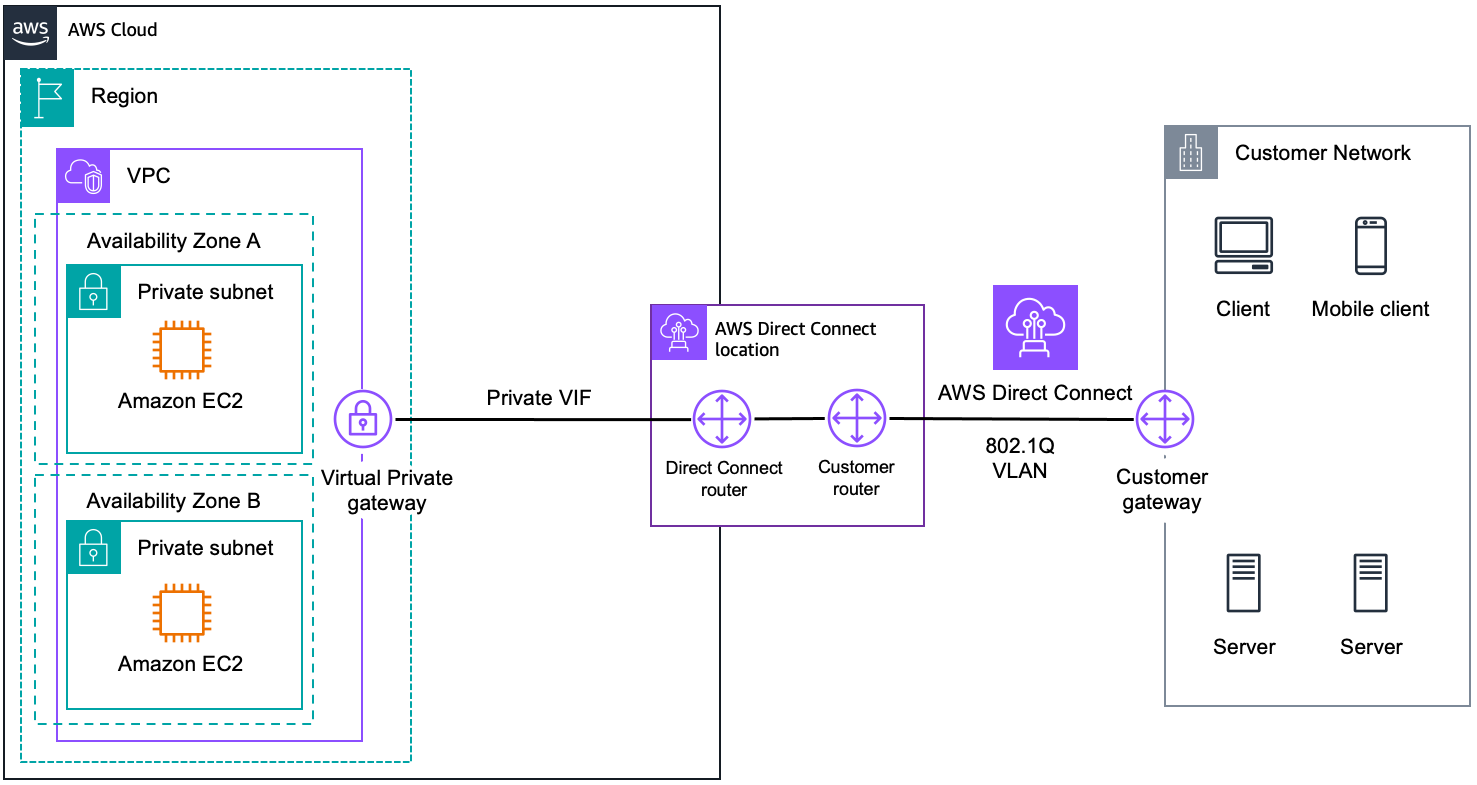
A Private Virtual Interface connects your on-premises network to resources inside a VPC. As shown in the diagram, the Private VIF points toward the Virtual Private Gateway (VGW) attached to Meridian’s VPC. From there, Meridian can reach EC2 instances and RDS databases inside the VPC’s private subnets.
The traffic path is:
Meridian's Data Center → Cross Connect → AWS DX Router → Private VIF → Virtual Private Gateway → VPC Resources (EC2, RDS)The Virtual Private Gateway is the VPC-side attachment point. Meridian associates it with their VPC in ap-southeast-2 and attaches it to the Private VIF in the Direct Connect console. Route propagation can be configured so that VPC route tables automatically learn the on-premises CIDR blocks via BGP.
For multiple VPCs, Meridian has two options:
Create a Private VIF per VPC (one per VGW), which works but doesn’t scale well
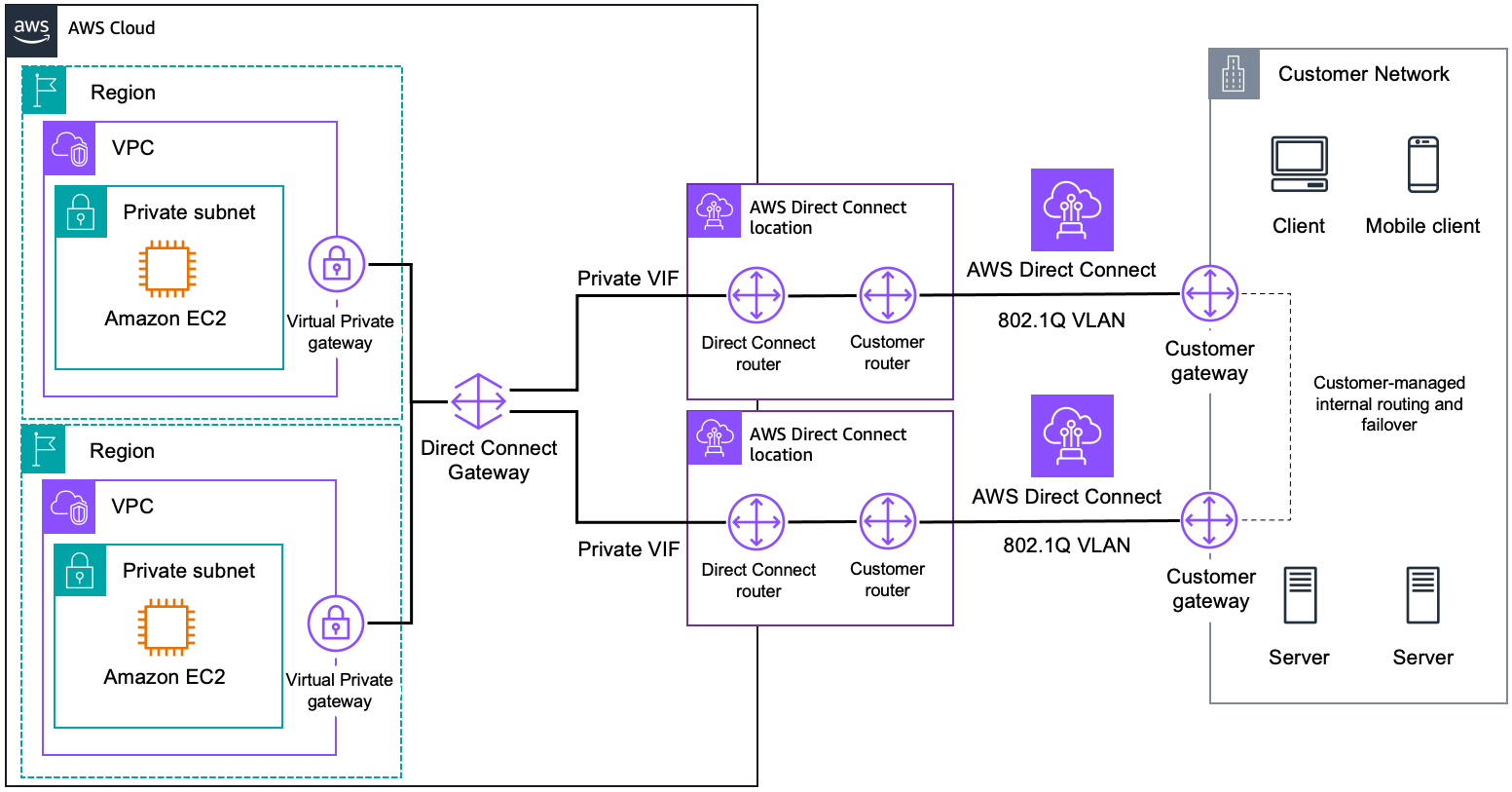
Use a Transit Gateway with a Direct Connect Gateway a pattern that lets a single Direct Connect connection reach multiple VPCs, potentially across regions. This is the recommended approach for organizations with more than one VPC.
Public VIF: Accessing AWS Public Services Without the Internet
This is the part that surprises most people.
AWS services like S3, SQS, and Elastic IP addresses are not inside a VPC. They live in what the diagram calls the “AWS Public Zone.” Normally, you’d reach them over the public internet.
A Public Virtual Interface allows Meridian to reach these services over the Direct Connect connection, not the public internet. Traffic to S3 bucket endpoints or SQS queue URLs goes through the DX connection, through AWS’s backbone, and arrives at the AWS public service without ever touching the internet.
The traffic path is:
Meridian's Data Center → Cross Connect → AWS DX Router → Public VIF → AWS Public Zone (S3, SQS, Elastic IPs)This matters for Meridian for two reasons: performance consistency (no internet variability for bulk S3 data movement) and data path control (compliance requirements around where financial data travels).
Note that a Public VIF advertises all AWS public IP prefixes for the region not just Meridian’s resources. Meridian’s router will need appropriate route filtering to avoid accidentally routing internet-bound traffic through the DX connection.
Performance Characteristics
This is Direct Connect’s core value proposition, stated plainly:
Latency is low and consistent. Between Meridian’s Sydney data center and the Sydney AWS region, a Direct Connect connection will deliver sub-millisecond to low-single-digit millisecond round-trip times, and that number won’t vary significantly based on time of day or external internet conditions.
Throughput is predictable. A 1 Gbps port gives Meridian close to 1 Gbps of usable throughput. Unlike an internet connection shared with other traffic, the DX port is dedicated. There is no oversubscription at the port level.
Comparison to Site-to-Site VPN: A Site-to-Site VPN over the internet gives Meridian an encrypted tunnel, but it still traverses the public internet. Throughput is limited by the internet connection’s practical performance, and latency varies. VPN is cheaper and faster to provision, which is why it’s a valid starting point but it cannot match Direct Connect’s performance characteristics for sustained, high-volume, latency-sensitive workloads.
Architecture Considerations for Resilience
Here is the most critical thing to understand about Direct Connect: a single connection has no built-in resilience. If the physical cross connect fails, if the AWS DX router has a hardware issue, if the carrier circuit goes down the connection goes down. Meridian’s on-premises systems lose connectivity to AWS until the issue is resolved.
For a financial services firm, this is unacceptable as a single-path design.
Strategy 1: Dual Connections at the Same DX Location
Meridian orders two separate 1 Gbps DX ports at the same Sydney DX location. Two separate cross connects, two separate BGP sessions, two separate VIFs. If one port fails, BGP failover routes traffic to the second.
The gap: Both connections terminate at the same physical facility. A facility-level event (power failure, fire, major infrastructure problem at the colocation data center) could take both connections down simultaneously.
Strategy 2: Connections at Different DX Locations
For the Sydney market, AWS has more than one Direct Connect location available. Meridian can order one connection at each location. Now a facility-level failure at one location does not impact connectivity through the other.
This is the recommended approach for maximum resilience. It requires Meridian to have carrier connectivity to two different facilities, which adds cost and operational complexity, but for regulated financial services workloads, it is the appropriate design.
Strategy 3: Direct Connect with Site-to-Site VPN Failover
A common and cost-effective pattern is to use Direct Connect as the primary path and a Site-to-Site VPN over the internet as a failover path. BGP local preference or AS path prepending can make the VPN path lower priority. If both DX connections fail, traffic automatically fails over to the VPN tunnel.
The VPN won’t deliver DX-equivalent performance, but it keeps Meridian’s systems reachable. For many organizations, this is the right balance between cost and resilience.
BGP Is the Routing Foundation
All of these patterns depend on BGP working correctly. BGP is mandatory for Direct Connect there is no alternative routing protocol. Meridian’s on-premises router must run BGP and must be configured to handle the route advertisements correctly, including:
Advertising Meridian’s on-premises CIDRs to AWS
Receiving and filtering AWS-advertised routes
Implementing the right BGP attributes (local preference, MED, AS path) to control traffic flow across multiple connections
BGP misconfiguration is one of the most common causes of unexpected routing behavior in Direct Connect deployments. The BGP session configuration should be reviewed by someone who understands routing policy, not just connectivity.
What the Exam Expects You to Know
For the AWS Solutions Architect Associate examination, Direct Connect tends to appear in questions that test whether you understand:
When to choose DX over VPN consistent latency, high throughput, compliance requirements, large data volumes all point to DX; cost sensitivity and speed of provisioning point to VPN
The VIF types and their destinations Private VIF → VPC via VGW or TGW; Public VIF → AWS public services without internet traversal; Transit VIF → Transit Gateway for multi-VPC
The resilience model one connection = single point of failure; two connections at different locations = facility-level resilience; DX + VPN backup = most common hybrid resilience pattern
The provisioning timeline DX is not instant; weeks to months from order to operational
Direct Connect Gateway allows a single DX connection to reach VPCs across multiple AWS regions, not just the region where the DX location is geographically closest
No encryption by default if Meridian requires encryption in transit, they need to layer on MACsec (for dedicated connections) or run an IPsec VPN over the DX connection
Summary
AWS Direct Connect is a service for organizations that have outgrown what the public internet can reliably provide for their AWS connectivity. It replaces an unpredictable shared path with a dedicated private circuit physically real, operationally specific, and architecturally consequential.
For Meridian Financial Group, it means their batch ETL jobs move data into S3 at predictable times, their application servers in EC2 talk to on-premises systems with consistent single-digit millisecond latency, and their compliance team can document exactly where financial data travels between their data center and AWS.
Getting there requires understanding the physical model (ports, cages, cross connects), the provisioning timeline (weeks, not hours), the pricing components (port-hours plus egress), the virtual interface types (Private and Public VIFs serving different destinations), and the resilience architecture (which is your responsibility to design, not AWS’s).
The connection itself is just a wire. What you build on top of it is the architecture.
This article covers AWS Direct Connect at the depth expected for the AWS Solutions Architect Associate certification. Pricing figures and regional availability should be verified against current AWS documentation, as these change over time.