

AWS Secrets Manager: Secure Credential Management in Production Environments
How to eliminate hardcoded secrets, automate credential rotation, and build security-first architectures on AWS

The Problem Nobody Talks About Until It’s Too Late
Most security breaches that trace back to compromised credentials share a common origin story: a developer hardcoded a database password in a config file, committed it to a Git repository, and forgot about it. Or an engineer embedded an API key directly in application code because they needed a quick fix before a deadline. Or credentials were stored in plaintext environment variables across dozens of EC2 instances, with no clear ownership of who had access to what.
This is credential sprawl, and it is a systemic problem in software engineering.
Beyond the obvious security risk, hardcoded or poorly managed credentials create significant operational pain:
Rotating a compromised credential means tracking down every place it is referenced and updating manually
There is no audit trail showing who accessed what, and when
Multiple teams may be sharing the same credentials without realising it
When a key expires or is rotated, applications fail in production because nothing was updated
AWS Secrets Manager exists specifically to solve this class of problem. It is not a general-purpose configuration store. It is a purpose-built service for managing sensitive credentials throughout their entire lifecycle from creation to access to rotation to deletion.
Hi — this is Pushpit from CloudOdyssey . Each week, I write about Cloud, DevOps, Systems Design deep dives and community update around it. If you have not subscribed yet, you can subscribe here.
What AWS Secrets Manager Is
At its core, Secrets Manager is a centralised, encrypted store for secrets. A secret can be a database username and password, an API key, an OAuth token, an SSH key, or any other sensitive string your application needs to function.
Instead of baking credentials into code or configuration files, your application makes an API call to Secrets Manager at runtime, retrieves the credential, and uses it. The credential never needs to exist on disk or in source control.
The service integrates natively with IAM for access control, AWS KMS for encryption, AWS Lambda for rotation, and services like Amazon RDS, Redshift, and DocumentDB for deep lifecycle management.
Core Capabilities
Secure Secret Storage
Secrets are stored as key-value pairs or JSON blobs. You can store structured secrets for example, a JSON object containing a username, password, host, and port which simplifies retrieval for database connections. Secrets have versioning built in, so previous versions are retained during rotation, allowing applications to complete in-flight requests before the old credential becomes invalid.
Encryption with AWS KMS
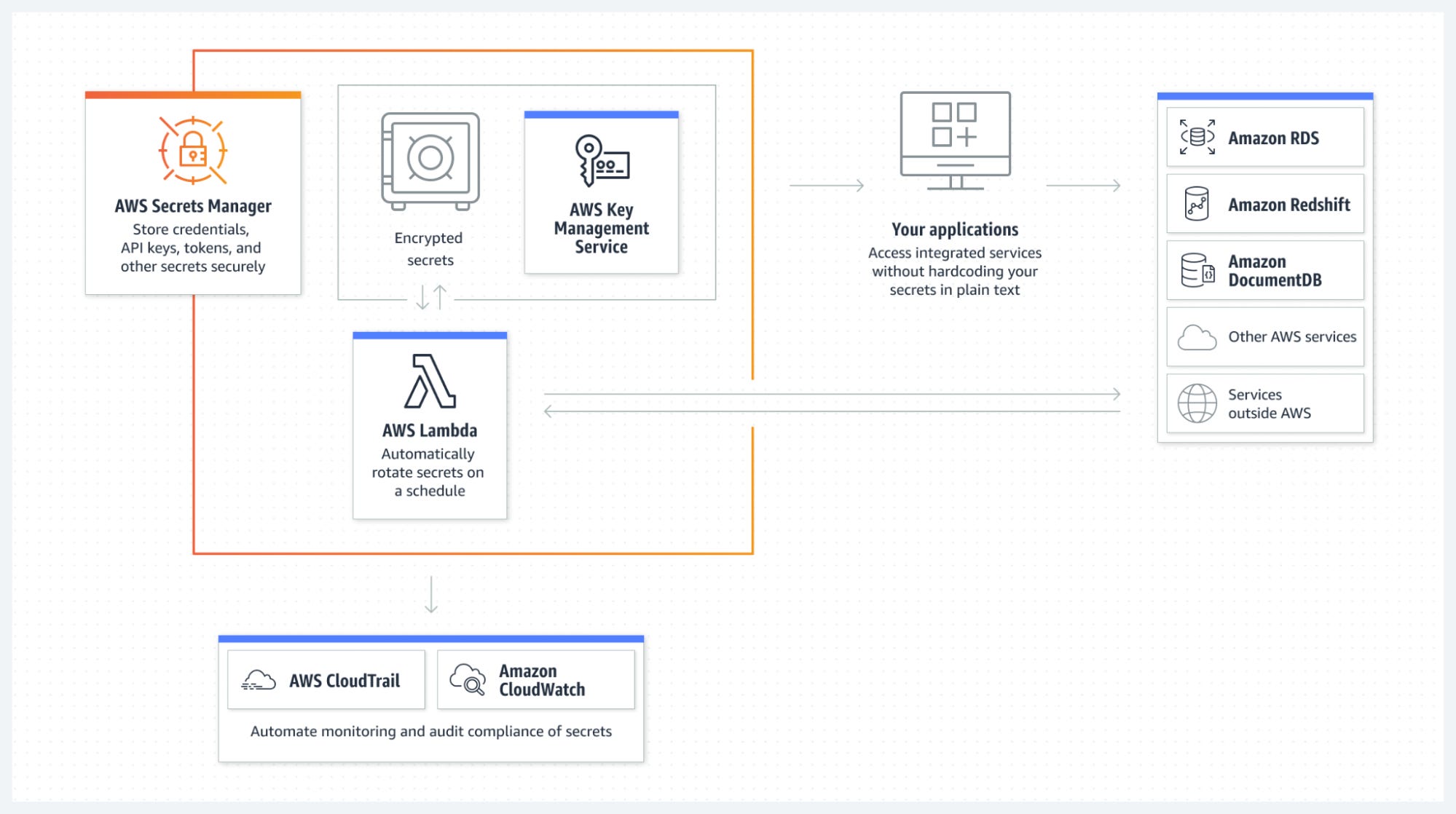
Every secret is encrypted at rest using AWS KMS. By default, Secrets Manager uses an AWS-managed KMS key. For stricter compliance requirements, you can specify a customer-managed key (CMK), which gives you full control over key rotation, usage policies, and audit logging via CloudTrail.
In transit, all communication with the Secrets Manager API uses TLS. There is no path where a secret travels unencrypted between your application and the service.
Access Control via IAM
Access to secrets is governed by IAM policies. You can control access at the secret level, specifying which principals users, roles, services can retrieve, modify, rotate, or delete a given secret. Resource-based policies on secrets allow cross-account access, which is useful in multi-account architectures where a centralised secrets account is managed by a security team.
A well-designed IAM policy for Secrets Manager access follows least privilege: an application role should have secretsmanager:GetSecretValue on only the specific secrets it needs nothing more.
Access via Console, CLI, SDK, or API
Secrets can be accessed through any standard AWS interface:
The AWS Management Console for manual management
The AWS CLI for scripting and operational tasks
AWS SDKs (Python/boto3, Java, Node.js, Go, etc.) for application integration
Direct HTTPS API calls for environments without SDK support
The SDK path is the standard approach for production applications. A single API call to GetSecretValue returns the secret string, which your application can parse and use immediately.
Automatic Secret Rotation
This is the capability that differentiates Secrets Manager from simpler alternatives. Rotation is handled by an AWS Lambda function that is invoked on a schedule you define for example, every 30, 60, or 90 days.
The rotation function follows a four-step lifecycle: it creates a new credential version, sets the new credential on the target service (e.g., updates the RDS database password), tests that the new credential works, then marks the new version as current and the old version as pending deletion.
AWS provides managed rotation Lambda functions for supported RDS databases. For custom credentials such as third-party API keys, you write a Lambda function that implements the rotation logic.
Integration with RDS and Other Services
For RDS, Redshift, and DocumentDB, Secrets Manager has native integration. When you enable rotation for an RDS secret, Secrets Manager handles both sides of the update it updates the database password on the RDS instance and updates the stored secret simultaneously, keeping them in sync. Your application never needs to know a rotation happened.
Architecture Walkthrough
The following diagram illustrates a complete Secrets Manager architecture, showing how an application retrieves credentials at runtime and how automated rotation keeps those credentials fresh.
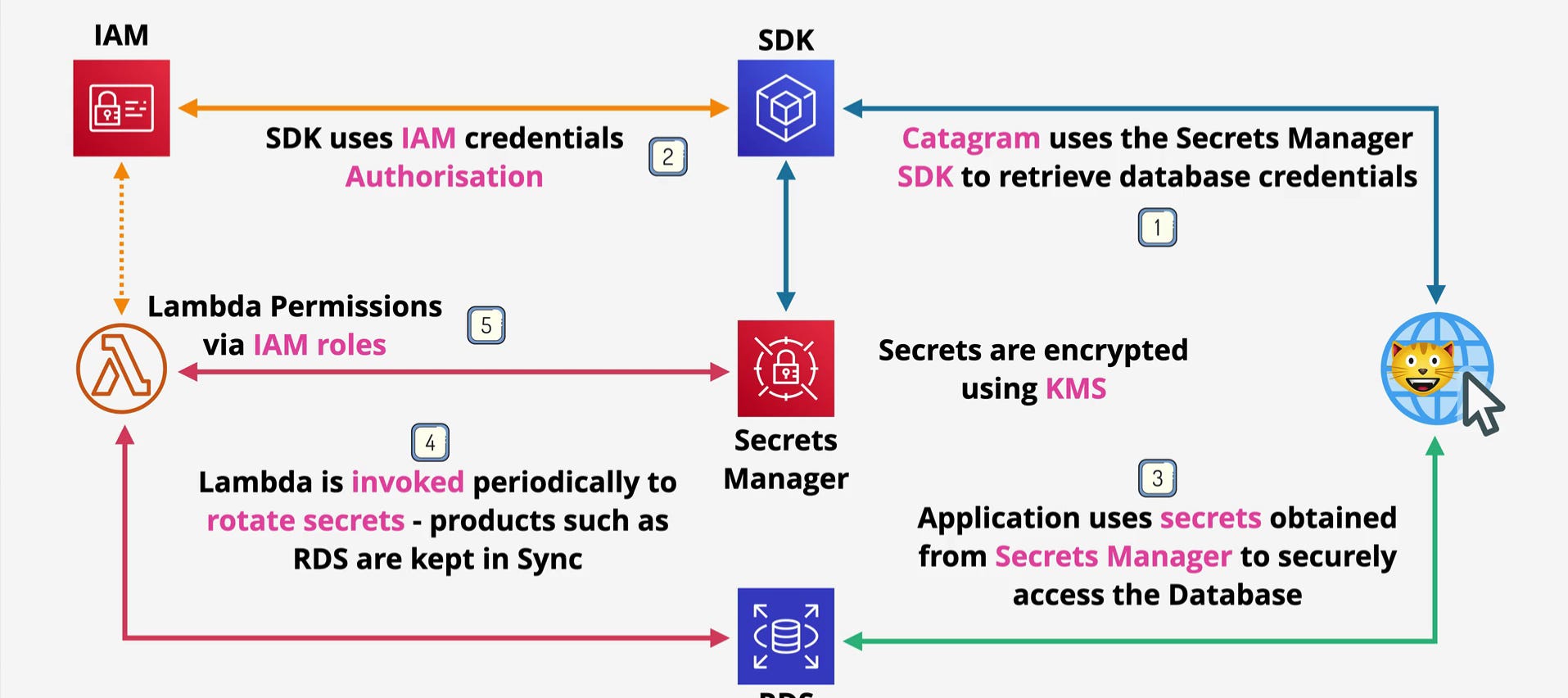
Step 1 — Application Retrieves Credentials via SDK
The application (in this case, Catagram) calls the Secrets Manager SDK to retrieve database credentials. This call is made at runtime not at deploy time, not from a config file. The application simply requests the secret by name and Secrets Manager returns the current credential value.
Step 2 — SDK Authenticates Using IAM
The SDK does not use a username or password to authenticate with Secrets Manager. It uses IAM credentials specifically, the IAM role attached to the running compute resource (an EC2 instance profile, ECS task role, or Lambda execution role). The SDK automatically retrieves and refreshes these temporary credentials via the instance metadata service. This is why there is no bootstrapping problem: the only credential your application needs to start is the IAM role, which is assigned at the infrastructure level, not in code.
Step 3 — Secrets Are Encrypted at Rest Using KMS
When Secrets Manager stores or retrieves a secret, the encryption and decryption happen transparently via KMS. Your application receives a plaintext credential in the API response, but at no point is the secret stored or transmitted in plaintext within the AWS infrastructure. If the IAM policy does not include permission to use the KMS key, the decryption call fails and no secret is returned.
Step 4 — Application Uses Retrieved Credentials to Access the Database
With the credentials in memory, the application opens a connection to the RDS instance using the username and password obtained from Secrets Manager. The application caches this connection for the duration of the session, avoiding unnecessary API calls on every request.
Step 5 — Lambda Rotates Credentials Periodically
A Lambda function is invoked periodically on a schedule configured in Secrets Manager to rotate the database credentials. The function updates the password on the RDS instance and updates the secret value stored in Secrets Manager. The Lambda function itself requires an IAM role with permissions to both call Secrets Manager and modify the database. This is why Lambda Permissions via IAM Roles appears in the architecture: the rotation function is not hardcoding credentials to perform the rotation; it is using its own IAM identity.
How Secret Rotation Works in Detail
The rotation model is the most architecturally significant feature of Secrets Manager, and it is the one most worth understanding deeply.
When rotation is triggered either manually or on schedule the Lambda function moves through four stages:
createSecret — Generates a new credential and stores it in Secrets Manager as a new version with the AWSPENDING label. The current version retains the AWSCURRENT label.
setSecret — Applies the new credential to the target service. For RDS, this means updating the database user’s password.
testSecret — Verifies that the new credential works correctly by opening a test connection using the AWSPENDING version.
finishSecret — Promotes the new version to AWSCURRENT and demotes the old version to AWSPREVIOUS. The AWSPREVIOUS version is retained briefly to allow in-flight application requests using the old credential to complete successfully.
This staged approach is what makes zero-downtime rotation possible. Applications that retrieve the secret on each connection attempt will naturally pick up the new credential after the rotation completes, with no deployment required.
Why Secrets Manager Is Often Confused With Parameter Store
AWS Systems Manager Parameter Store is the service most commonly confused with Secrets Manager, and for good reason they share surface-level similarities:
Both can store strings and encrypted values
Both are accessible via IAM policies
Both integrate with AWS SDK and CLI
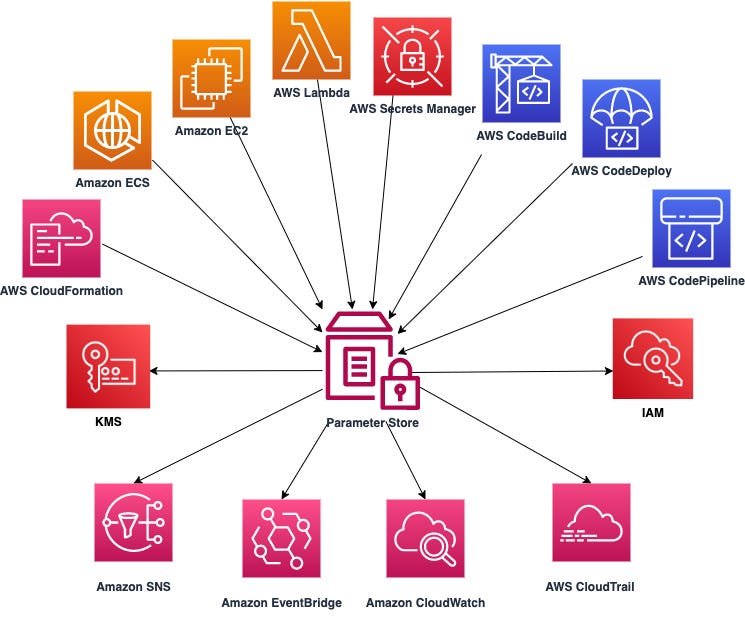
But they serve fundamentally different purposes, and choosing the wrong one for sensitive credentials is a common architecture mistake.
Parameter Store is designed for application configuration feature flags, environment-specific settings, connection strings that are not sensitive, and configuration parameters that change between environments. It supports SecureString parameters (encrypted via KMS), but rotation is not built in. You manage versioning and rotation manually. It is also significantly cheaper, which makes it appropriate for non-sensitive or semi-sensitive configuration at scale.
Secrets Manager is designed specifically for sensitive credentials that need active lifecycle management. The key differentiators:
Built-in automated rotation with Lambda integration
Native integration with RDS, Redshift, and DocumentDB for synchronised credential updates
Full versioning model with
AWSCURRENT,AWSPENDING, andAWSPREVIOUSlabelsDesigned for credentials, not configuration
The cost difference is meaningful: Secrets Manager charges per secret per month, plus per API call. Parameter Store’s standard tier is free, and the advanced tier with larger values is much cheaper per parameter. For applications with hundreds of secrets, the cost of Secrets Manager adds up but for database passwords, API keys, and service credentials that need rotation, it is the correct choice.
When to Use Secrets Manager vs Parameter Store
A practical decision framework:
Use Secrets Manager when:
Storing database credentials that require automatic rotation
Managing API keys for third-party services
Storing any credential that should never be hardcoded or long-lived
You need a full audit trail of secret access via CloudTrail
Cross-account secret sharing is required
Use Parameter Store when:
Storing non-sensitive application configuration (log levels, feature flags, URLs)
Managing environment-specific settings across multiple environments
You need encrypted storage but do not require automated rotation
Cost optimisation is a priority and rotation is not a requirement
AWS Exam Perspective
For the Solutions Architect Associate and Professional exams, Secrets Manager questions typically appear in scenarios involving:
Automatic database credential rotation — If a scenario describes an RDS database where credentials need to rotate automatically without application changes, Secrets Manager is the correct answer. Parameter Store does not support built-in rotation.
Eliminating hardcoded credentials — Any scenario where credentials are currently stored in code, environment variables, or configuration files and the question asks for the most secure alternative, Secrets Manager is the target answer — specifically combined with the IAM role pattern for compute access.
Cross-account secret access — Secrets Manager supports resource-based policies that allow principals from other AWS accounts to retrieve secrets. This appears in exam scenarios involving centralised security accounts in multi-account organisations.
KMS encryption of secrets — Exams test that you understand secrets are encrypted using KMS, that you can use either AWS-managed or customer-managed keys, and that KMS key policies are an additional layer of access control beyond IAM.
The rotation Lambda lifecycle — The four-step rotation model (createSecret, setSecret, testSecret, finishSecret) appears in professional-level exam questions about how zero-downtime rotation is achieved.
Practical Architecture Example
Consider a containerised API running on Amazon ECS Fargate that connects to an RDS PostgreSQL database.
At the infrastructure level, the ECS task definition specifies a task execution role that includes permission to call secretsmanager:GetSecretValue on the specific ARN of the database credentials secret. No password is stored in the task definition, in the container image, or in any environment variable.
At application startup, the service calls GetSecretValue using the boto3 SDK. The SDK automatically retrieves temporary IAM credentials from the ECS metadata endpoint no explicit credential configuration is needed in the application code. The returned JSON is parsed to extract the username, password, host, and port fields, and a connection pool is initialised.
Rotation is configured in Secrets Manager on a 30-day schedule. The managed rotation Lambda for PostgreSQL handles updating the database password and the stored secret simultaneously. When rotation occurs, the connection pool is refreshed on the next health check cycle, and the application continues operating without any deployment or manual intervention.
CloudTrail logs every GetSecretValue call, including the principal, timestamp, and source IP. This provides a complete audit trail for compliance requirements.
Key Design Takeaways
Never store credentials in code, environment variables, or configuration files retrieve them from Secrets Manager at runtime
Use IAM roles on compute resources (EC2 instance profiles, ECS task roles, Lambda execution roles) as the authentication mechanism for Secrets Manager API calls there are no application-level credentials to manage
Encrypt secrets with a customer-managed KMS key in high-compliance environments to maintain key ownership and audit visibility
Use the four-step rotation model with Lambda for zero-downtime credential rotation the AWSPREVIOUS version ensures in-flight requests are not interrupted
Apply least-privilege IAM policies: grant
secretsmanager:GetSecretValueon specific secret ARNs only, notsecretsmanager:*on all resourcesUse resource-based policies on secrets for cross-account access patterns in multi-account organisations
Choose Parameter Store for non-sensitive configuration at scale; use Secrets Manager specifically for credentials that require active lifecycle management and rotation
Enable CloudTrail logging for
secretsmanager.amazonaws.comto maintain an audit trail of all secret access events
This article covers AWS Secrets Manager behaviour as of the current AWS documentation. Pricing and service limits should be verified against the AWS pricing page for your region.