
Data Immutability: Understanding S3 Object Lock🛡️
A practical breakdown of Governance Mode, Compliance Mode, and the strategic use of Legal Holds.

Data protection is often discussed in terms of backups and disaster recovery.1 But there's a more fundamental layer: data immutability. This is the principle that, once written, data cannot be altered or deleted.2 It’s a powerful concept that moves beyond just recovery and into guaranteed data integrity.
Amazon S3 Object Lock is a primary tool for implementing this.3 Let's break down what it is and how to apply it strategically.
Core Function: The WORM Model
At its heart, S3 Object Lock applies a WORM (Write-Once-Read-Many) model to your data.4 When you place an object in a bucket with Object Lock enabled, you are essentially making it read-only for a defined duration. This is not a complex idea, but its implications for security and compliance are significant.
To use it, you must enable versioning on your S3 bucket, and Object Lock must be enabled when the bucket is created.5
The Control Mechanisms
Object Lock isn't a single switch; it provides two distinct controls to manage immutability.6
1. Retention Periods
This is the most common control. You define a specific timeframe during which an object is protected.7 This is managed through two modes:
Governance Mode: This mode is best understood as a strong deterrent against accidental changes.8 It locks the object for everyone, but designated users with special IAM permissions (
s3:BypassGovernanceRetention) can override the lock to modify retention settings or delete the object.9Practical Use-Case: Protecting critical application backups or logs from accidental deletion by general team members, while still allowing a senior cloud administrator to perform necessary cleanup or modifications if required. It's a safety net with a controlled administrative override.
Compliance Mode: This is an absolute, unbreakable lock. Once an object is locked in this mode, no one—including the AWS account's root user—can overwrite or delete it until the retention period expires. The retention period can be extended, but never shortened.10
Practical Use-Case: Storing financial records, medical data, or legal documents that fall under strict regulatory mandates (e.g., SEC Rule 17a-4, HIPAA).11 This provides auditors with mathematical proof that the data has not been tampered with.
2. Legal Hold: The Indefinite Preservation Mandate
A Legal Hold is a separate, independent control that acts as an indefinite lock on an object version, regardless of any retention period in place. Think of it as a master "pause" button that overrides all other lifecycle rules. The hold remains active until an authorized user with the s3:PutObjectLegalHold permission explicitly removes it.12 It's a simple on/off switch for indefinite preservation.
Practical Aspect: The key difference from a retention period is that a Legal Hold has no expiration date. It's designed for situations where the duration of preservation is unknown and cannot be predetermined. While a 7-year retention period handles a known compliance need, a Legal Hold handles an unforeseen event.
Real-World Scenario: An eDiscovery Request ⚖️
Imagine you work for a large corporation. The company's standard data policy is to store all internal communications in an S3 bucket with a 5-year retention period using Governance Mode.
The Event: One day, the company becomes involved in a lawsuit. The opposing counsel files an eDiscovery request, legally demanding all communications from the last two years related to a specific project, "Project Titan."
The Problem: Some of the relevant emails and documents are already four years old. Under the standard policy, they are scheduled to be automatically deleted in just one year. If that happens, it would be a serious violation of the legal discovery process, resulting in severe penalties.
The Solution: The company's legal and IT teams work together. They identify all objects (documents, emails, chats) in the S3 bucket related to "Project Titan." An IT administrator with the appropriate permissions then programmatically applies a Legal Hold to each of these specific object versions.
The Outcome:
The objects are now instantly protected, indefinitely.
Even when an object's original 5-year retention period expires, the Legal Hold prevents it from being deleted.
The hold ensures data integrity, proving to the court that the evidence has not been tampered with since the hold was placed.
Years later, once the lawsuit is fully resolved, the legal team gives the green light. The IT administrator then removes the Legal Hold from the objects. The original data lifecycle policy takes over again, and the objects are deleted as they pass their retention date.
This scenario highlights how Legal Hold acts as a crucial, flexible tool to react to unpredictable events, ensuring legal and regulatory compliance outside of standard data retention schedules.
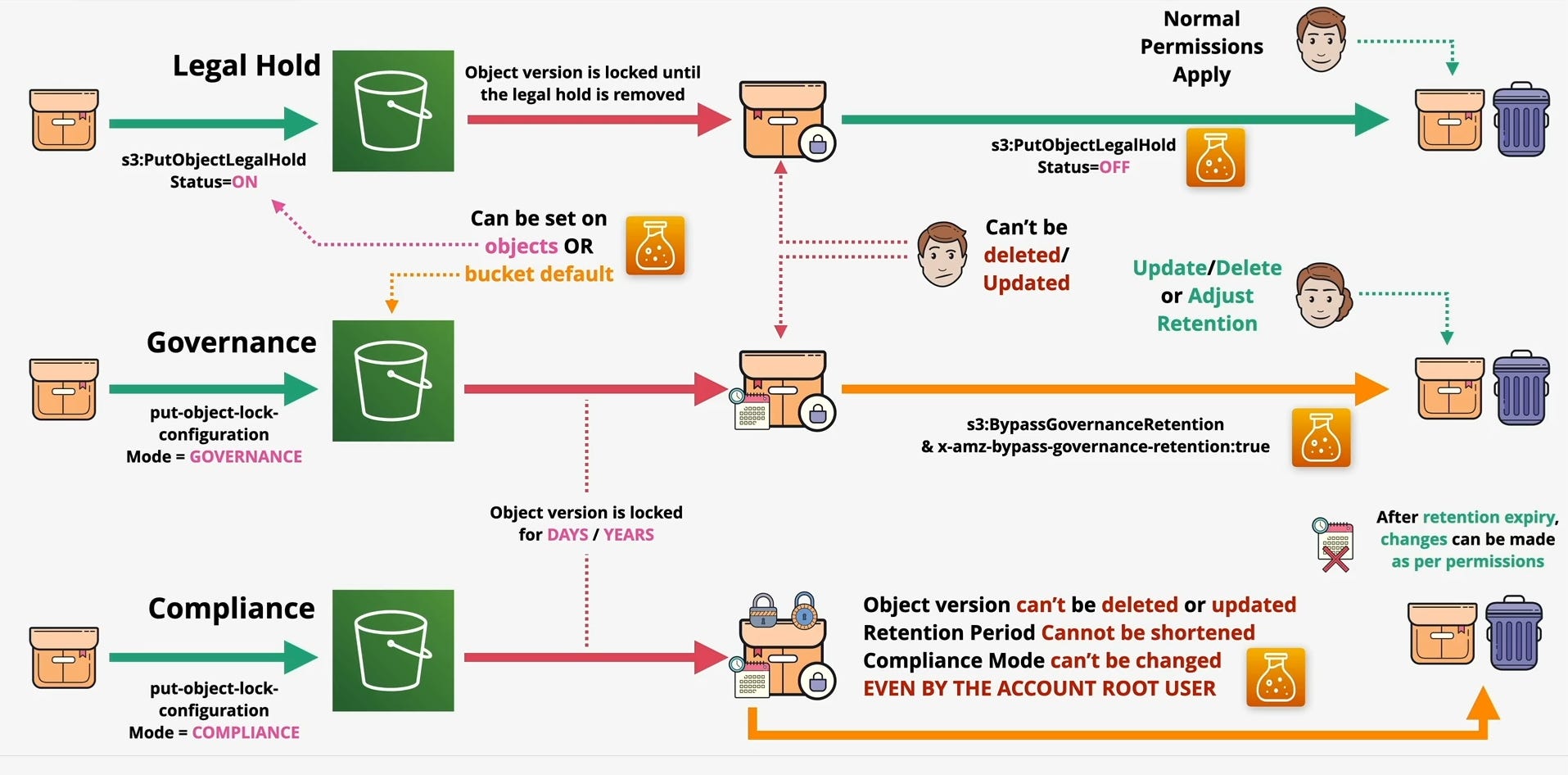
Strategic Application: A Simple Decision Tree
Choosing the right setting is a matter of clear intent:
Is my goal to prevent common human error and add a layer of protection?
→ Use Governance Mode.
Is my goal to satisfy a known legal or regulatory requirement for data integrity?
→ Use Compliance Mode.
Is my goal to preserve data for an unknown duration due to an unforeseen event like a lawsuit?
→ Apply a Legal Hold.