

Intrinsic Functions, or How CloudFormation Thinks at Runtime
Solving the ‘I Don’t Know This Yet’ Problem in Infrastructure as Code”

Here is a frustration you will hit fast when writing CloudFormation templates naively. You want to reference the ARN of an S3 bucket you are creating in the same template. But you do not know the ARN yet because the bucket has not been created yet. So what do you put in the template?
This is exactly the problem intrinsic functions solve. They are CloudFormation’s way of computing values at runtime: values that are not known when you write the template but will be known when the stack is actually deployed.
Think of them like formulas in a spreadsheet. You do not type the final number into a cell. You type =A1+B1 and the spreadsheet figures out the answer when it has the data. Intrinsic functions work exactly the same way, and understanding them turns your static YAML files into genuinely dynamic infrastructure programs.
Hi — this is Pushpit from CloudOdyssey . I write about Cloud, DevOps, Systems Design deep dives and community update around it. If you have not subscribed yet, you can subscribe here.
The Functions You Will Use Every Day
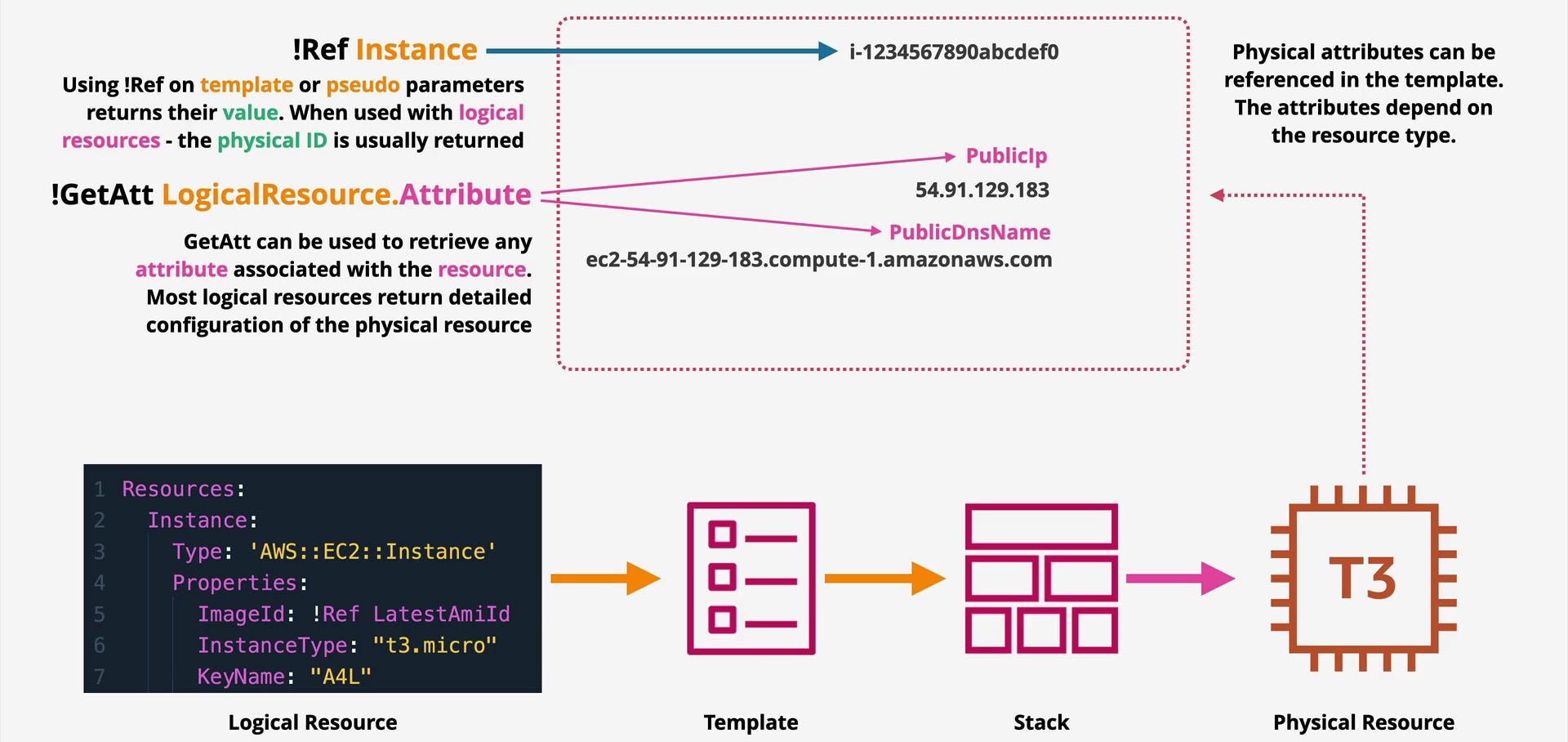
!Ref is the one you will type most often. It returns the primary identifier of a resource or the value of a parameter. For an EC2 instance, that is the instance ID. For an S3 bucket, it is the bucket name. For a parameter, it is whatever value the deployer passed in.
Parameters:
  MyEnvironment:
    Type: String
    Default: dev

Resources:
  AppBucket:
    Type: AWS::S3::Bucket
    Properties:
      BucketName: !Ref MyEnvironment   # resolves to "dev" at runtime
!GetAtt goes a level deeper. When you need a specific attribute of a resource rather than its primary identifier, this is your function. ARNs, DNS names, endpoint URLs, all of these come via !GetAtt.
Outputs:
  BucketArn:
    Value: !GetAtt AppBucket.Arn          # The full ARN of the bucket

  LoadBalancerDNS:
    Value: !GetAtt MyLoadBalancer.DNSName  # DNS name to put in Route 53
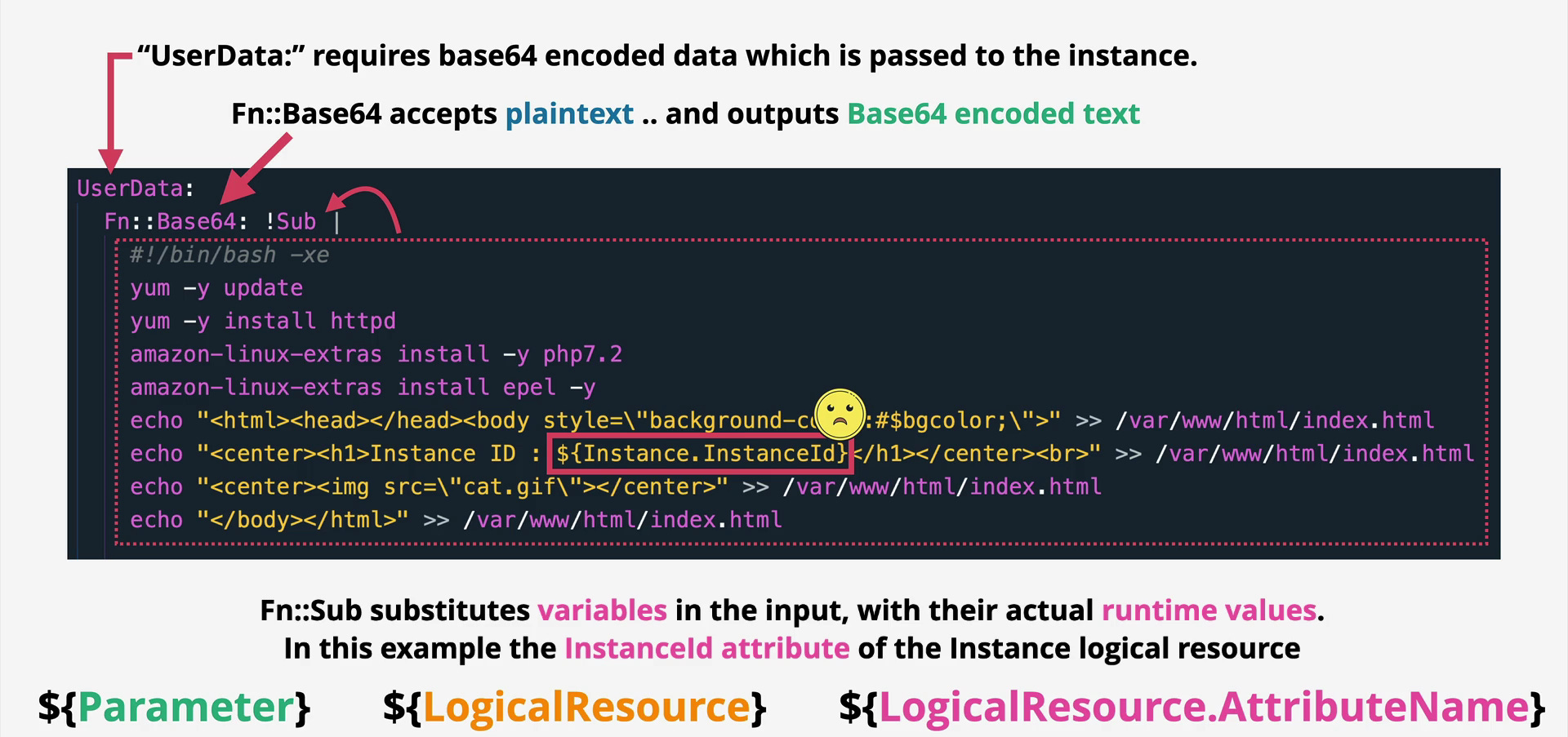
!Sub handles string substitution and it is far cleaner than the older !Join for most use cases. You write a template string with ${VariableName} placeholders and CloudFormation fills them in.
Properties:
  BucketName: !Sub "assets-${AWS::AccountId}-${AWS::Region}"
  # If AccountId is 123456789 and Region is ap-south-1
  # Result at runtime: "assets-123456789-ap-south-1"
!FindInMap is the lookup table function. You define a Mappings section (covered in Part 3) with a structured table of values, and !FindInMap retrieves the right one based on keys you provide.
!If is the conditional expression, essentially a ternary operator. Give it a condition name and two possible values. If the condition evaluates to true it returns the first value, otherwise the second.
Properties:
  InstanceType: !If [IsProduction, t3.large, t3.micro]
The Logic Functions
CloudFormation gives you four logical operators for building boolean conditions that power the !If function and the Conditions section. They work exactly like their equivalents in any programming language.
!Equals compares two values and returns true if they match. !Not flips a boolean. !And requires all listed conditions to be true. !Or requires at least one.
Conditions:
  IsProduction: !Equals [!Ref EnvName, prod]
  IsNotProd: !Not [!Condition IsProduction]

  IsLargeProd: !And
    - !Condition IsProduction
    - !Condition IsHighTrafficRegion

  NeedsVerboseLogs: !Or
    - !Equals [!Ref EnvName, dev]
    - !Equals [!Ref EnvName, staging]
The Functions You Need for Specific Situations
!Base64 encodes a string to Base64. The only reason you will use this in practice is for EC2 UserData, which AWS requires to be Base64-encoded. CloudFormation handles the encoding transparently when you wrap your startup script in this function.
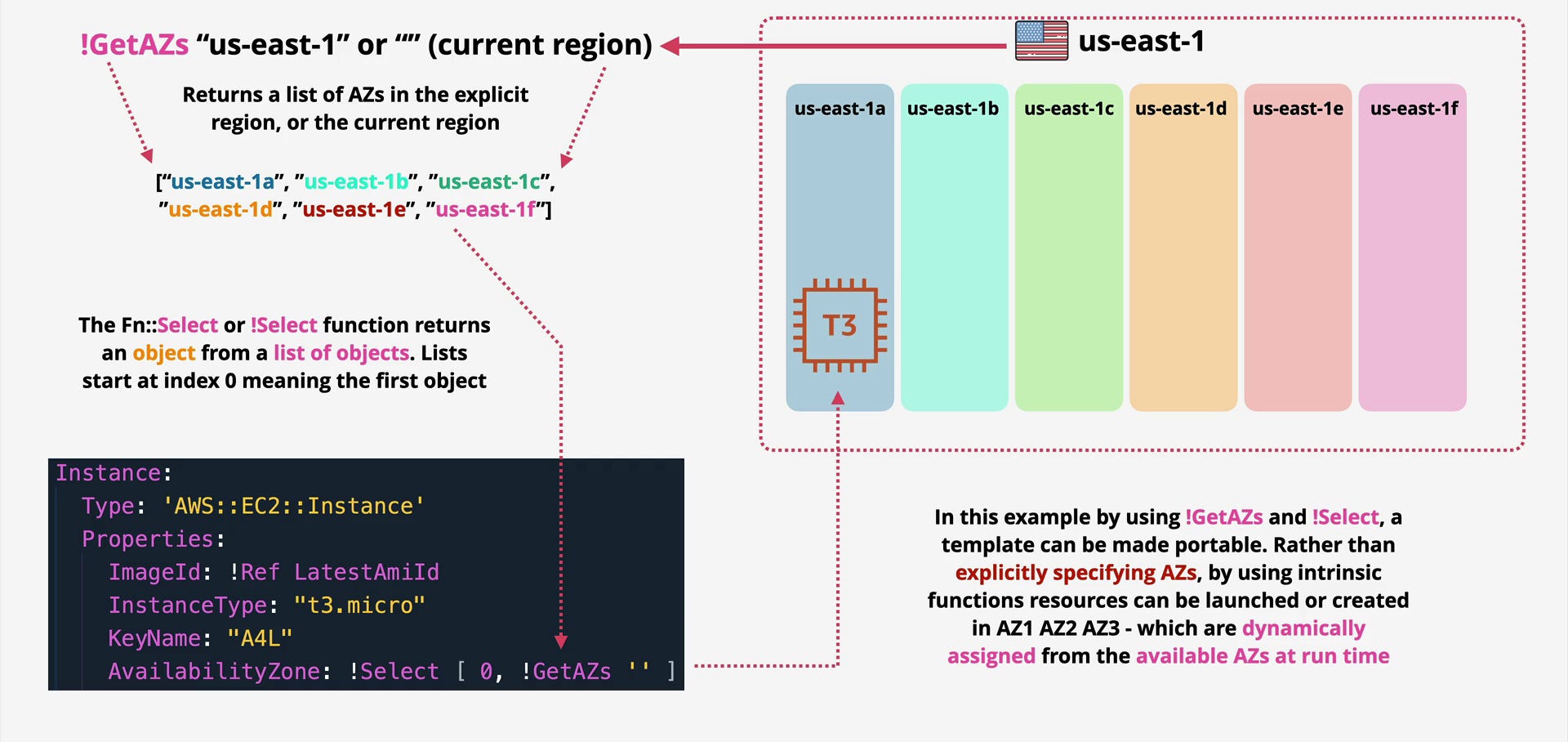
!Select picks one item from a list by zero-based index. Useful when you have a list of availability zones and need to assign specific subnets to specific AZs.
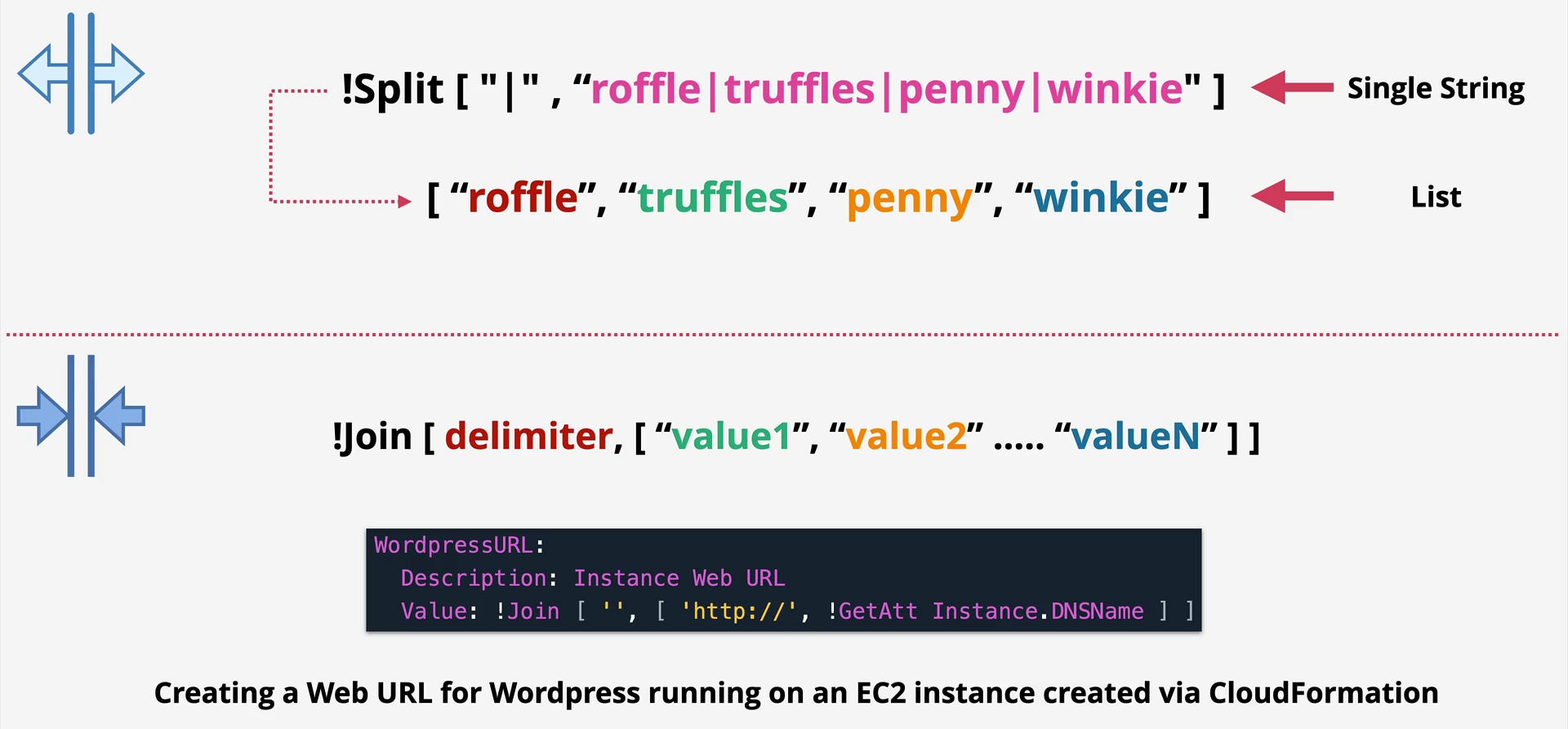
!Split takes a string and a delimiter and returns a list, the inverse of !Join.
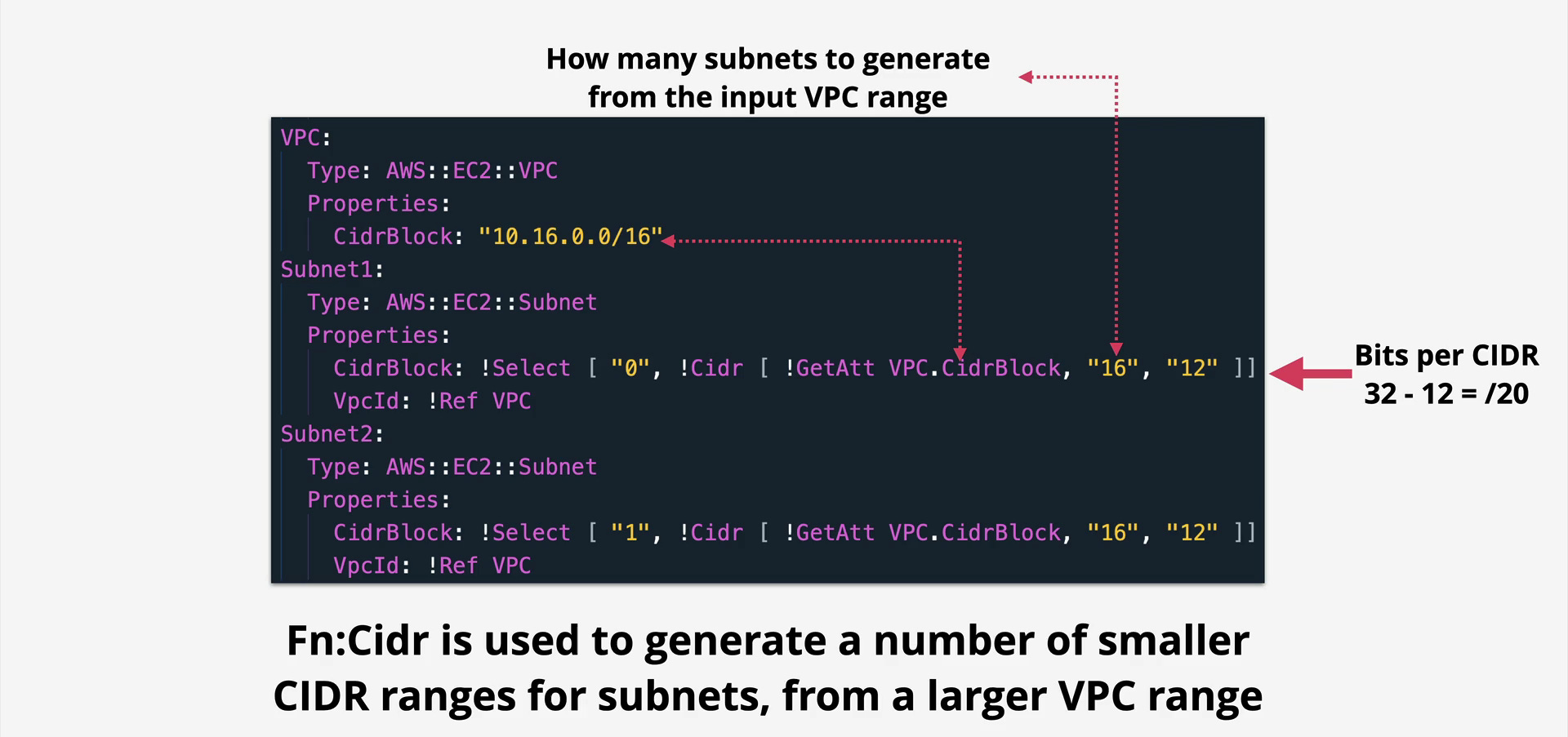
!Cidr generates an array of CIDR blocks from a base range, saving you from manually calculating subnet addresses when building VPCs programmatically.
Following Along
# Deploy a stack with a parameter, overriding the default
aws cloudformation create-stack \
  --stack-name functions-demo \
  --template-body file://functions-demo.yaml \
  --parameters ParameterKey=EnvName,ParameterValue=prod

# See the resolved output values after deployment
aws cloudformation describe-stacks \
  --stack-name functions-demo \
  --query "Stacks[0].Outputs"
Things to Remember While Architecting
!Ref on a resource and !Ref on a parameter behave differently. On a resource, it returns the physical ID. On a parameter, it returns the parameter value. Know which you are calling when debugging unexpected values.
!GetAtt attributes vary by resource type. Check the AWS documentation for each resource’s available attributes. Common ones are Arn, DNSName, Endpoint.Address (for RDS), and PublicIp (for EC2).
You can nest intrinsic functions. !Select [0, !Split [",", !Ref MyList]] is valid and powerful for complex transformations.
!If can use !Ref AWS::NoValue as one of its return values, which completely removes a property from the template at runtime when a condition is false. This is cleaner than setting a dummy placeholder value.
Use !Sub over !Join for string composition. !Sub reads like a template string and handles pseudo parameters natively. !Join requires a list structure that becomes unwieldy quickly.
Interview Corner
Q: What is the difference between !Ref and !GetAtt?
!Ref returns the primary identifier of a resource, usually its name or ID. !GetAtt retrieves a specific attribute of that resource. For example, !Ref MyBucket gives you the bucket name, while !GetAtt MyBucket.Arn gives you its full ARN. You use !Ref when you need to pass a resource’s identity to another resource’s property, and !GetAtt when you need a specific characteristic of that resource beyond its primary identifier.
Q: Why can you not just hardcode an ARN in a CloudFormation template?
Because ARNs embed account IDs and region names. Hardcoding them makes the template work only in one specific account in one specific region. Using !GetAtt or !Sub with ${AWS::AccountId} and ${AWS::Region} makes the same template deploy correctly anywhere, which is the entire point of writing templates in the first place.
