

Mastering Hardware Affinity: The Architect’s Guide to AWS EC2 Placement Groups
Why your 100Gbps instance is only giving you 5Gbps, and how to architect specifically for rack-level locality and topology awareness.

We often buy into the pleasant illusion that the cloud is an infinite, abstract pool of compute. We spin up an EC2 instance, and it simply “exists” somewhere in the ether. But under the abstraction layer, the laws of physics still apply. Your code runs on metal, signals travel through copper and fiber, and hardware eventually fails.
When you are architecting for extreme performance (HPC) or extreme reliability (Mission Critical), relying on AWS’s default random placement algorithms isn’t enough. You need to tell AWS exactly where to put your machines relative to one another.
This is where EC2 Placement Groups come in.
A Placement Group is essentially a request to the AWS control plane to influence the physical placement of a group of interdependent instances. It is free to use, but it requires careful architectural planning. Today, we are going to dissect the three types Cluster, Spread, and Partition and look at the “hidden” mechanics of bandwidth, latency, and hardware isolation.
1. Cluster Placement Groups: The Physics of Speed
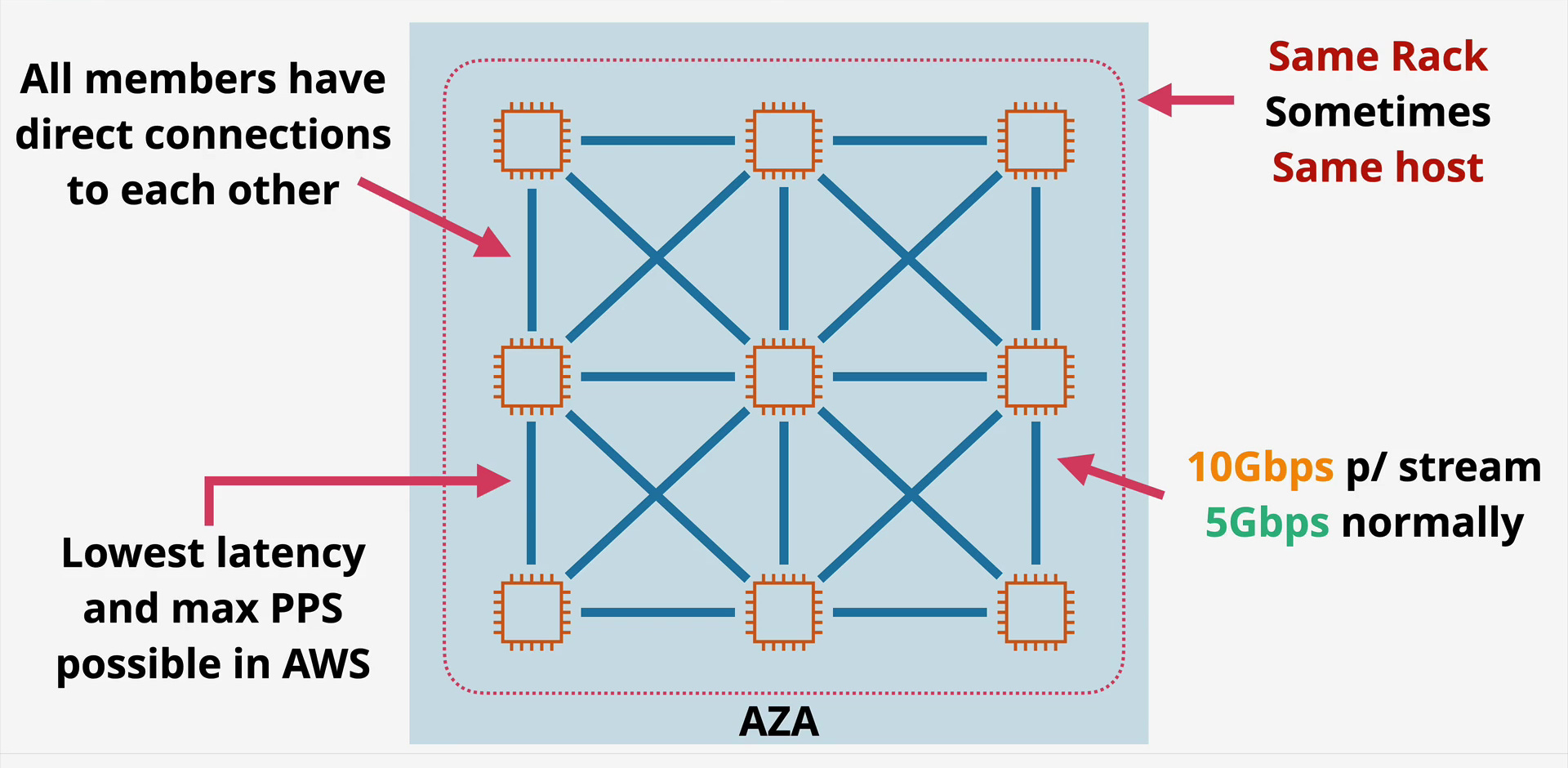
If your application requires the absolute lowest network latency and the highest network throughput, you need a Cluster Placement Group.
The Core Logic: “Pack Them Tight”
When you launch instances into a Cluster, AWS attempts to pack them as physically close together as possible. We are talking about instances sitting on the same rack, or racks immediately adjacent to each other, often sharing the same network spine. This minimizes the physical distance light has to travel, dropping latency to single digit microseconds.
The “Single Stream” Bandwidth Trap
This is where many architects get confused. You might provision an instance with “100 Gbps Network Bandwidth,” but that is aggregate bandwidth.
The Bottleneck: A single TCP flow (defined by a 5-tuple hash: Source IP, Source Port, Dest IP, Dest Port, Protocol) is limited by the underlying flow hashing mechanisms of the network.
The Reality: Even in a Cluster group, a single stream is often capped (historically at 5 Gbps, rising to 10–25 Gbps on newer
n-type instances with ENA Express).The Solution: To fill that 100 Gbps pipe, your application must be multi-threaded, creating multiple distinct flows.
Enhanced Networking & EFA
To truly exploit a Cluster group, you must use Enhanced Networking (ENA). For High Performance Computing (HPC) workloads like fluid dynamics or financial modeling, you should go a step further and use the Elastic Fabric Adapter (EFA). EFA works best in Cluster groups because it bypasses the OS kernel entirely (OS-bypass), allowing applications to talk directly to the network card, drastically reducing CPU overhead and latency.
The “Same Instance Type” Rule
While not strictly enforced by a hard error message, AWS strongly suggests using the same instance type (e.g., all c5n.18xlarge) within a Cluster.
The Reason: Different instance families (like M5 vs C5) often reside on different hardware generations or different physical aisles in the data center. Asking AWS to pack a
t3.microright next to ap4d.24xlargeis physically difficult because they likely live in different hardware pools. Mixing types drastically increases your chance of getting anInsufficientInstanceCapacityerror.
Spanning VPC Peers: Logical vs. Physical
Can a Cluster span VPCs? Surprisingly, yes. You can launch instances into the same Placement Group from peered VPCs, provided they are in the same Region and Availability Zone.
The Logic: VPCs are logical constructs; Placement Groups are physical constructs. You can have logically separated networks (e.g., a Database VPC and an App VPC) that are physically sitting on the same rack for speed.
2. Spread Placement Groups: The “Social Distancing” Protocol
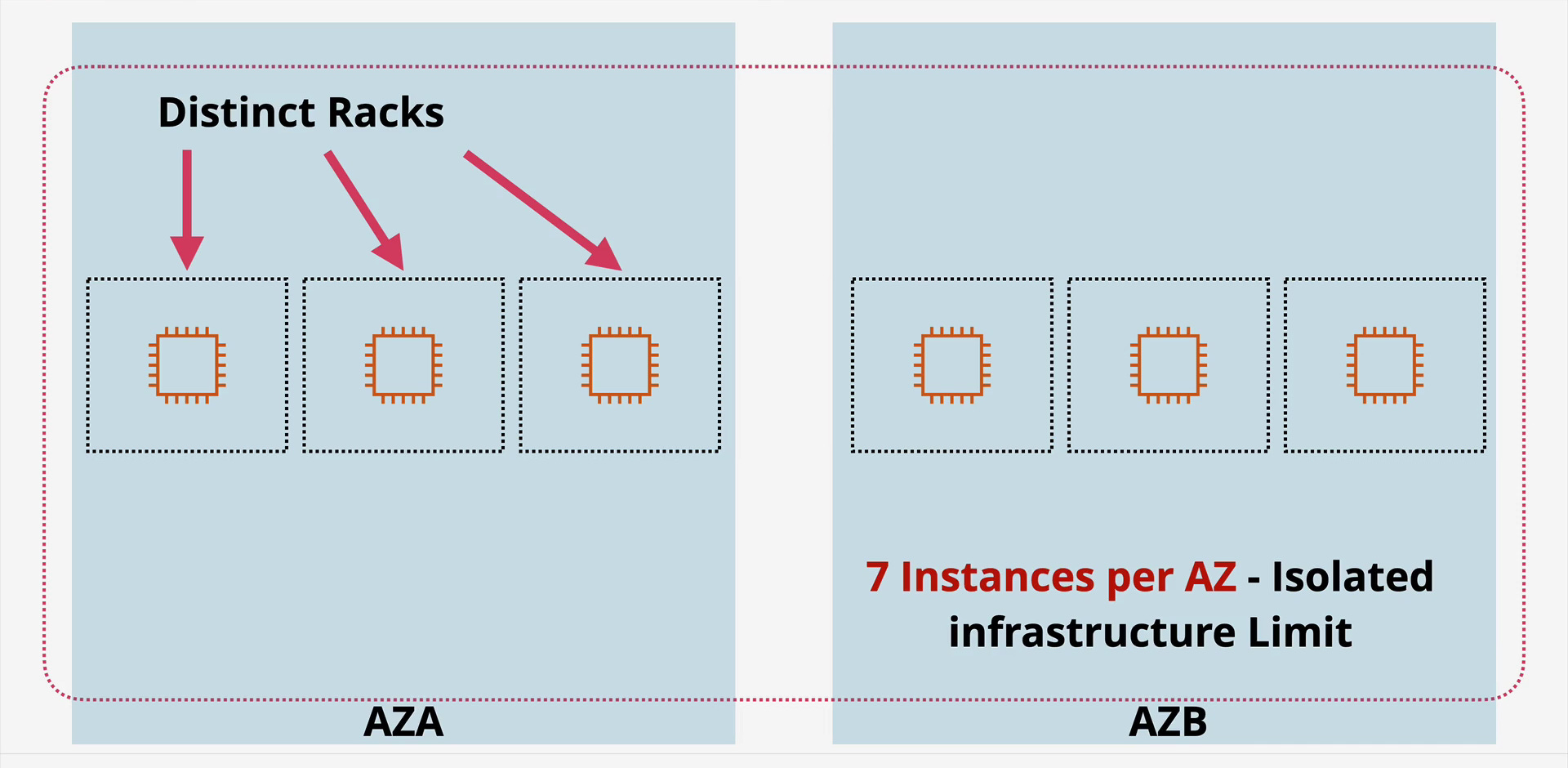
If the Cluster group is about “packing tight,” the Spread group is about “social distancing” for your servers. This is your anti-affinity tool.
The Core Logic: “Strict Isolation”
A Spread Placement Group ensures that each instance is placed on distinct hardware specifically, different racks, with different network uplinks and different power sources. If Rack A catches fire or loses its top-of-rack switch, only one of your instances dies.
The “Magic Number 7” Constraint
There is a hard limit of 7 running instances per Availability Zone per Spread group.
Why 7? This isn’t an arbitrary software limit; it’s a physical constraint. A data center only has so many distinct, qualifiable racks available for this specific type of strict reservation.
Scaling Strategy: If you need 14 instances, you must span them across two Availability Zones (7 in AZ-1, 7 in AZ-2).
Use Cases
Critical Monoliths: If you have a legacy application that cannot scale horizontally but runs in an Active Passive pair, putting them in a Spread group is mandatory.
Controllers: Kubernetes Master nodes, Cassandra seed nodes, or Database Primaries.
3. Partition Placement Groups: The Big Data Hero
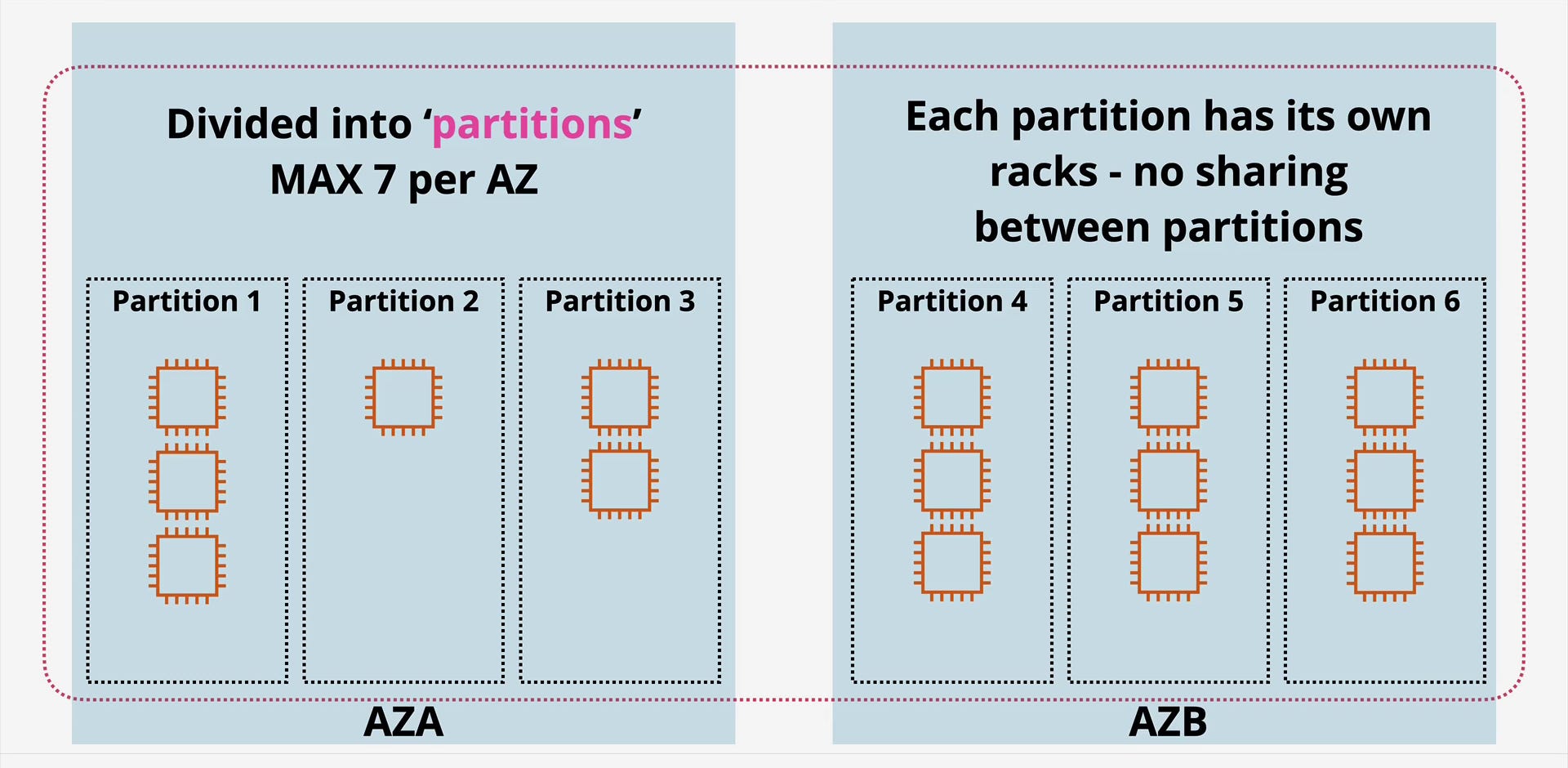
What if you have a distributed system like HDFS (Hadoop), HBase, Cassandra, or Kafka? You need many instances (hundreds, not just 7), but you also need to know that they won’t all fail at once. You need a middle ground.
The Core Logic: “Buckets of Racks”
Partition Placement Groups divide your instances into logical segments called Partitions. AWS ensures that instances in Partition 1 do not share racks with instances in Partition 2.
The “Topology Aware” Advantage
This is the killer feature for Big Data. Distributed file systems (like HDFS) rely on data locality and replication.
Replication Decisions: By querying the instance metadata service, your application can “see” which partition it belongs to.
Scenario: If HDFS sees that Data Node A is in Partition 1, it will intentionally replicate that data block to Data Node B in Partition 2. This makes your software “Hardware Aware.”
Key Limits
Scaling: You can have up to 7 partitions per Availability Zone.
Density: Unlike Spread groups, you can put many instances into a single partition. All instances in Partition 1 might share a rack, but they are guaranteed to be safe from failures in Partition 2.
4. Operational Realities: The “Gotchas”
Before you rush to the console, keep these practical aspects in mind:
The “All-at-Once” Launch Strategy You cannot easily “move” an existing instance into a Placement Group. You must create an AMI, terminate the old instance, and launch a new one.
Pro Tip: When using Cluster groups, try to launch all required instances in a single API call. This gives the AWS scheduler the best chance to find a large block of contiguous free space. Launching them one by one over time increases fragmentation and failure rates.
Capacity Reservations (ODCR) If you are using Cluster Placement Groups for a massive simulation, relying on On-Demand capacity is risky. You might get 50 instances launched and then hit a wall for the 51st. For strict placement needs, use On-Demand Capacity Reservations (ODCR) first to “book” the hardware, then launch your instances into that reservation.
Host vs. Rack vs. Zone
Cluster: Same Rack (usually).
Spread: Different Racks.
Dedicated Host: This is a licensing construct, ensuring your VM runs on a specific physical server entirely dedicated to you. Do not confuse “Dedicated Host” with “Placement Group,” though they can be used together.
Final Thoughts
EC2 Placement Groups are the difference between an application that works and an application that performs. Use Cluster when physics is your enemy and you need speed. Use Spread for your “Crown Jewel” servers that cannot go down together. Use Partition for your distributed data engines.
By understanding the physical reality of the data center, you move from being a cloud user to a true cloud architect.

The 'physics still apply' point is so spot on! Briliant!