

Understanding Amazon Cognito: The Identity Layer Your AWS Applications Need
How User Pools and Identity Pools Separate Authentication from AWS Authorization

If you’ve ever built a web or mobile application, you know the moment well. A user clicks “Sign Up,” and suddenly you’re responsible for their password, their email verification, their password reset flow, their session management, and if you’re building on AWS figuring out how they can securely access your S3 buckets or DynamoDB tables without you hardcoding credentials into your frontend code.
This is where most developers realize that identity isn’t just a feature. It’s an entire architecture problem.
Amazon Cognito exists to solve this problem, but it’s often misunderstood. It’s not just “AWS authentication.” It’s a two-part identity system that separates who your users are from what they can access and understanding that distinction is critical to building secure, scalable cloud applications.
The Identity Problem in Modern Applications
Before we dive into Cognito itself, let’s be clear about what we’re actually solving for.
When you build a traditional server-side application, identity is relatively straightforward. A user logs in, your server creates a session, and that session has all the permissions of your backend service account. Your server acts as a trusted intermediary it authenticates the user, then uses its own credentials to access databases, file storage, and other resources on their behalf.
But modern applications don’t work this way anymore.
Single-page applications, mobile apps, and serverless architectures push more logic to the client. Your React app or Swift application isn’t just displaying data it’s calling APIs directly, uploading files to cloud storage, and interacting with backend services in real time. This creates a fundamental security challenge: how do you give client applications access to AWS resources without embedding your AWS credentials in code that ships to every user’s device?
The answer is that you don’t give the client application access at all. You give the authenticated user temporary, scoped credentials based on their identity.
This is where Cognito comes in, and why it’s built as two separate but complementary services: User Pools for authentication and Identity Pools for authorization.
The Two Sides of Cognito
Think of Amazon Cognito as two specialized systems working in tandem:
User Pools answer the question: “Who is this person?” They handle everything related to user accounts sign-ups, sign-ins, password policies, multi-factor authentication, and social login integration. When a user successfully authenticates, User Pools issue a set of JSON Web Tokens (JWTs) that cryptographically prove the user’s identity.
Identity Pools answer a different question: “What AWS resources should this identity have access to?” They take identity tokens from User Pools, Google, Facebook, or any OpenID Connect provider and exchange them for temporary AWS credentials by assuming IAM roles. These credentials are what actually grant access to S3, DynamoDB, SQS, and other AWS services.
The separation is deliberate. Authentication and authorization are fundamentally different concerns, and Cognito treats them as such.
How Authentication Works: User Pools Deep Dive
Let’s start with User Pools, because this is where the user’s journey begins.
A User Pool is essentially a managed user directory. You create one, configure your sign-up and sign-in requirements, and Cognito handles all the heavy lifting password hashing, email verification, account confirmation, password reset flows, and session management.
When a user signs up through your application, Cognito stores their profile information securely. You can require email verification, phone number verification, or both. You can enforce password complexity requirements. You can enable multi-factor authentication using SMS, time-based one-time passwords, or both. All of this happens without you having to write password validation logic, store hashed passwords, or implement MFA yourself.
The sign-in flow is equally straightforward. A user provides their credentials, Cognito validates them, and if successful, returns three tokens:
The ID token contains claims about the user’s identity their username, email, custom attributes you’ve defined, and when the token was issued. This is what your application uses to know who the user is.
The access token is meant for authorization at your own API endpoints. It contains information about what the user is allowed to do within your application’s scope. If you’re building an API Gateway-backed service, you can use this token to authorize requests.
The refresh token is a long-lived token that can be exchanged for new ID and access tokens without requiring the user to sign in again. This is how you maintain sessions across application restarts.
These tokens are JWTs - JSON Web Tokens which means they’re cryptographically signed, tamper-proof, and can be validated without making additional network calls to Cognito. Your backend can verify an ID token by checking its signature against Cognito’s public keys, ensuring the token is valid and hasn’t been modified.
The Critical Limitation of JWTs
Here’s what trips up many developers: AWS services don’t accept JWTs for authorization.
You can’t take the ID token from a User Pool and use it to upload a file to S3. You can’t use the access token to query a DynamoDB table. AWS services expect AWS credentials specifically, an access key ID, secret access key, and session token issued by AWS Security Token Service (STS).
User Pools give you identity. They don’t give you AWS access.
This is where Identity Pools enter the picture.
How Authorization Works: Identity Pools Deep Dive
Identity Pools solve the credential problem.
Think of an Identity Pool as a token exchange service. You give it a valid identity token from a Cognito User Pool, Google Sign-In, Facebook Login, Sign in with Apple, or any SAML 2.0 or OpenID Connect provider and it gives you back temporary AWS credentials.
Here’s the flow in practice:
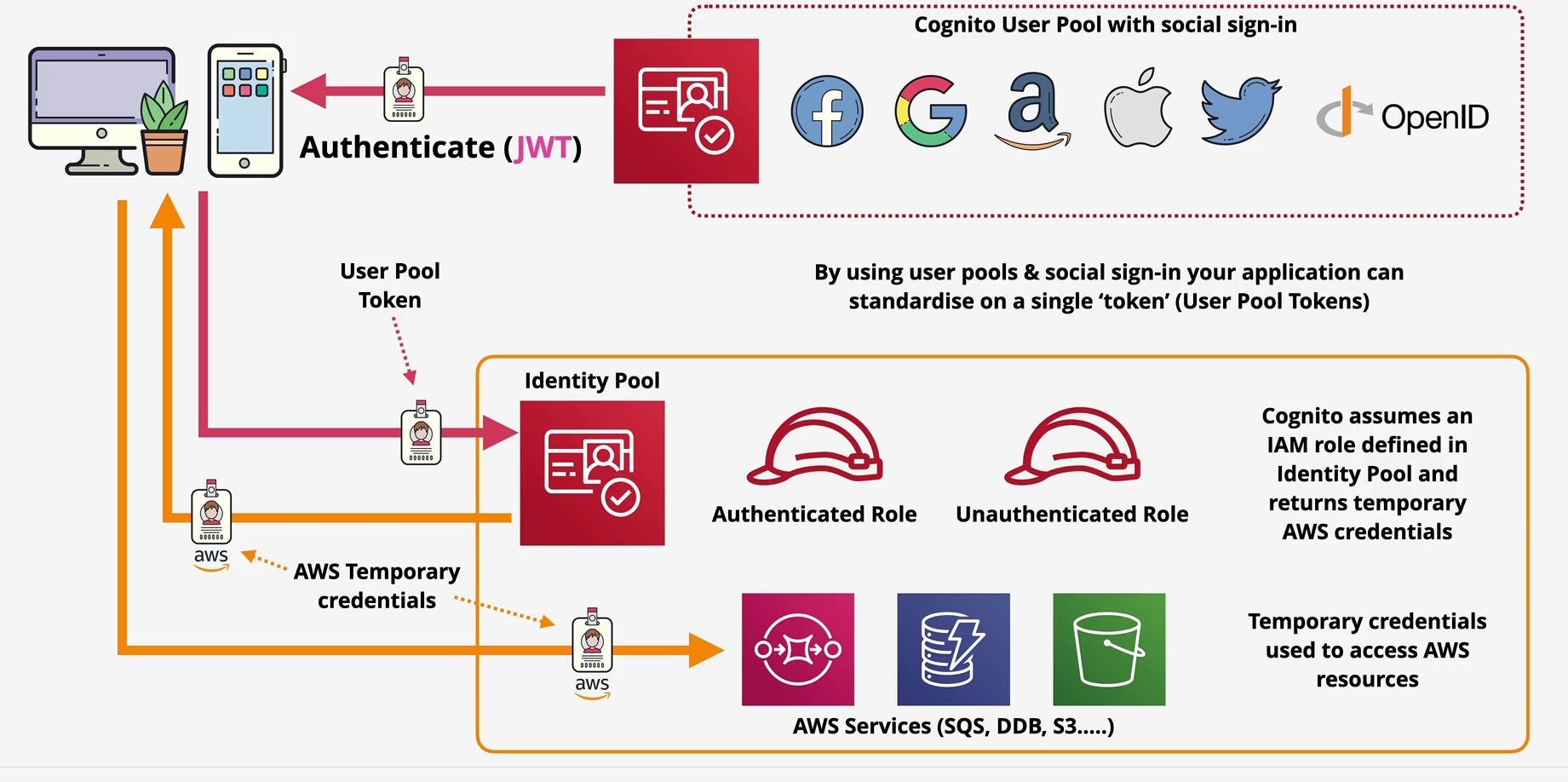
Your user authenticates with a User Pool and receives a JWT. Your application sends this JWT to an Identity Pool. The Identity Pool validates the token, determines which IAM role should be assumed based on your configuration, and calls AWS Security Token Service to generate temporary credentials. These credentials are returned to your application, which can now use them to access AWS services directly.
The credentials are temporary typically valid for one hour and follow the principle of least privilege. You define exactly which resources and actions the role can access through standard IAM policies. A mobile app user might get read-only access to their own folder in an S3 bucket. A premium tier user might get write access to additional resources. The policy is enforced at the AWS level, not just in your application code.
Authenticated vs. Unauthenticated Access
Identity Pools support two access modes: authenticated and unauthenticated.
Authenticated access is what we’ve just described a user proves their identity through some provider, and Cognito assumes an IAM role that you’ve designated for authenticated users. You control exactly what this role can do.
Unauthenticated access is more interesting. Sometimes you want to give limited AWS access to users who haven’t signed in yet. Maybe you want anonymous users to upload crash reports to S3, or query read-only data from DynamoDB. Identity Pools let you define a separate IAM role for unauthenticated users with appropriately restricted permissions.
This is powerful for progressive enhancement. A user can start using your application immediately with limited capabilities, then sign up to unlock additional features all backed by different IAM roles with different permission scopes.
The Complete Architecture Flow
Let’s walk through the full lifecycle to see how User Pools and Identity Pools work together in a real application:
A user opens your mobile app and clicks “Sign Up.” Your app calls Cognito User Pools with the user’s email and password. Cognito creates the account, sends a verification email, and waits for confirmation. Once the user confirms their email, they can sign in.
On sign-in, your app again calls the User Pool, this time with credentials. If authentication succeeds, Cognito returns three JWTs. Your app stores these tokens securely on the device.
Now the user wants to upload a profile picture. Your app needs to put that image in an S3 bucket, but it can’t do that with JWTs alone. So your app calls an Identity Pool, passing the ID token from the User Pool. The Identity Pool validates the token, determines the user is authenticated, and assumes the IAM role you’ve configured for authenticated users.
AWS STS generates temporary credentials an access key, secret key, and session token scoped to that IAM role. These credentials are returned to your app, which configures the AWS SDK with them. The app can now call s3.putObject() directly, and S3 accepts the request because the temporary credentials have the necessary permissions.
An hour later, those credentials expire. The app requests new ones from the Identity Pool using the same ID token (or uses the refresh token to get a new ID token first, then exchanges it). The process repeats seamlessly.
The user never sees AWS credentials. You never hardcode them. The credentials exist only in memory, are scoped to specific resources, and expire automatically. This is identity architecture done right.
Why This Design Matters
The separation between User Pools and Identity Pools isn’t just architectural elegance it has real security and operational implications.
First, it enforces the principle of least privilege at the infrastructure level. Your application can’t accidentally grant excessive permissions because the permissions are defined in IAM policies, not application code. Even if your frontend has a bug, a user can only access what their assumed IAM role allows.
Second, it eliminates credential exposure. In older architectures, developers would sometimes embed AWS credentials in mobile apps or frontend code, then try to restrict access through application logic. This is fundamentally insecure because anyone can decompile your app or inspect your JavaScript. With Cognito, the credentials are generated on-demand, temporary, and never exposed in your codebase.
Third, it scales effortlessly. User Pools can handle millions of users without you managing database sharding, connection pooling, or distributed session stores. Identity Pools can issue credentials to those millions of users without bottlenecks or manual scaling.
Fourth, it supports federated identities cleanly. Your application can accept users from User Pools, Google, Facebook, enterprise SAML providers, or any combination thereof. Identity Pools normalize all of these into temporary AWS credentials, so your resource access logic is consistent regardless of how the user authenticated.
Real-World Application Patterns
This architecture enables patterns that would be difficult or insecure to implement otherwise.
In a mobile photo-sharing app, each user gets their own S3 bucket prefix through IAM policy variables. When they authenticate and receive temporary credentials, the IAM policy includes a condition like s3:prefix equals cognito-identity-pool-id/user-sub/. They can upload and download from their own folder, but not anyone else’s enforced at the S3 level, not just in app logic.
In a multi-tenant SaaS application, different customer organizations map to different Identity Pool roles with different DynamoDB access patterns. Enterprise customers might get direct DynamoDB access for analytics, while free-tier users go through API Gateway with rate limiting. The identity system drives the architectural boundaries.
In a serverless single-page application, the frontend authenticates with User Pools, exchanges the token for AWS credentials through Identity Pools, and calls Lambda functions directly through the AWS SDK. The Lambda execution role and the user’s temporary credentials combine to enforce fine-grained access control. You’re not building an authentication layer on top of Lambda you’re leveraging AWS’s built-in identity and access management.
The Mental Model That Matters
If there’s one takeaway from understanding Cognito, it’s this: User Pools tell you who someone is. Identity Pools tell you what they can access.
User Pools are your authentication boundary. They verify credentials, issue tokens, and maintain user profiles. They’re optimized for the user management tasks that every application needs but no one wants to build from scratch.
Identity Pools are your authorization bridge. They translate identity tokens into AWS credentials, enabling direct client-to-service communication without compromising security. They’re the mechanism that makes “never embed credentials in client code” actually practical.
When you combine them, you get a complete identity architecture: strong authentication through User Pools, federated identity support across providers, temporary credential issuance through Identity Pools, and IAM-enforced authorization for every AWS resource your users touch.
This isn’t just about security though the security benefits are substantial. It’s about building applications that scale, that follow cloud-native patterns, and that align with the principle of least privilege from the ground up.
Understanding this flow, this separation of concerns, this delegation of identity to a managed service that’s what separates cloud engineers who bolt authentication onto their applications from those who design identity as a core architectural layer.
And in production systems handling real user data, real payments, and real trust, that distinction matters.
Amazon Cognito gives you two specialized services that work together: User Pools for managing user identities and issuing JWTs, and Identity Pools for exchanging those JWTs into temporary AWS credentials via IAM role assumption. Master this flow authentication followed by credential exchange followed by scoped AWS access and you’ve unlocked the identity pattern that scales across mobile apps, single-page applications, and serverless architectures.
The architecture isn’t just secure. It’s the foundation for building modern cloud applications the right way.
