

Why Your Distributed System Will Fail Without a Queue (And How Amazon SQS Actually Works)
For engineers who’ve debugged production failures at 3 AM and understand why temporal coupling breaks systems.

Every senior engineer has lived through this nightmare: a spike in traffic hits your application, and suddenly everything starts failing in cascading waves. Your web servers are timing out. Your database connections are exhausted. Your background workers are crashing. The root cause? You tried to build a distributed system without proper decoupling, and now every component is directly coupled to every other component’s availability and performance characteristics.
This is where message queues become non-negotiable infrastructure. Not because they’re trendy, but because distributed systems have an inherent problem: temporal coupling. When Service A needs to talk to Service B, what happens when B is slower than A? What happens when B goes down completely? What happens when A suddenly sends 10x the normal traffic?
Without a queue, the answer is usually “everything breaks.” With a queue, the answer is “the system absorbs the load and processes it when ready.”
What SQS Actually Is (And the Managed vs Self-Hosted Decision)
Amazon SQS is a fully managed, public message queuing service that acts as a buffer between distributed system components. The mental model you want is simple: SQS is a shock absorber between components that have different throughput characteristics or availability profiles. Everything else flows from this core purpose.
Here’s the fundamental tradeoff you’re making:
Running your own RabbitMQ or Kafka gives you more features (complex routing, transactions, priority queues) but requires you to handle high availability, replication, monitoring, security patching, capacity planning, and disaster recovery. Using SQS trades some advanced features for zero operational overhead.
For most teams, especially those without dedicated platform engineers, this is the right tradeoff. Don’t underestimate the value of having one less thing to manage when that thing is as foundational as message queueing.
What makes SQS different:
It’s fully managed and highly available. AWS runs SQS across multiple AZs automatically. Queue failures cascade across every dependent service, making queue availability often more critical than your application servers themselves.
It has no ordering guarantees by default. Standard SQS queues deliver messages at least once, in approximately the order sent, but guarantee neither. This isn’t a bug it’s a deliberate design decision that enables horizontal scaling without coordination overhead.
Messages are temporary. Max retention is 14 days. If you’re using SQS for long-term storage, you’re using the wrong tool.
The Message Lifecycle: Visibility, Retries, and Why Idempotency Isn’t Optional
Understanding how messages move through SQS is critical because the behavior is different from traditional message brokers.
Here’s what actually happens:
Producer sends message → SQS stores it redundantly across multiple AZs
Consumer polls the queue → SQS returns up to 10 messages
Visibility timeout starts → Message becomes invisible to other consumers
Consumer processes the message → Does the work
Consumer explicitly deletes the message → Permanently removed
The critical piece: visibility timeout. When a consumer receives a message, SQS doesn’t delete it. Instead, it hides the message for a configurable period (default 30 seconds, max 12 hours). This is SQS’s mechanism for handling consumer failures.
Failure Scenarios You Must Understand
Scenario 1: Consumer crashes mid-processing. Visibility timeout expires, message reappears, another consumer retries. This is self-healing.
Scenario 2: Processing exceeds visibility timeout. Message becomes visible while the original consumer is still working. Now you have two consumers processing the same message simultaneously. Set your visibility timeout longer than your maximum expected processing time.
For long-running jobs, use ChangeMessageVisibility to dynamically extend the timeout while processing. This prevents redelivery without setting an artificially high initial timeout.
Scenario 3: Consumer processes the message but fails to delete it. Delete call times out, or consumer crashes between processing and deletion. Message will be redelivered and processed again. Your consumers must be idempotent processing the same message twice cannot cause data corruption.
Scenario 4: The message is genuinely unprocessable. Malformed data, deleted resources, or buggy code. It will cycle forever. This is where Dead Letter Queues come in.
The key insight: SQS optimizes for availability and fault tolerance, not for preventing duplicate processing. Standard queues guarantee at-least-once delivery. Your application code must handle this gracefully.
Standard vs FIFO Queues: When Ordering Is Actually a Bad Idea
When AWS launched FIFO queues in 2016, they were acknowledging that some workloads genuinely need ordering guarantees. But these guarantees come with tradeoffs that make FIFO the wrong choice for most systems.
Standard Queues (The Default)
At-least-once delivery: Messages delivered at least once, possibly more
Best-effort ordering: Generally ordered, but not guaranteed
Unlimited throughput: AWS scales horizontally without limit
FIFO Queues (Strict Ordering)
Exactly-once delivery (within 5-minute deduplication window)
Strict ordering: Messages delivered in exact order sent
Hard performance limits: 300 msg/s (3,000 msg/s with batching)
Critical clarification: FIFO provides exactly-once delivery with deduplication, not magically safe processing. Idempotency still matters because application logic can fail after SQS confirms delivery but before your code completes.
When FIFO Is a Bad Idea (Most of the Time)
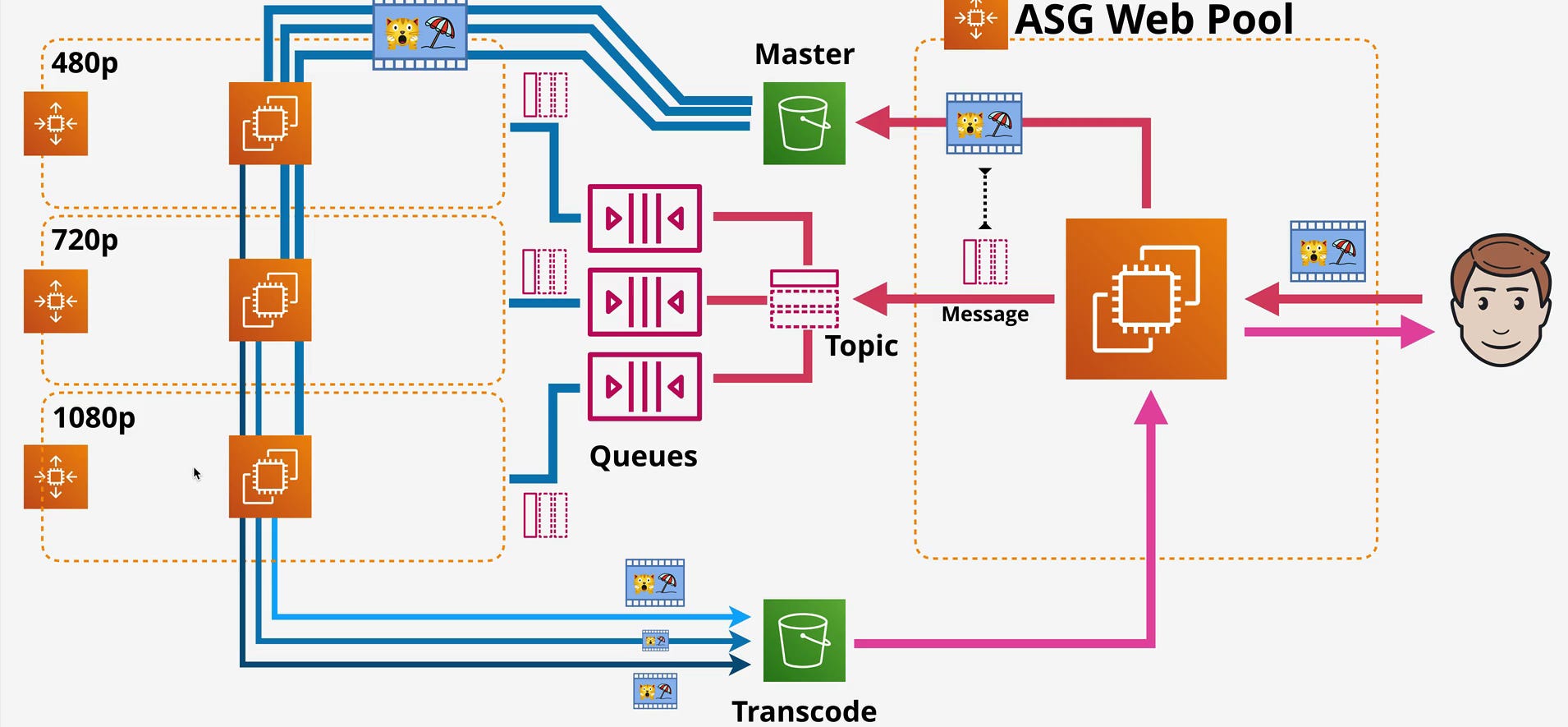
Look at the video transcoding pipeline in the diagram. Three separate queues for 480p, 720p, and 1080p processing. Does it matter if video #500 transcodes before #501? No. Each video is independent work. Standard queues are perfect here because you can scale to tens of thousands of transcodes per second without artificial limits.
Use FIFO when:
Processing financial transactions where order matters
Event sourcing requiring sequential replay
Chat systems where message ordering affects UX
Don’t use FIFO when:
You just want to avoid writing idempotent code (write it anyway)
Processing independent units of work (images, videos, data records)
You need high throughput (>3,000 msg/s)
Dead Letter Queues: Handling Poison Messages
Every production SQS system needs Dead Letter Queues. This isn’t optional.
A DLQ is a separate queue where SQS automatically moves messages that have been received too many times without being successfully deleted. Configure maxReceiveCount on your main queue (typically 3-5), and when a message exceeds that threshold, SQS moves it to the DLQ.
What Engineers Usually Get Wrong
Wrong: Single DLQ shared across multiple queues. You can’t tell which queue failed messages came from.
Right: One DLQ per queue. Name them consistently (video-processing-480p-dlq for queue video-processing-480p).
Wrong: Setting maxReceiveCount to 1-2. Transient failures send messages to DLQ prematurely.
Right: Set to 3-5 depending on failure patterns. Allows retries on transient issues while catching poison messages.
Wrong: Never monitoring the DLQ.
Right: CloudWatch alarms when DLQ depth exceeds threshold. Periodic review, fix issues, redrive to source queue if appropriate.
In a well-architected system, your DLQ should be mostly empty. If it’s constantly filling, you have systemic problems buggy code, weak validation, or unreliable infrastructure.
Autoscaling and Event-Driven Compute: The Real Power of Queues
This is where SQS becomes genuinely powerful. The architecture diagrams show two different scaling patterns worth examining.
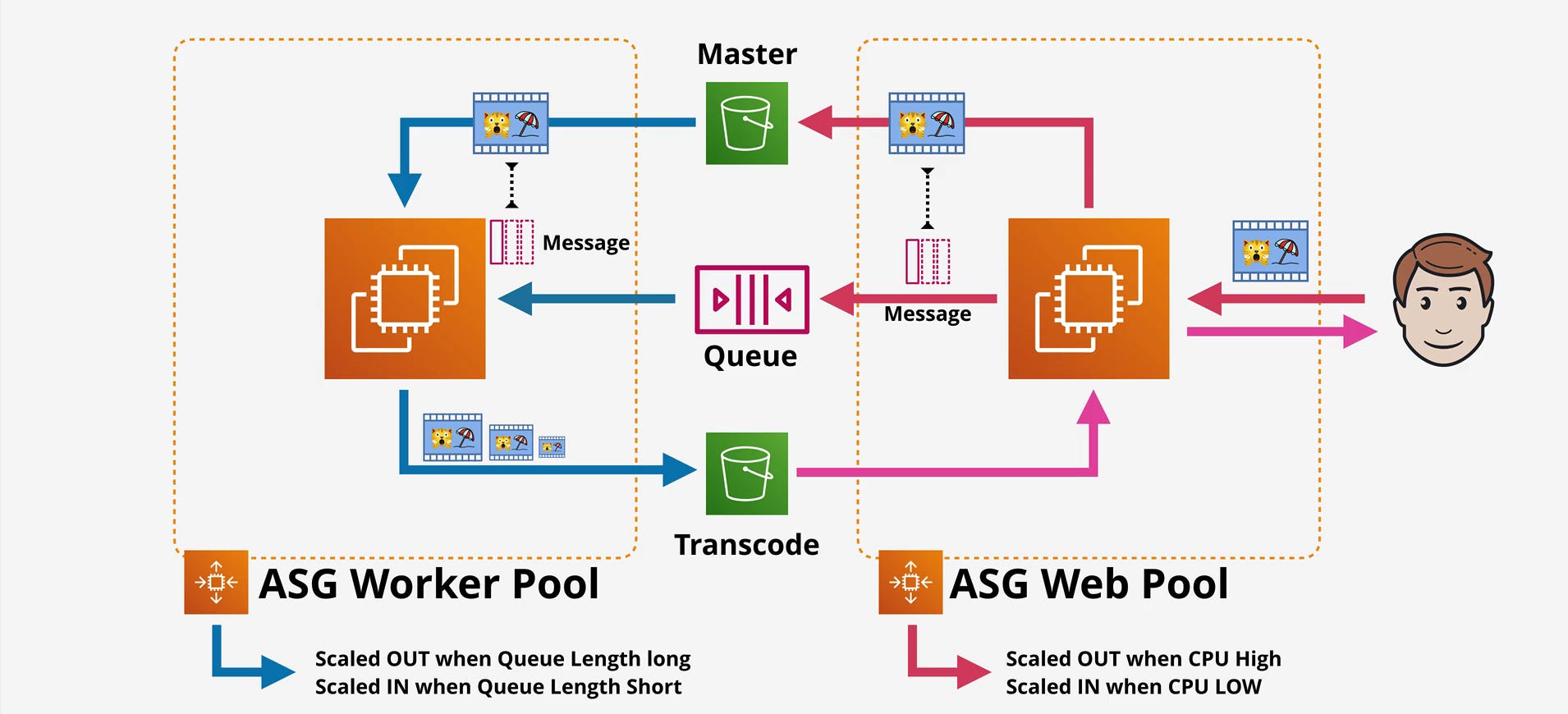
ASG Scaling on Queue Depth
Look at how the Worker Pool scales based on queue length while the Web Pool scales on CPU. This decoupling is the architectural pattern that matters.
Configure an Auto Scaling Group with target tracking based on ApproximateNumberOfMessagesVisible divided by running instances. Set a target (say, 100 messages per instance).
When queue depth increases:
CloudWatch sees messages per instance exceeds target
ASG launches additional EC2 instances
New instances pull from queue and process
Queue depth decreases
When queue empties, ASG scales in. You only pay for workers when there’s work to do.
Critical caution: ASG scaling on queue depth has nuances. CloudWatch metrics have 1-5 minute lag. Rapid scale-out can cause oscillation. Set appropriate cooldown periods and alarm thresholds to prevent scale-in thrashing during temporary dips in queue depth.
Lambda + SQS: The Alternative
AWS automatically polls your queue, invokes Lambda with message batches, and scales concurrency based on queue depth. You get autoscaling without managing EC2.
But different tradeoffs:
Cold starts: 100ms-2s depending on runtime
Execution limits: 15 minutes max
Cost model: Per invocation, not per hour
For video transcoding taking minutes per job with hundreds of concurrent processes, EC2 gives more control. For lightweight work (image resize, emails, database updates), Lambda + SQS is often cheaper and simpler.
Backpressure Is the Key Insight
The queue provides natural backpressure. In the diagrams:
Web tier scales on CPU (handles user requests)
Worker tier scales on queue depth (processes async work)
This means:
Each tier scales independently
Burst traffic fills the queue, doesn’t overwhelm workers
Workers sized for average load, not peak
Independent tuning of scaling policies
Without the queue, the web tier directly invokes workers, creating tight coupling and forcing both to scale together. The queue breaks this coupling.
Polling Models: Long Polling Is Not Optional
How consumers retrieve messages has major cost and latency implications.
Short Polling (Usually Wrong)
Consumer makes ReceiveMessage request, SQS samples servers and returns immediately—even if queue is empty. If you poll every 100ms and the queue is empty most of the time, you burn through 864,000 requests per day per consumer, just waiting for work.
Long Polling (The Right Default)
Set WaitTimeSeconds parameter (up to 20 seconds). SQS holds the connection open and waits for a message. If one arrives, it’s returned immediately. If not, you get an empty response after timeout.
This reduces empty responses by 90%+ and cuts request costs by orders of magnitude. When the queue has messages, latency is identical to short polling.
Enable long polling on every queue. Set WaitTimeSeconds to 20 seconds. This is standard for async worker patterns.
SNS + SQS Fanout: Multi-Consumer Pipelines
The first diagram shows a Message Topic (SNS) between multiple queues. This is the SNS + SQS fanout pattern, solving a problem queues alone can’t: multiple independent consumers needing the same message.
Critical difference:
SQS: One message, one consumer (once consumed, it’s gone)
SNS: One message, multiple subscribers (each gets a copy)
In the video processing diagram:
Processed video results publish to SNS Topic
SNS fans out to multiple subscribers:
Master S3 bucket (archival)
ASG Web Pool queue (post-processing/serving)
Other consumers (analytics, CDN invalidation, notifications)
Why this pattern exists: Multiple independent systems react to the same event without coupling. With only SQS, you’d have to make consumers explicitly forward messages (coupling), have one consumer do all work (monolithic), or poll the same queue from multiple consumers (race conditions).
With SNS + SQS, the video processor publishes once, SNS creates copies for each subscribed queue, and consumers poll independently. Consumers can fail, scale, or be added/removed without affecting others.
Real Production Use Cases
E-commerce order: Order placed → SNS → queues for inventory, payment, shipping, analytics, email
IoT ingestion: Sensor data → SNS → queues for real-time alerts, storage, analytics, ML pipeline
Content processing: Upload → SNS → queues for virus scan, metadata extraction, thumbnail generation, indexing
Each consumer scales independently, fails independently, deploys independently.
Security: The IAM vs Queue Policy Decision
SQS supports two access control types. Understanding when to use each matters.
Identity policies (IAM): Attached to users/roles. “This Lambda can receive from any queue.”
Queue policies: Attached to queue. “This queue accepts messages from account X.”
Use identity policies when you control the identity (your Lambda, EC2, users). Use queue policies for cross-account access or allowing AWS services (SNS, S3) to publish.
Common pattern: Identity policies for your services consuming the queue, queue policies to allow SNS topics to publish to it.
KMS encryption gotcha: If using customer-managed CMK, your consumers need kms:Decrypt permissions in addition to SQS permissions. Many “access denied” errors are actually KMS permission problems.
Always use least privilege. If Lambda only receives and deletes, grant only sqs:ReceiveMessage and sqs:DeleteMessage. Restrict resource ARN to specific queues.
The Cost Model: Batching Is Not Optional
SQS bills per request, not per message. Roughly $0.40 per million requests for standard queues.
A “request” is any API call. But SendMessageBatch and ReceiveMessage allow up to 10 messages per request, up to 256 KB total payload.
If you send 10 million messages:
One at a time: 10 million requests = $4
Batched (10 per request): 1 million requests = $0.40
That’s 10x cost reduction for the same work.
Combined with long polling to reduce empty responses, you can achieve 50-100x cost reduction compared to naive implementations. I’ve seen AWS bills drop from $5,000/month to $50/month just by enabling long polling and batching.
The 256 KB Message Limit
Each message can be up to 256 KB. For larger payloads, store in S3 and send only the reference through SQS.
For video processing:
Upload video to S3
Send SQS message:
{"bucket": "videos-raw", "key": "user123/video.mp4"}Worker downloads from S3, processes, uploads result
Worker publishes result to SNS with output S3 location
This keeps SQS messages small and cheap while handling arbitrarily large payloads.
Cost Optimization Checklist
Enable long polling (
WaitTimeSeconds=20)Batch sends and receives (up to 10 messages per request)
Use standard queues unless you genuinely need FIFO
Use S3 for large payloads, SQS for references only
Scale consumers based on queue depth to avoid idle compute
When SQS Is the Right Tool (and When It Isn’t)
Use SQS When:
You need to decouple components with different throughput or availability profiles. The web tier serving users shouldn’t directly couple to the transcoding tier processing uploads. SQS absorbs bursts and provides backpressure.
You’re building async worker patterns. Background jobs, batch processing, webhooks.
You want managed infrastructure. You don’t want to run RabbitMQ or Kafka.
You need pub/sub fanout to multiple consumers. SNS + SQS delivers the same event to multiple independent systems.
You want autoscaling based on queue depth. Make your system elastic and cost-efficient.
At-least-once delivery is acceptable. Most async workloads don’t need exactly-once if you implement idempotent consumers.
Don’t Use SQS When:
You need guaranteed ordering and exactly-once semantics at massive scale. FIFO is limited to 3,000 msg/s. Consider Kinesis or Kafka.
You need real-time streaming analytics. Use Kinesis or managed Kafka for windowing, aggregation, complex event processing.
Messages need long-term storage. Max retention is 14 days. Use Kinesis, Kafka, or write directly to S3/database.
Latency must be sub-millisecond. SQS is HTTP-based with inherent network latency. Use Redis Streams or in-memory queues.
You need complex routing or transformation. Look at Step Functions, EventBridge, or integration platforms.
You’re building synchronous request/response. Use API Gateway, Lambda, or direct service calls.
Final Thoughts
SQS is not exciting technology. It’s a simple queue with straightforward semantics and deliberate limitations. But simple, reliable infrastructure is what keeps systems running at 3 AM when everything else is on fire.
The architecture diagrams at the beginning show SQS doing what it does best: decoupling video processing stages, providing backpressure between web and worker tiers, and enabling independent scaling of each component. This is the pattern that matters not the features, but the architectural problems queues solve.
Build systems that absorb unexpected load. Build components that fail independently without cascading failures. Build worker pools that scale based on actual backlog, not guesses about peak traffic. Use Dead Letter Queues to surface failures instead of hiding them. Monitor queue depth, consumer lag, and DLQ metrics as first-class operational signals.
And remember: the best queue is the one you don’t have to think about.
